
Expert Computer Recycling In Atlanta For Businesses
An Atlanta office upgrade usually ends the same way. The new laptops are deployed, the old desktops get stacked in a conference room, and nobody wants to be the person who decides what happens next.
For IT, operations, and facility managers, that pile isn't just clutter. It's a mix of data-bearing devices, hazardous materials, asset records, and disposal liability. A few towers and monitors are manageable. A full office refresh, tenant turnover, warehouse cleanout, or relocation can turn into a logistics problem fast, especially when electronics are mixed in with furniture, cabling, fixtures, and general junk.
That’s where computer recycling in atlanta stops being a simple drop-off task and becomes an operations decision. The right process protects data, documents custody, keeps usable equipment out of the landfill stream, and gives your team one clear record of what left the building and how it was handled.
Your Guide to Commercial Computer Recycling in Atlanta
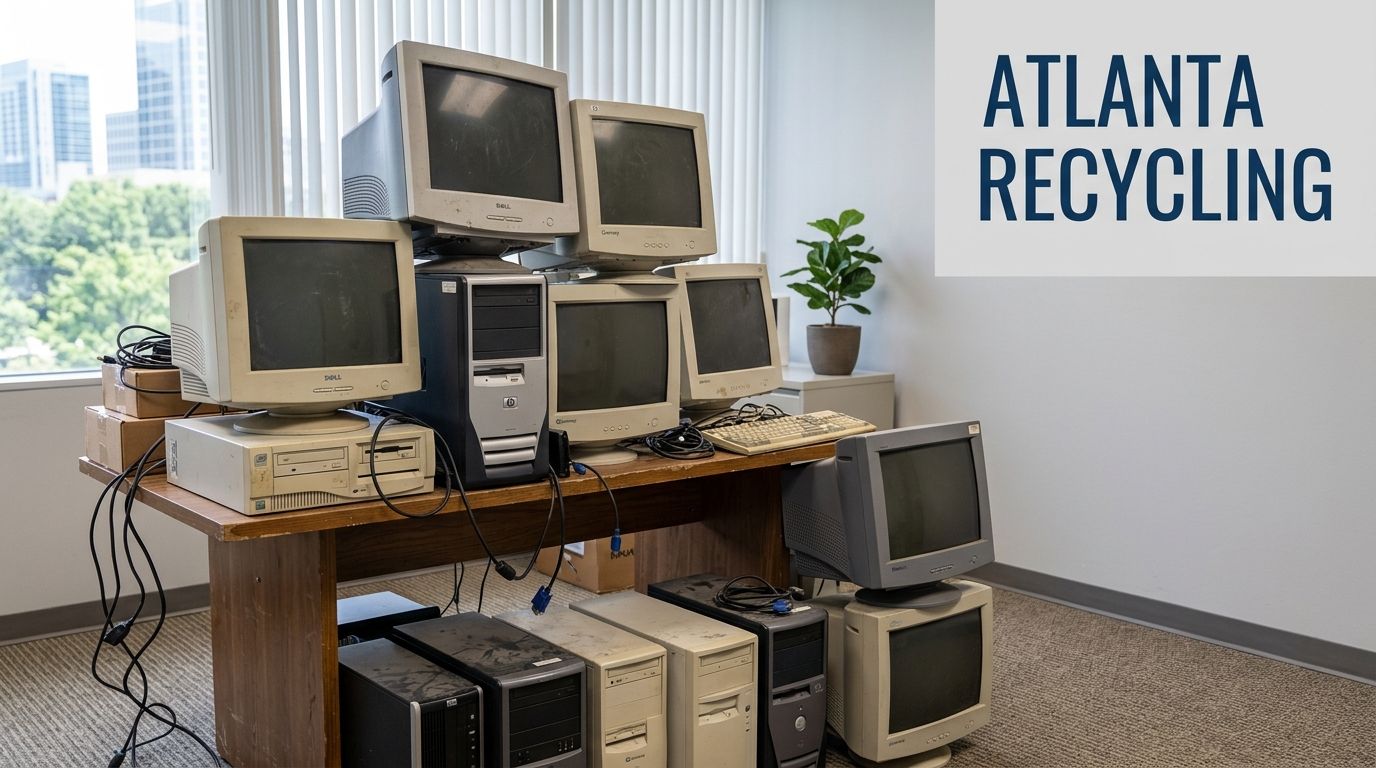
An office manager usually sees the issue first. A storage room fills with retired monitors. A former tenant leaves behind workstations. A renovation exposes years of old printers, docking stations, and dead UPS units that nobody formally decommissioned. The visible problem is space. The actual problem is risk.
Why businesses can’t treat e-waste like ordinary junk
Computers and peripherals carry two kinds of exposure. First, they may still contain business data. Second, they contain materials that shouldn't be handled like routine trash during a cleanout.
The scale of the problem is larger than many teams assume. The U.S. National Safety Council estimates that 75% of all personal computers ever sold are now surplus electronics, the EPA classifies these devices as hazardous household waste, and only 15% of electronic devices in the U.S. are properly recycled, according to Atlanta Computer Recycling’s summary of EPA and National Safety Council figures. For commercial sites, that means every casual disposal decision adds to a much bigger waste stream.
Practical rule: If a device ever stored company, customer, employee, or tenant information, treat removal as a controlled process, not a housekeeping task.
What works and what fails in the real world
What works is simple in principle. Separate electronics from general debris, keep an inventory of what’s leaving, and use a recycler that can support compliance documentation. What fails is the common shortcut of mixing old IT assets into a general haul-away load and assuming someone downstream will sort it out.
Standard junk removal solves volume. It usually doesn’t solve chain of custody. Standalone recycling can solve electronics processing. It often doesn’t solve the operational headache of clearing everything else around it. Commercial clients usually need both.
That’s why integrated service matters for companies operating across Atlanta commercial cleanout needs. One coordinated pickup for furniture, non-electronic junk, and segregated e-waste reduces disruption and keeps your team from managing multiple vendors for one project.
The better way to approach a cleanout
For businesses, responsible computer recycling in atlanta should do four things at once:
- Clear the site efficiently so your office, suite, warehouse, or property can move to its next use.
- Protect data-bearing assets before anything leaves your control.
- Route equipment correctly so reusable items are triaged differently from scrap units.
- Create documentation your IT, procurement, and facilities teams can use.
When those four pieces stay connected, disposal becomes manageable. When they’re split across unrelated vendors, details get lost. That’s where compliance issues, missing records, and avoidable confusion show up.
Data Security and Pre-Recycling Preparation
Before pickup gets scheduled, the internal work starts. A recycler can process equipment correctly, but your organization still needs to know what it owns, what data may exist on it, and what level of destruction is required for each asset.
Build the inventory before anyone touches the pile
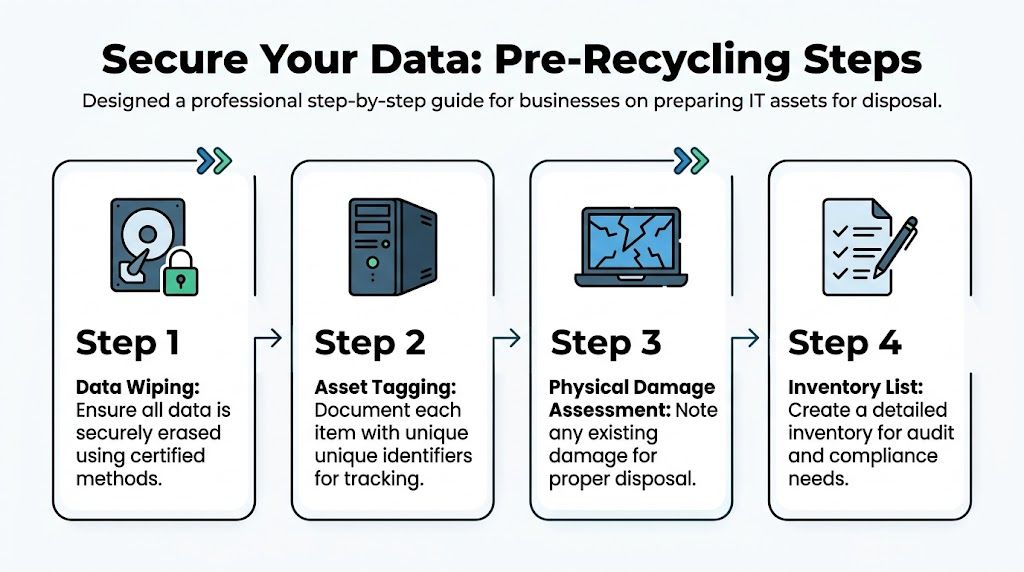
Start with a basic asset list. It doesn’t have to be elegant. It does have to be accurate enough for audit and custody purposes.
Track the items you’re retiring by device type, location, asset tag if available, and serial number if visible. Flag anything that likely contains storage media, including desktops, laptops, servers, external drives, and multifunction devices with internal memory.
A practical inventory often includes:
- Device identity such as asset tag, serial number, hostname, or department assignment.
- Physical location so pickup teams know what belongs in which room, closet, rack, or floor.
- Data risk level based on likely content, such as HR, finance, healthcare, legal, or general office use.
- Disposition path such as wipe for reuse, shred drive, or recycle as non-functional equipment.
If your team needs a structure for this process, 10 Key IT Asset Management Best Practices is a useful reference for tightening internal controls before assets leave the building.
Choose the right sanitization method
Not every device needs the same treatment. The mistake is applying one blanket rule to everything.
Software wiping makes sense when systems are functional, storage media can still be accessed, and your organization plans to remarket, redeploy, or donate hardware under controlled conditions. Physical destruction makes more sense when drives are damaged, machines won't boot, data sensitivity is high, or reuse isn’t worth the extra handling.
Use this decision logic:
- If the device is functional and eligible for reuse, wiping may be appropriate.
- If the drive is inaccessible or damaged, shredding is usually the cleaner answer.
- If the device handled sensitive records, physical destruction often reduces ambiguity.
- If you can’t verify the storage status, assume media is present until proven otherwise.
A missing hard drive record creates the same panic as a missing hard drive.
Free recycling and compliant disposal are not the same
Many small and mid-sized companies become vulnerable. Free programs can be useful for residents or very simple consumer drop-offs, but business disposal has a different standard.
A documented compliance gap exists because “free recycling” is often conflated with “compliant disposal,” while many providers don’t offer the auditable chain-of-custody records and certified data destruction processes businesses need, according to Atlanta Computer Recycling’s guidance on where to recycle electronics. If your organization handles customer records, employee data, financial files, or internal communications, that distinction matters.
Internal prep checklist that saves trouble later
Most disposal problems begin before the truck arrives. Someone forgot to remove a device from inventory. A branch office mixed personal electronics into a company load. A copier with storage wasn't flagged. The fix is disciplined prep.
Use a short internal checklist:
- Assign one owner for the project. IT, facilities, operations, or procurement should lead. Shared ownership usually means missing details.
- Quarantine the load in one controlled area once devices are approved for disposition.
- Separate obvious non-e-waste like cardboard, broken furniture, and general trash from electronics.
- Remove accessories strategically. Power cords, docks, and keyboards can stay with matched systems if they help identification, but loose mixed cables should be grouped clearly.
- Confirm sign-off from department heads for any device that may still be considered active.
What your team is still responsible for
Even with a qualified recycler, your company owns the front-end discipline. That means confirming the asset list, choosing the sanitization standard, identifying exceptions, and retaining records.
Businesses that handle this well don’t rely on memory or hallway conversations. They create a defensible trail before disposition starts. That trail is what makes the downstream certificate or destruction record meaningful instead of cosmetic.
Evaluating Certified Recyclers vs Donation Programs
Donation sounds good on paper. It can be appropriate for some equipment in some circumstances. But for a business, the right question isn’t whether a device can leave your building. It’s whether the receiving channel matches your compliance, documentation, and liability requirements.
What certification changes
Certified e-waste processing is built around controlled handling, documented downstream movement, and material recovery. That matters because electronic waste isn’t uniform. Some units can be refurbished, some must be dismantled, and some contain components that need tighter handling than a thrift-style intake process can provide.
Certified Atlanta e-waste recyclers achieve 95-98% landfill diversion rates through advanced component-level processing, according to Green Atlanta’s guide to electronics waste disposal. That process separates hazardous materials and recoverable commodities rather than treating everything like a donation bin or mixed junk load.
Donation has a place, but not for every business load
Donation works best when devices are functional, approved internally for release, and no one is depending on the recipient to solve the compliance side retroactively. It’s not a substitute for disciplined IT asset disposition.
The problem is that many businesses use donation to avoid the harder operational questions. Was the device wiped to the right standard? Is there a custody record? Who confirmed release authority? If a data-bearing device slips through without proper preparation, the fact that it went to a well-meaning organization doesn’t remove your exposure.
Donation is a disposition channel. It is not a compliance framework.
Side-by-side comparison
| Feature | Fulton/Beyond Surplus (Certified Recycler) | Donation Center (e.g., Goodwill) | Standard Junk Hauler |
|---|---|---|---|
| Primary purpose | Managed recycling and IT asset disposition with integrated haul-away support | Reuse and community donation intake | Site clearing and removal |
| Data destruction documentation | Typically part of the process when requested and scoped | Often limited or inconsistent for business audit needs | Usually not the core service |
| Chain of custody | Structured handling and transfer records | May be limited for commercial compliance needs | Often focused on pickup, not IT custody |
| Refurbish vs recycle triage | Evaluated as part of electronics processing | Focused on donation suitability first | Usually not specialized |
| Hazardous component handling | Built into electronics recycling workflow | Varies by program and accepted items | Not the main competency |
| Bulk mixed cleanouts | Can align electronics handling with general removal | Usually geared to drop-off or narrower intake | Handles volume, but not necessarily e-waste compliance |
| Business reporting | Supports destruction records and diversion documentation | Usually lighter documentation | Limited sustainability reporting |
| Best fit | Offices, facilities, warehouses, property turnovers, and refresh projects | Approved reusable devices with low compliance complexity | Non-electronic junk and general debris |
For companies that want background on how service standards and handling philosophy differ, the Fulton Junk Removal company overview explains the combined cleanout and recycling model used for projects that involve both junk removal and electronics.
How to disqualify the wrong vendor quickly
If you’re evaluating providers, don’t start with marketing language. Start with operational questions.
Ask these before approving anyone:
- What happens to non-working equipment? If the answer is vague, the downstream process probably is too.
- How is data-bearing equipment segregated? This should be answered clearly, not casually.
- What documentation do we receive? You need more than a receipt.
- Can the provider handle bulk cleanout conditions? Offices rarely generate neat, sorted, ready-to-go electronics piles.
- Who manages mixed loads? If your project includes furniture, scrap, and e-waste, fragmented vendors create handoff risk.
The right partner for computer recycling in atlanta isn’t the one with the simplest slogan. It’s the one whose process still holds up when the project is messy, mixed, and time-sensitive.
Streamlining Bulk Cleanouts and Integrated Recycling
Most business disposal jobs don’t arrive as tidy rows of labeled laptops. They show up as a floor of abandoned cubicles, a server closet full of retired gear, loose monitors in storage, old printers near loading docks, and random electronics mixed into everything else.
That’s the gap many online guides miss. Most focus on individual drop-offs, while businesses and property managers often face 50+ mixed electronic items during bulk cleanouts and need one coordinated solution, as noted in Beyond Surplus’s discussion of Atlanta computer and electronic donations.
How an integrated cleanout actually unfolds
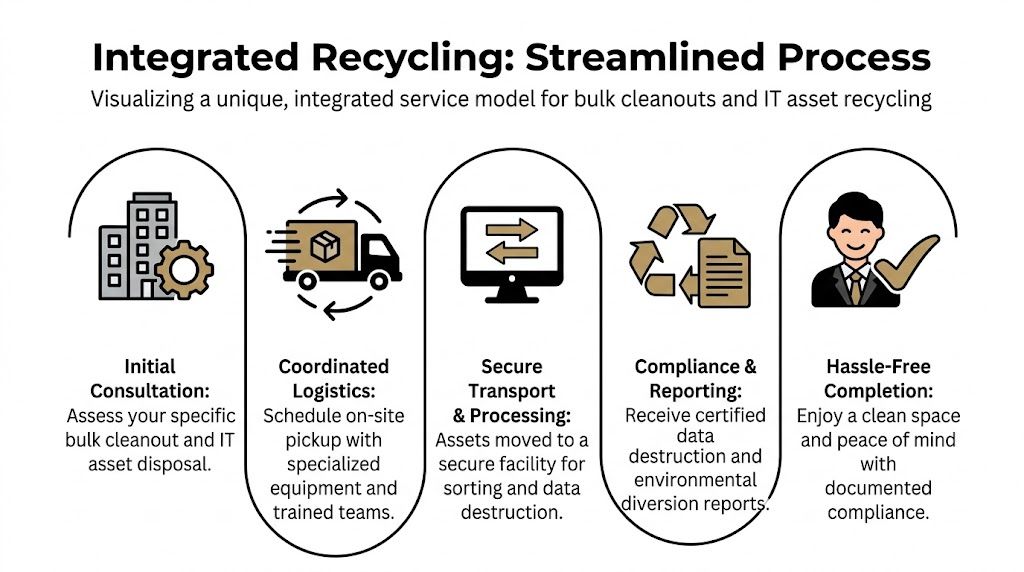
A typical scenario starts with an operations or facilities lead who has two deadlines at once. One is internal, usually tied to reopening space, ending a lease, or finishing an office refresh. The other is practical. The area has to be emptied without creating a second project around electronics compliance.
In that setting, a split-vendor approach creates friction. One company removes furniture. Another picks up electronics later. Someone on-site has to separate loads, coordinate access, answer questions from two crews, and reconcile two sets of paperwork.
An integrated model avoids that. Fulton Junk Removal services are designed for single-contact cleanouts where general junk removal and electronics segregation happen within the same project scope, while the e-waste stream moves into responsible recycling channels under the Beyond Surplus system.
A realistic office cleanout example
Consider an office suite after a tenant move-out. The space contains desks, chairs, shelving, whiteboards, boxed files, broken monitors, old desktops, networking gear, and a closet full of cables and peripherals no one wants to inventory by hand.
The first task isn’t hauling. It’s sorting the site into categories that affect handling:
- General junk and bulky items that can move through standard removal workflows.
- Data-bearing equipment that needs controlled separation.
- Potentially reusable electronics that should be triaged before scrap decisions are made.
- Loose accessories and mixed peripherals that need grouping so the load doesn’t become untraceable.
Once crews separate those categories on-site, the cleanout moves faster and the paperwork gets cleaner. The property manager doesn’t have to guess which items were recycled, which were removed as trash, and which may still require follow-up from IT.
Mixed loads aren’t the problem. Unsorted mixed loads are the problem.
Why single-contact coordination matters
The biggest operational benefit isn’t marketing convenience. It’s control.
When one project manager handles timing, site access, labor, and load segregation, your team spends less time relaying instructions between vendors. That reduces the chance that a pallet of electronics gets left behind because the recycler expected dock access on a different day, or that a junk crew accidentally loads devices that were supposed to be held for data destruction.
In commercial environments, those mistakes usually come from handoff gaps:
- The electronics weren’t identified early enough.
- The wrong crew arrived first.
- No one owned final sign-off on what could leave.
- Reporting came back in fragments.
Integrated handling closes those gaps. It also helps when the cleanout includes odd categories such as lab-adjacent equipment, telecom shelves, warehouse office gear, or electronics mixed into estate and foreclosure situations.
What works on-site during bulk pickups
The most efficient projects use a simple field process. Mark electronics holding zones clearly. Keep data-bearing items inside controlled interior space until loading begins. Give building management one point of contact for elevator, dock, and access coordination. Treat reusable and scrap electronics differently from the start.
What doesn’t work is asking staff to “set aside anything important” without a written list. That usually leaves your team with mystery devices by the close of business and no confidence in whether the room is cleared.
For businesses managing computer recycling in atlanta at scale, the operational win is straightforward. One crew can empty the site. One process can separate the electronics correctly. One reporting path can support what happened after pickup.
Costs and The Value of Diversion Reporting
A facilities manager in Atlanta clears a floor before a lease turnover and gets two very different quotes. One price covers pickup only. The other covers pickup, controlled handling for data-bearing equipment, documented destruction, and a diversion report the company can hand to leadership or a property owner. Those are not the same service, even if both vendors promise to haul the equipment away.
For commercial computer recycling, price usually follows risk, labor, and documentation requirements more than raw volume.

What you’re actually paying for
A staged pallet of keyboards, cables, and non-data peripherals is straightforward. A mixed office cleanout with towers under desks, monitors in private offices, locked storage rooms, and hard drives that require documented destruction takes more time, more control, and more accountability.
Cost usually changes based on:
- Site conditions such as stairs, elevators, dock rules, parking limits, and the distance from work area to loading area
- Labor intensity when equipment is scattered, mixed with general junk, or still installed in workspaces
- Data handling requirements if storage media must stay under tighter custody and receive destruction documentation
- Reporting expectations when your business needs itemized records for compliance, audit files, or sustainability reporting
- Bundled project scope when computer recycling is tied to a larger office cleanout, move, closure, or warehouse purge
This is also where an integrated provider has practical value. If one team handles the furniture, scrap, loose office contents, and electronics under a single project plan, your business avoids duplicate scheduling, separate access coordination, and split reporting.
A low quote is not always a good buy. In this field, it can mean the provider priced out the controls your internal teams expect to see later.
Why the paperwork matters
After a commercial e-waste project, the documents usually matter almost as much as the pickup itself. The two records clients ask for most often are a Certificate of Destruction and a diversion report.
A Certificate of Destruction confirms that specified data-bearing material was destroyed using the agreed method. A diversion report shows how the collected load was directed into reuse or recycling channels instead of a disposal stream. Those records answer different questions inside the same organization.
- IT and security teams need proof that devices with storage were handled according to policy
- Facilities and operations need a clean record of what left the site and on what date
- Legal, procurement, and risk teams may need documentation that supports vendor oversight and transfer of responsibility
- Sustainability teams need reporting they can use in internal summaries, landlord updates, or client reporting
If a vendor removes equipment but cannot clearly define the reporting package, your team may still be left chasing answers after the building is empty.
Diversion reporting has practical business value
Diversion reporting helps close out the job properly. It gives your company a documented record of how the material was handled, which matters if leadership asks for backup, a client requests confirmation, or a property manager wants assurance that electronics were not mixed into general disposal.
That distinction matters more in bulk cleanouts than many teams expect. A standard junk invoice may confirm that material left the property. It usually does not tell IT what happened to storage devices, and it does not give sustainability staff much they can use.
For companies that want to compare cleanout planning approaches, the commercial cleanout and recycling articles on the Fulton Junk Removal blog show how reporting fits into broader site operations.
What the investment returns
The return on this investment is risk reduction, faster closeout, and better records.
You clear space without forcing staff to improvise disposal decisions. You reduce the chance that data-bearing equipment disappears into an undocumented stream. You also give IT, operations, and leadership a file they can refer back to after the pickup is finished.
For businesses managing computer recycling in atlanta, value is measured by more than whether the old equipment is gone. Value comes from closing the project with the right controls, the right documentation, and fewer loose ends.
Common Questions About Computer Recycling in Atlanta
Do you only handle business electronics
No. Large residential, estate, and property turnover situations often include a meaningful volume of electronics too. The main difference is documentation and handling expectations. Commercial clients usually need tighter custody records, scheduled access coordination, and formal destruction or diversion reporting.
What kinds of equipment count as computer recycling
It covers more than desktops and laptops. In practice, these projects often include monitors, servers, networking hardware, storage devices, printers, telecom gear, docking stations, cables, accessories, and mixed office electronics left behind during upgrades or move-outs.
If a project includes both electronics and non-electronic material, keeping those streams separated from the start makes the outcome cleaner.
Is free recycling good enough for a business
Sometimes, but only in narrow situations. If the equipment is low-risk, already sanitized internally, and your organization doesn’t need audit-grade documentation, a free option may be workable.
For many businesses, that’s not the actual situation. Once devices may contain records, internal data, or employee information, the better question is whether the provider can support chain of custody and documented destruction. Free intake and compliant disposition are not automatically the same thing.
Should our team wipe devices before pickup
Yes, if your internal policy requires it and your team has the capability. Many organizations prefer to complete approved wiping before release, then use downstream destruction for exceptions, failed drives, or higher-risk assets.
The important part is consistency. Don’t assume a verbal instruction to “factory reset everything” creates an auditable process.
What if our load is mixed with furniture and office junk
That’s common. Office cleanouts rarely produce a neat electronics-only load.
The practical approach is to treat the project as two connected streams. One stream is general junk and bulky material. The other is e-waste that needs separate handling. Trying to solve those through separate vendors often creates timing issues and duplicate coordination.
Can you help with tenant move-outs and property manager cleanouts
Yes. Those are some of the situations where an integrated approach makes the most sense. Former tenants often leave behind a mix of office contents, broken electronics, and unknown equipment in closets or back rooms.
Property managers usually need fast turnover, simple scheduling, and clear records of what was removed. A process that handles both the cleanout and the electronics stream is easier to manage than piecing together different services.
What should we do before scheduling pickup
A short prep list helps:
- Identify one internal contact who can approve removal decisions.
- Gather electronics into known areas where possible, without disturbing devices that still need review.
- Separate business assets from personal items if the site includes shared or mixed use.
- Flag anything sensitive such as servers, storage devices, copiers with memory, or locked equipment.
- List access constraints like loading docks, elevators, building rules, and limited pickup windows.
That small amount of prep usually prevents most day-of confusion.
Do you serve only the city of Atlanta
The service footprint covers Atlanta and surrounding communities within the metro area, depending on project type and scheduling. Commercial clients, property managers, and multi-site operators should confirm location details when requesting service, especially if the work involves several pickups or a broader regional cleanout plan.
How do we start a compliant cleanout
Start by describing the job in operational terms, not just by item count. Mention whether the site is occupied, whether devices may contain data, whether there’s mixed junk involved, and what records your team needs after completion.
That makes it easier to scope labor, routing, and documentation correctly. If you need to discuss a project directly, use the Fulton Junk Removal contact page to request the next step.
If you're planning computer recycling in atlanta as part of an office cleanout, tenant turnover, warehouse reset, or equipment refresh, Fulton Junk Removal can coordinate the haul-away side while supporting responsible electronics processing through Beyond Surplus. That gives IT, facilities, and operations teams a single path for bulk removal, e-waste segregation, and the documentation needed to close the job cleanly.
