
Recycle Electronics Atlanta: Recycle Electronics Atlanta:
You’re probably dealing with one of three situations right now. An office move left a closet full of old monitors and docking stations. A property turnover exposed abandoned TVs, routers, and printers. Or a home cleanup turned up years of dead laptops, tablets, cords, and mystery electronics that nobody wants to throw in the trash.
That’s where most recycle electronics atlanta searches start. People want a place to take the stuff. What they usually need is a safe, compliant, practical way to remove it without creating a data problem, an environmental problem, or a scheduling mess.
For homeowners, the issue is convenience and responsible disposal. For businesses, IT teams, facilities managers, and property managers, the implications are more significant. A retired device isn’t just junk. It can hold client data, employee records, credentials, and internal files. If it contains batteries, screens, or heavy metals, it also needs proper handling.
The Growing E-Waste Challenge in Atlanta
Atlanta doesn’t have a small electronics disposal problem. It has a fast-moving one tied to growth, turnover, upgrades, and constant device replacement.
Globally, e-waste reaches 50-60 million tons each year, and only 17.4% is recycled, while the United States generates over 3.5 million tons annually, according to Reworx Recycling’s Atlanta e-waste overview. That same source notes Fulton County is home to STS Electronic Recycling’s 600,000 sq ft R2v3 certified plant, built around large-scale processing, NAID AAA data destruction, and zero-landfill commitments.

What counts as e-waste
Laptops and phones are often the first electronics that come to mind. In actual cleanouts, the list is much wider.
- Office equipment includes desktops, laptops, monitors, servers, switches, printers, scanners, phones, and point-of-sale hardware.
- Household electronics usually means TVs, tablets, gaming systems, chargers, speakers, routers, and old accessories.
- Forgotten storage devices matter just as much, especially external drives, backup units, and old company-issued hardware sitting in drawers.
A lot of these items contain materials that shouldn’t end up in a dumpster. Lead and mercury are the common examples because they can harm soil, water, and human health when electronics are mishandled.
Why Atlanta feels the pressure faster
Atlanta’s pace creates a specific disposal pattern. Offices refresh equipment. Medical and professional practices replace aging devices. Apartments turn over. Warehouses phase out old handhelds and network gear. Households stack up obsolete screens and battery-powered devices in garages and basements.
Practical rule: The faster a city upgrades technology, the faster yesterday’s useful equipment becomes today’s disposal liability.
That’s why generic trash removal doesn’t solve the problem. Tossing old electronics into mixed waste may feel quick, but it ignores the two things that matter most: what’s inside the device, and what the device is made of.
The real risk isn’t only environmental
For businesses and property managers, improper disposal can create exposure in two directions at once. The first is environmental handling. The second is data security.
A retired office printer may still store network settings and scanned files. A laptop from a former employee may still contain saved passwords or client documents. An abandoned desktop from a tenant improvement project may look worthless, but its hard drive can still be valuable to the wrong person.
That’s why responsible disposal needs to be treated as an operations task, not an afterthought. If you’re clearing space in Atlanta service areas, the electronics portion of the job needs its own plan, especially when the load includes both general junk and data-bearing equipment.
Your Pre-Recycling Checklist Data Security and Preparation
Most disposal mistakes happen before pickup ever starts. Someone unplugs devices, stacks them by the door, and assumes the recycler will figure everything out. That’s backwards.
If a device stores data, preparation starts with information control. If the load includes batteries or mixed equipment, preparation also affects safety and chain of custody. A useful electronics recycling process begins with a short checklist that your office manager, facilities lead, or homeowner can follow.
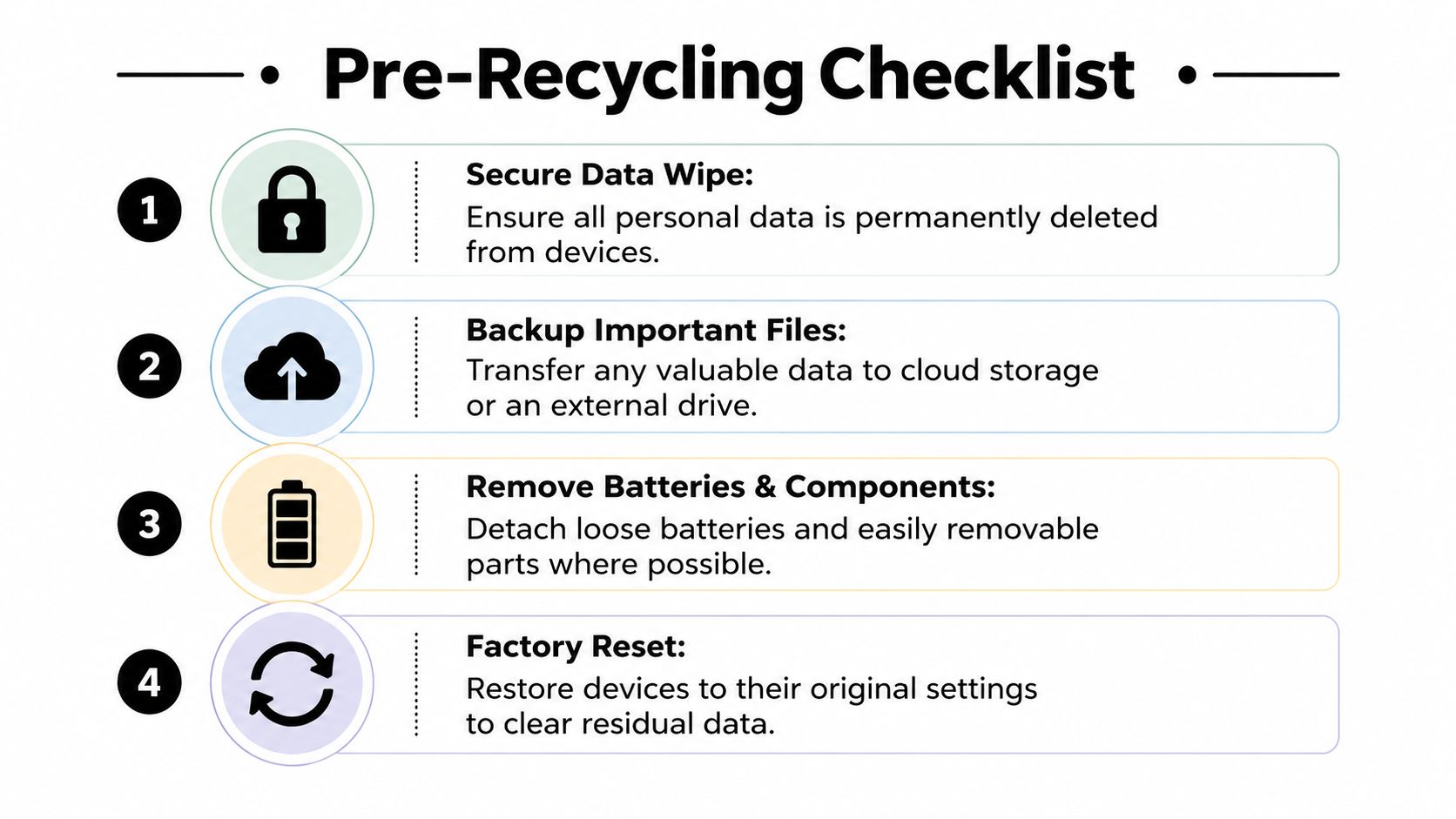
A major reason this matters is trust. A 2023 EPA-related summary published by Atlanta Computer Recycling says 70% of small businesses cite data breach fears as a barrier to recycling. That concern makes sense. Many drop-off options for smaller users don’t clearly explain NIST-compliant audits or certificates of destruction.
Start with data before you move anything
Back up what you need first. Do that before the devices leave a desk, rack, or storage room.
For offices, that means checking shared folders, browser-saved credentials, local accounting exports, and any data that never made it to cloud storage. For homeowners, it usually means photos, documents, saved notes, and app data.
Then separate your devices into two groups:
- Items with no meaningful data exposure, such as dead cables, broken keyboards, simple accessories, and non-smart peripherals.
- Items with possible data exposure, including laptops, desktops, servers, tablets, phones, copiers, and external drives.
That second group needs more care than a quick factory reset in most business settings.
Know when a reset is enough and when it isn’t
For a personal phone or tablet, a proper reset after backup may be part of the prep. If you need a straightforward consumer guide, this walkthrough on wiping your Android phone data is a useful reference before recycling a personal device.
For company hardware, don’t assume a reset equals secure destruction. In a commercial environment, especially if the device held customer information, employee records, financial files, or health-related information, certified sanitization is the safer route.
A factory reset is a user step. Certified data destruction is a compliance step.
Build a simple asset list
You don’t need a complicated spreadsheet to stay organized. You do need a record.
Create a basic inventory with:
- Device type such as laptop, server, monitor, or tablet
- Make and model if visible
- Serial number or asset tag when available
- Location where the item came from, such as Suite 300, front desk, or warehouse office
- Disposition note like recycle, destroy, or evaluate for reuse
Property managers should add unit number or tenant association if the electronics came from a turnover. Office teams should note whether any device was company-issued.
This step prevents confusion later when someone asks what happened to a specific machine.
Prep the load so pickup goes smoothly
Not every item needs hands-on disassembly. In fact, taking apart equipment without a process often makes things worse.
Use this practical prep standard:
- Remove loose batteries when easy and safe: If a battery is obviously removable, separate it. Don’t pry open sealed equipment.
- Keep matching components together: Put docks with laptops, power supplies with monitors, and labeled accessories with their parent device.
- Flag damaged items: Cracked screens, swelling batteries, and broken casings should be identified before handling.
- Set aside anything you may redeploy: Working equipment should be evaluated before it gets mixed into a recycling pile.
If you’re coordinating a broader cleanout, this kind of prep makes pickup and sorting easier for both junk removal and recycling teams. It’s also the point where many businesses realize they need one coordinated service rather than separate vendors. That’s where an integrated option from our Atlanta junk removal services starts to make operational sense.
Navigating Atlanta's Electronics Disposal Options
Atlanta has plenty of disposal options on paper. The primary question is which option fits the type of material you have.
A homeowner with one working tablet has a different need than a property manager clearing a mixed unit with furniture, a TV, a modem, and a damaged desktop. A finance office retiring several workstations has a different risk profile than someone dropping off old headphones and cables.
The challenge is that most recycle electronics atlanta guides flatten these jobs into one category. In practice, you need to look at security, item limits, scheduling friction, and whether the provider can handle non-electronic debris at the same time.
What free and low-cost options do well
Community events and local drop-offs are useful when the load is small and the material is straightforward. They can work for residents who don’t need pickup, don’t need documented data destruction, and can fit the event schedule.
Retailer programs can also be convenient for a narrow group of items. Donation works when equipment is still functional and suitable for reuse.
Those options tend to break down when the job includes multiple item types, uncertain data exposure, or time pressure.
A separate issue is cost volatility around bulky electronics. Keep North Fulton Beautiful’s electronics guidance notes rising fees for TVs and monitors, and says Georgia’s 2025 e-waste ordinance update increased processing costs by 25%. The same source points out that free events often exclude certain items or non-residents. That’s a real problem for contractors, estate cleanouts, and property teams managing mixed loads.
Atlanta Electronics Recycling Options Compared
| Method | Best For | Data Security | Convenience | Cost |
|---|---|---|---|---|
| Community drop-off event | Residents with a few accepted items | Limited visibility unless the event clearly documents destruction practices | Lower convenience because timing and accepted-item rules can be restrictive | Sometimes free, but exclusions may apply |
| Retail take-back program | Small consumer electronics and simple returns | Usually basic from the customer’s point of view, not ideal for sensitive business assets | Fine for a few items, poor fit for office cleanouts | Varies by item and program |
| Donation | Working devices with reuse value | Only appropriate after data has been properly addressed | Good for selected equipment, not for broken or obsolete loads | Often low direct cost, but not a universal solution |
| Certified recycler drop-off | Businesses or residents who can transport their own equipment | Better when chain of custody and destruction documentation are available | More effort if you must load, drive, unload, and coordinate separately | Depends on material mix and handling needs |
| Bundled junk removal plus certified recycling | Offices, warehouses, property managers, and mixed cleanouts | Strongest fit when data-bearing devices and reporting matter | Highest convenience because one pickup can cover electronics and general junk | More predictable for labor-heavy, mixed-material jobs |
What usually does not work
The common failure point is trying to force a mixed cleanout through a single-purpose channel.
For example:
- An office move may have monitors and laptops, but it also has chairs, shelving, whiteboards, and miscellaneous scrap.
- A turnover may include a TV and router, but also mattresses, debris, and non-recyclable trash.
- A retail refresh may retire point-of-sale terminals and displays while also generating packaging, fixtures, and damaged furnishings.
If you split those into separate vendors, you create extra scheduling, extra handling, and more opportunities for devices to fall out of your tracking process.
The easiest disposal option isn’t always the lowest-friction option once you count loading time, staff coordination, and compliance follow-up.
For readers interested in the broader consumer side of the issue, this overview on reducing e-waste with phone recycling is a useful reminder that reuse and responsible recovery matter even for smaller devices. But for commercial cleanouts, logistics usually drive the decision more than environmental intent alone.
If your load includes electronics plus general debris across multiple locations, it helps to evaluate providers based on coverage, scheduling, and material handling across metro Atlanta service areas.
The Fulton and Beyond Surplus Advantage Certified Recycling and Compliance
The difference between basic haul-away and compliant electronics handling comes down to process. Not marketing. Process.
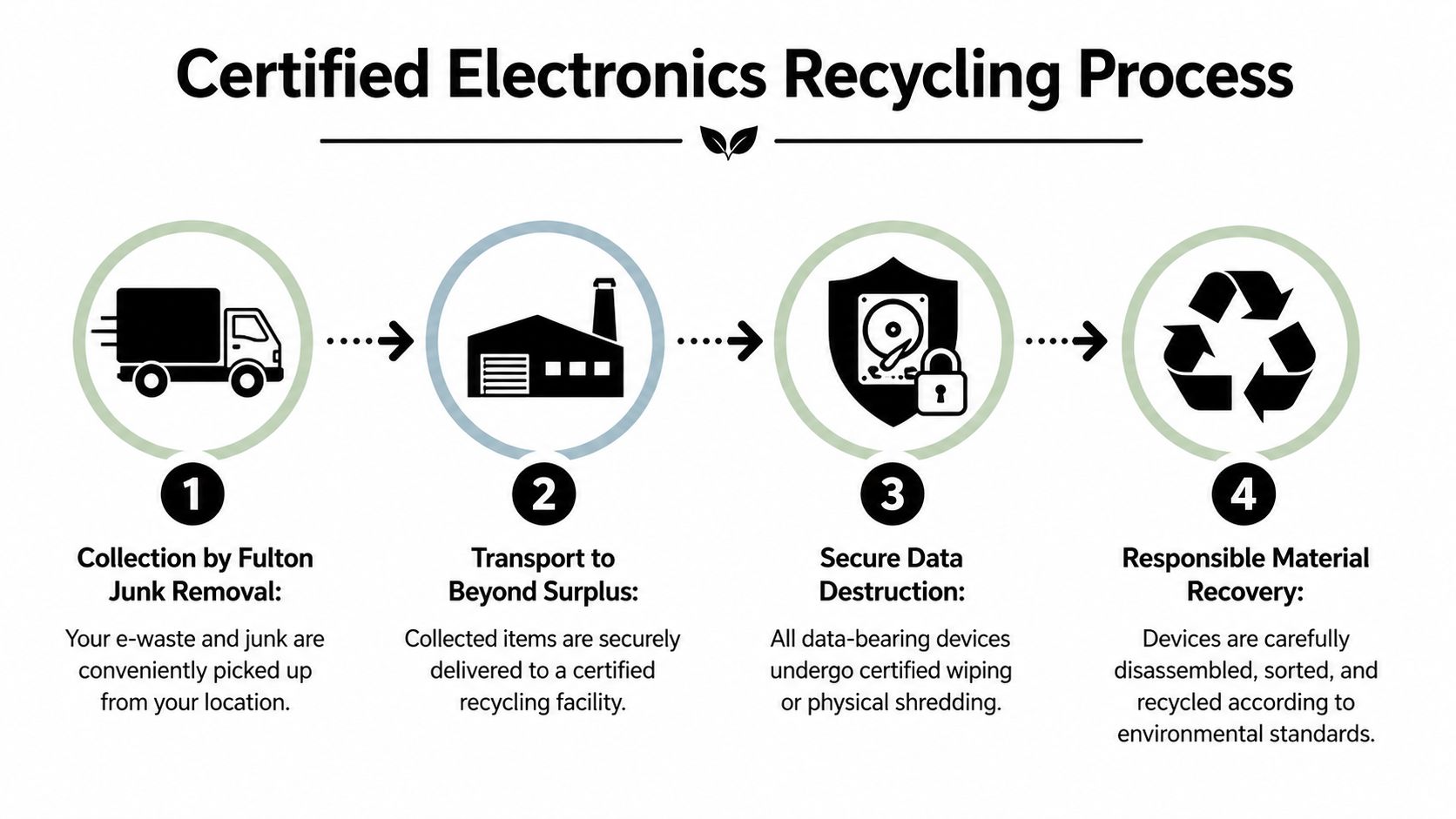
When electronics leave a business, you need to know what happens next. Who picked them up. How they were separated. Whether data-bearing devices were wiped or destroyed. Whether anything suitable for reuse was screened out before shredding. And whether the final output was handled through an actual recycling stream instead of disappearing into mixed disposal.
That’s the value of an integrated setup tied to Beyond Surplus. The hauling side removes the material from your site. The downstream recycling side handles electronics through a documented process rather than treating them like generic bulk waste.
What certified processing changes
A proper electronics stream doesn’t jump straight to destruction. It starts with sorting and triage.
According to this detailed look at what happens to recycled electronics, professional protocols at facilities like Beyond Surplus achieve 90%+ material recovery. That process includes refurbishment triage for 30-50% of devices, NSA-approved data destruction, and manual dismantling that can recover up to 95% lithium extraction from batteries and 70% metal recovery from circuit boards. The same source notes poor sorting can cause 15-20% drops in material yield.
That matters for two reasons. First, better sorting supports better environmental outcomes. Second, disciplined sorting is usually a sign that the operator isn’t treating sensitive devices casually.
What businesses should ask for
If you’re responsible for IT assets, facilities, or property operations, ask practical questions, not generic ones.
Look for:
- Chain of custody procedures so devices are tracked from pickup through processing
- Documented data destruction for laptops, desktops, drives, and servers
- Asset-level visibility when serial-specific reporting is needed
- Diversion reporting when your company tracks recycling and landfill reduction
- Material separation discipline so electronics aren’t mixed into general junk streams
A lot of vendors can remove equipment. Fewer can support the paperwork that matters after the truck leaves.
Field note: If your internal team may need to answer legal, audit, or sustainability questions later, get the documentation requirement settled before the pickup date.
Why the bundled model works operationally
For offices and property teams, separate vendors create handoff risk. One company handles desks and fixtures. Another handles e-waste. Someone internally has to stage everything, meet both crews, and reconcile what went where.
A bundled model reduces those handoffs. Fulton Junk Removal can remove general junk and electronics in one coordinated pickup, while Beyond Surplus processes the recyclable stream responsibly and provides the supporting reporting for customers who need documented handling. That’s especially useful during office decommissions, warehouse cleanouts, and tenant turnovers where electronics are only part of the total load.
There’s also a practical sustainability upside. Reuse gets considered before destruction, and recoverable materials are separated with purpose instead of being buried in mixed debris.
If you want to understand how the company approaches cleanouts and environmentally responsible disposal, the background on Fulton Junk Removal and its connection to Beyond Surplus gives the broader operating context.
Scheduling Your Integrated Junk and Electronics Removal
The scheduling side should be simple. If it isn’t, the service model is wrong.
Most customers don’t need a lecture on e-waste. They need a pickup plan that fits their building access rules, keeps staff time under control, and handles more than one material category at once. That’s why integrated removal works so well for electronics in real-world cleanouts.
Georgia’s device pipeline has been building for years. Montclair Crew’s Georgia electronics recycling overview reports electronics imports in Georgia rose from 2,000 units in 2013 to over 55,000 in 2017. Those devices don’t disappear. They age out into office refreshes, warehouse replacements, move-outs, and home cleanups.
What to have ready before you book
You don’t need a perfect inventory to schedule a job. A clear summary is usually enough to start.
Prepare these details:
- Your material mix: electronics only, or electronics plus furniture, fixtures, scrap, and general junk
- Site conditions: stairs, elevators, loading dock access, parking limits, and suite or unit location
- Special handling notes: servers, drives, copiers, TVs, damaged devices, or anything that may need careful separation
- Timing needs: office hours, turnover deadline, renovation schedule, or event cleanup window
That short list helps the removal team estimate labor, truck space, and handling requirements.
Common scenarios that benefit from one pickup
A retail location replacing point-of-sale systems usually doesn’t just have terminals. It also has displays, old shelving, packaging, and back-room clutter.
A property manager clearing a surrendered unit may find a TV, modem, printer, and cable box mixed in with furniture and trash. Splitting that into separate disposal channels takes more coordination than the job deserves.
A homeowner cleaning out a basement may only have a handful of electronics, but the bigger issue is often convenience. Once old exercise equipment, shelving, broken chairs, and boxes are part of the same project, a single removal appointment becomes much more practical.
What the process typically looks like
Most integrated jobs follow a straightforward flow:
- Request an estimate with a description of the load and location.
- Confirm the scope so electronics and general junk are both accounted for.
- Schedule the pickup window based on your access and timing needs.
- Have the material ready or identified on site so the crew can remove it efficiently.
- Receive follow-up documentation when applicable for electronics handling and diversion reporting.
If your cleanout affects business operations, schedule around downtime, not around convenience alone. The wrong pickup window can interrupt staff and loading access more than the removal itself.
If you’re ready to line up a commercial or residential pickup, the fastest step is usually to contact the Fulton Junk Removal team with the load details and location.
FAQs for Atlanta E-Waste Recycling
Is it worth arranging pickup for just a few electronics?
It can be, depending on what else is part of the job. A single laptop or phone may be easier to handle through a drop-off option if you’ve already prepared it properly. But if you also have a TV, office chair, broken shelving, or general clutter, combining everything into one removal appointment is often more practical than making separate trips.
What should a property manager ask for after a tenant cleanout?
Ask for documentation that shows the electronics were handled through a responsible recycling stream, especially if the load included computers, routers, or any data-bearing device. If your ownership group tracks diversion or sustainability reporting, ask about that upfront so the paperwork matches your internal needs.
How should an IT director prepare decommissioned laptops?
Start with an asset list. Include serial numbers or asset tags if available, then separate data-bearing equipment from non-sensitive accessories. Don’t rely on informal disposal practices for business devices. If the equipment held company, customer, or employee information, make sure the downstream process includes documented data destruction.
Can old furniture and electronics go out in the same trip?
Yes, if you’re using an integrated cleanout service built for mixed loads. That’s one of the biggest advantages for offices, warehouses, retailers, and turnover projects. You don’t need one vendor for desks and another for laptops if the removal process is set up to sort those materials correctly downstream.
Are free recycling events enough for commercial cleanouts?
Usually not. They can be helpful for residents with a small number of accepted items, but they tend to be a weak fit for business cleanouts, bulky electronics, or jobs with access constraints and time pressure. They also don’t solve the general junk side of the project.
What about devices that no longer work?
Non-working equipment is still recyclable in many cases. Dead laptops, broken monitors, failed network equipment, and obsolete peripherals still need proper handling because of their components and potential data exposure. Working condition mainly affects whether an item is a reuse candidate before final recycling.
What if I don’t know which items count as electronics?
When in doubt, separate anything with a plug, battery, board, screen, or storage function from regular junk. That simple rule catches most of what needs special handling and prevents accidental mixing before pickup.
If you’re clearing out an office, managing a property turnover, or trying to recycle electronics atlanta residents and businesses accumulate over time, Fulton Junk Removal can help simplify the job. The service is built for real cleanouts, where electronics, furniture, scrap, and general junk often show up together, and where responsible downstream recycling through Beyond Surplus matters as much as getting the space cleared quickly.
