
IT Asset Disposal for Offices in Atlanta: Secure & Compliant
Old laptops pile up in a storage room. A server closet has gear no one wants to touch. Your lease end date is getting close, or your team is replacing aging desktops across the office. That's when disposal stops being a simple cleanup job and turns into a security, compliance, and logistics problem.
For Atlanta businesses, IT asset disposal is now a formal business process, not an afterthought. The U.S. IT asset disposition market was valued at $2.66 billion in 2022 and is projected to reach $4.90 billion by 2032, a 6.2% CAGR, according to Custom Market Insights' U.S. IT asset disposition market report. That matters because offices aren't just “getting rid of old equipment” anymore. They're managing data destruction, environmental handling, internal signoff, and value recovery in one coordinated workflow.
In Atlanta, that often gets harder because office cleanouts rarely involve only electronics. You may need desks, shelving, cubicles, wire, and miscellaneous junk removed at the same time that laptops, drives, and networking gear need a documented ITAD chain of custody. For companies operating across Atlanta service areas, combining those workstreams can save a lot of back-and-forth.
Navigating Your Atlanta Office Tech Refresh

A typical office refresh creates three separate problems at once. First, you need old devices out of the way. Second, you need confidence that no data leaves the building unsanitized. Third, you need the removal to happen without disrupting the people still working around it.
That's why IT Asset Disposal for Offices in Atlanta has shifted into a practical operations function. Facilities managers care about loading docks, timing, and lease conditions. IT cares about drives, inventory, and proof of destruction. Procurement and sustainability teams care about reuse, recycling, and final reporting.
What makes office IT disposal harder than it looks
A few retired laptops aren't usually the issue. Mixed inventories are. Offices tend to have:
- User devices like laptops, desktops, tablets, and monitors
- Infrastructure gear such as servers, switches, firewalls, and rack equipment
- Peripheral clutter including docking stations, keyboards, phones, cables, and printers
- Non-IT items like chairs, filing cabinets, and old fixtures that still need to leave the site
If those streams are handled separately, the project slows down fast. One vendor removes furniture. Another picks up e-waste. Someone from IT tries to maintain a spreadsheet while the office is mid-move.
Practical rule: If your office cleanout includes both data-bearing equipment and general junk, treat it as one coordinated project from day one.
What works in real offices
The projects that go smoothly start before pickup day. Teams identify what must be destroyed, what may be reusable, and what's non-IT debris. They assign one owner internally and avoid “we'll sort it later” thinking.
What doesn't work is staging everything in one room and hoping the vendor figures it out on-site. That's how devices lose labels, reusable assets get mixed into scrap piles, and your audit trail falls apart.
Why Atlanta Offices Need a Formal ITAD Strategy
Improper disposal creates risk in three directions at once. Data risk is the obvious one, but it isn't the only one. Environmental handling and reputation matter too, especially when a client, regulator, or internal auditor asks what happened to retired devices.
The broader market reflects that shift. By 2023, the U.S. ITAD market had reached USD 2.9 billion, with growth tied to tighter data-security regulation and rising sustainability requirements, according to Ken Research's U.S. IT asset disposition market analysis. That same market framing connects ITAD programs to compliance support for FTC, HIPAA, and NIST 800-88.
Data security is the first reason
Every office has more data-bearing assets than is often understood. Laptops are obvious. Network appliances, local printers, old backup devices, and decommissioned servers get overlooked all the time.
A formal ITAD strategy gives your team a process for:
- Identifying sensitive assets before they leave the site
- Separating reusable gear from destroy-only inventory
- Documenting each handoff from internal storage to vendor pickup
- Matching sanitization method to media type instead of using one blanket approach
If you're planning a relocation at the same time, the move itself adds complexity. A practical resource like Emmanuel Transport's guide for business moves is useful because it reminds teams to align disposal timing with floor plans, vendor access, and move sequencing, not just packing lists.
Environmental handling affects compliance and reporting
Electronics shouldn't be treated like ordinary office trash. Once monitors, towers, and networking gear get mixed into a general haul-away stream, your business loses visibility over where they went and how they were processed.
That matters for internal reporting as much as external compliance. Sustainability leads and facilities teams often need a cleaner paper trail than a basic junk receipt can provide. A strong disposal plan gives them a documented endpoint.
For more local operational guidance on cleanouts and responsible removal workflows, Fulton's commercial junk removal blog covers the kind of issues office teams run into during transitions.
Poor IT disposal rarely fails at the moment equipment is unplugged. It fails in the hours or days after retirement, when no one can clearly account for each asset.
Reputation gets tied to process
Clients and employees don't usually see your disposal workflow. They do notice when a company talks seriously about data protection and sustainability but handles retired electronics casually.
A formal strategy keeps your internal claims aligned with your actual process. It also prevents the most common reputational problem in this area: not malicious disposal, just sloppy disposal.
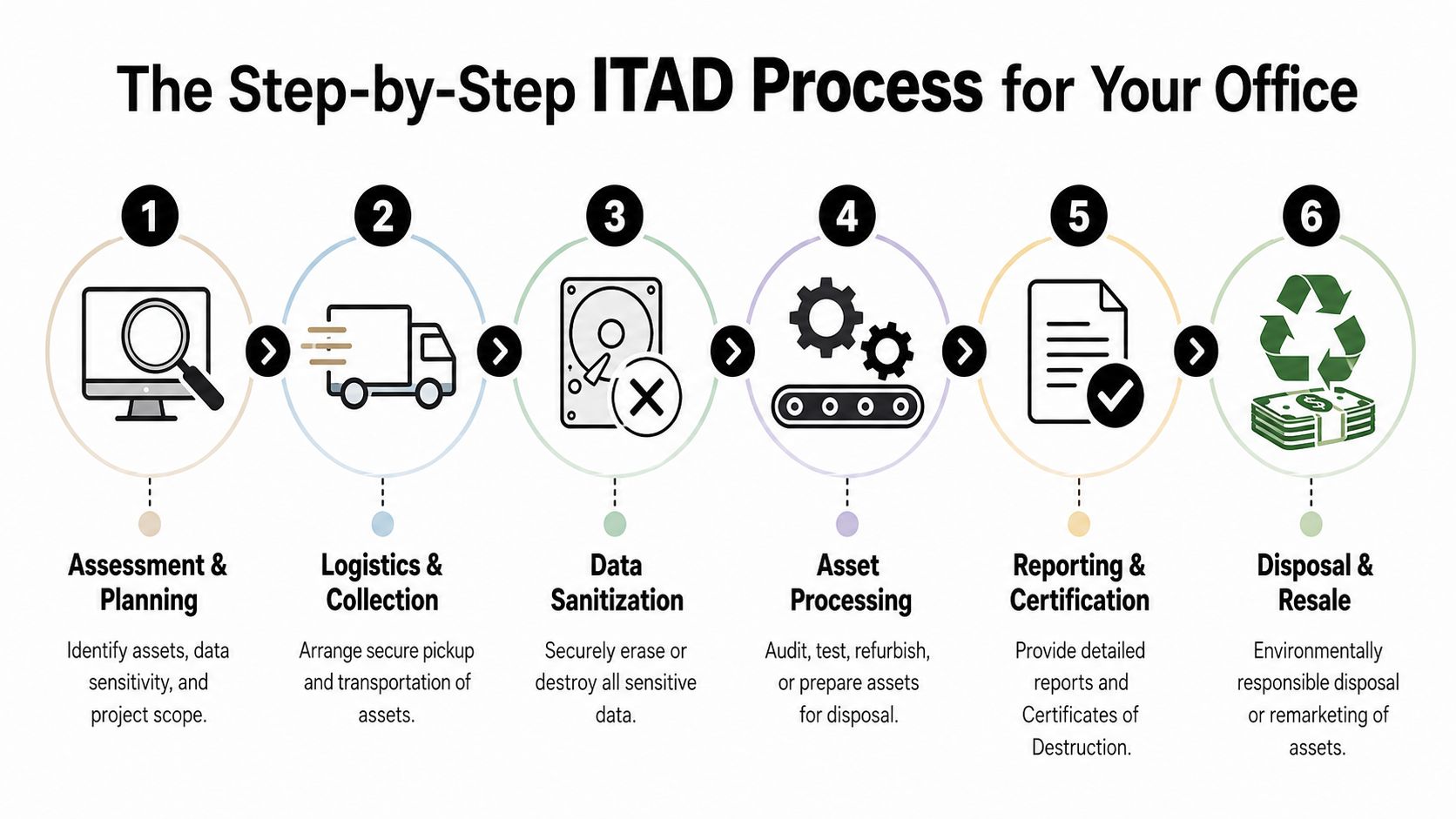
The Step-by-Step ITAD Process for Your Office
A good ITAD project follows a predictable sequence. That's what makes it auditable and manageable. When the sequence gets skipped, offices usually end up with missing serials, disputed pickup scopes, or confusion about which assets were wiped and which were destroyed.
Start with inventory and triage
Before anything moves, build a working inventory. It doesn't need to be fancy, but it does need to be specific enough to separate categories. At minimum, teams should identify asset type, whether the device stores data, basic condition, and intended path.
That first sort usually creates three groups:
- Assets with potential reuse value that may be wiped, tested, and remarketed
- Assets that require physical destruction because of condition, policy, or data sensitivity
- Equipment and non-IT debris that still needs removal but follows a different disposition path
Many office cleanouts frequently go sideways. People often classify based on convenience instead of policy. If a closet is overloaded, everything gets marked “junk.” That may feel efficient, but it can erase resale value and complicate records.
Match sanitization to the device
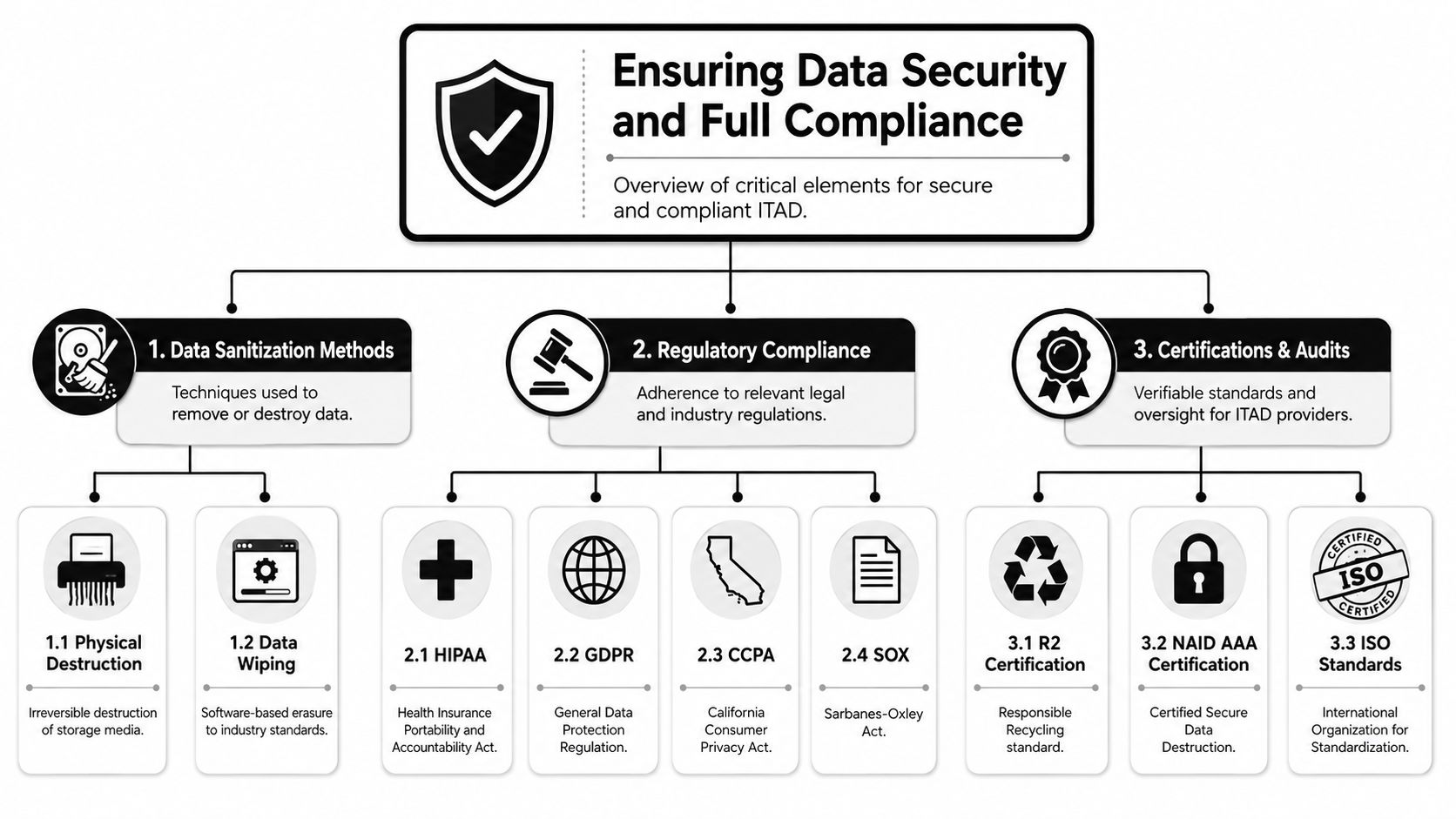
The most critical control point is still data sanitization. Industry guidance for Atlanta businesses recommends degaussing, hard-drive shredding, or data-wiping software, depending on media type and required assurance level, as outlined in Beyond Surplus' Atlanta IT equipment disposal best practices.
Here's the practical trade-off:
- Data wiping preserves reuse potential, but only works when the media and process support verified erasure.
- Degaussing can be appropriate for certain magnetic media where that method fits the device type and security requirement.
- Hard-drive shredding gives finality, but you've chosen destruction over resale the moment you do it.
The right question isn't “What's the most secure method?” It's “What's the right approved method for this asset, this media, and this policy requirement?”
Control pickup and transport
Once assets are classified and sanitized or staged for sanitization, pickup has to be controlled. Offices should use labeled containers or segregated pallet groups, maintain internal release records, and confirm who signs custody over at the dock.
This stage should also account for practical building constraints:
- Loading access for freight elevators, dock reservations, and after-hours windows
- Packing method for loose drives, rack gear, and fragile displays
- Workplace continuity so active departments aren't blocked by staging activity
- Separation discipline so destroy-only assets don't get mixed with reusable units
When companies need one provider that can coordinate both general cleanout labor and electronics handling, Fulton Junk Removal's service offerings are structured around that combined workflow.
Finish with reports and certificates
The final step is documentation. If all you receive is a pickup receipt, the project isn't complete from a governance standpoint.
Ask for records that show:
- What was collected
- How data-bearing items were handled
- Which assets were destroyed, recycled, or remarketed
- What certificates or disposition summaries close the loop
That paperwork is what turns removal into a defensible business process.
Ensuring Data Security and Full Compliance
Most disposal mistakes happen because teams confuse “picked up” with “compliant.” They aren't the same thing. A truck can leave your parking lot and you can still have no usable proof of what happened to the data-bearing devices inside it.
What compliance looks like in practice
For an office manager or operations lead, compliance usually comes down to three things:
- Approved sanitization for the media you retired
- A documented chain of custody from your site to final processing
- Final records that can support internal review, customer requirements, or an audit
The standards language can sound technical, but the operational point is simple. You need a process that another person can review later and understand without guesswork.
Industry guidance used in Atlanta also treats certifications such as R2, e-Stewards, or ISO 14001 as practical proxies for controlled downstream handling and environmentally sound recycling, based on Atlanta Computer Recycling's IT asset management best practices.
Why certificates matter so much
A certificate of destruction or a final disposition report isn't just paperwork for a file folder. It's your evidence that policy was followed. Without it, teams end up relying on memory, emails, and vendor assurances.
That's weak internal control.
A useful final package should help you answer questions like:
- Was this specific serial-numbered device accounted for?
- Was it wiped for reuse or physically destroyed?
- Who handled it after it left our room, closet, or server area?
- Can we prove the disposition if legal, compliance, or procurement asks later?
If you can't trace a retired device from the office floor to final disposition, you don't have enough control over the process.
Certifications should support the workflow
Certifications don't replace execution. They help you screen whether a vendor is likely to have disciplined procedures, trained staff, and controlled downstream partners.
That's the practical reason many businesses ask about R2, e-Stewards, and NIST-aligned sanitization practices. They aren't looking for badges alone. They're trying to reduce uncertainty.
If you want background on how Fulton approaches commercial cleanouts and responsible handling as part of the Beyond Surplus family, the company overview is on the Fulton Junk Removal about page.
How to Choose the Right ITAD Vendor in Atlanta
An Atlanta office manager usually starts calling vendors when the deadline is already close. The lease is ending, new equipment is arriving, and old laptops, monitors, chairs, and cubicles all need to leave the space on the same schedule. At that point, the right vendor is the one that can control risk and keep the project moving without creating extra coordination work for your team.
Start by separating the vendor types. A junk hauler removes items from the office. An ITAD provider handles data-bearing equipment with documented processing. An integrated provider does both under one project plan. That distinction matters on mixed office cleanouts, because the problem is rarely just "remove this stuff." The primary task involves clearing the office while keeping IT assets identified, handled correctly, and matched to the reporting your finance, compliance, and facilities teams will ask for later.
Questions worth asking before pickup day
Ask direct questions before anyone loads a truck.
- How do you identify and reconcile equipment? Look for serial-number or asset-tag tracking, not bulk counts alone.
- Who handles data-bearing devices after pickup? The vendor should explain whether equipment is wiped, destroyed, or remarketed, and how that decision is documented.
- What does pickup day look like on site? You want a clear process for staging, labeling, loading, and signed custody transfer.
- Can the same team manage non-IT office items too? That matters if your project includes desks, filing cabinets, fixtures, or general cleanout debris.
- What will I receive at closeout? The final package should match the approved scope and show what happened to the retired assets.
If your company also sends phones out for repair before retirement, Fixo's repair privacy advice is a useful reminder that device risk starts long before final disposal. Repair, redeployment, storage, and retirement all need controlled access and clear handoffs.
Atlanta office disposal vendor comparison
| Feature | Standard Junk Hauler | Specialized ITAD Firm | Fulton + Beyond Surplus (Integrated) |
|---|---|---|---|
| General office junk removal | Usually yes | Often limited | Yes |
| Data-bearing asset handling | Often limited or outsourced | Core service | Yes |
| Serial-level tracking | May be limited | Typically part of process | Available through integrated ITAD workflow |
| Chain of custody | Varies widely | Typically structured | Structured when IT assets are included |
| Furniture and electronics in one project | Yes, but IT controls may be weak | Electronics-focused | Yes |
| Disposition reporting | Basic haul-away receipt in many cases | Detailed ITAD reporting | Combined cleanout and ITAD documentation |
| Operational simplicity for office moves | Moderate | Moderate if you need a second hauler | High |
The trade-off is straightforward. A specialized ITAD firm is often a good fit for electronics-only projects with no furniture, no fixture removal, and no general cleanout scope. A standard hauler may be enough for offices clearing out non-electronic items. Many Atlanta businesses, though, are dealing with both categories at once.
That is why the integrated model matters. Fulton Junk Removal can handle the physical office cleanout, while Beyond Surplus manages the certified ITAD portion inside the same job flow. For companies coordinating projects in areas like South Fulton office cleanout service coverage, that single-vendor structure cuts down on duplicate walkthroughs, scheduling conflicts, and mismatched paperwork.
Choose the vendor that fits the actual project, not the simplest label. If your office has mixed assets and a short timeline, one coordinated removal and ITAD workflow usually creates fewer problems than trying to manage two separate vendors on the same floor.
The Fulton and Beyond Surplus Advantage
The hardest office cleanouts aren't pure IT jobs. They're mixed projects with old electronics, furniture, fixtures, loose storage, and deadline pressure from a move, renovation, or lease turnover.
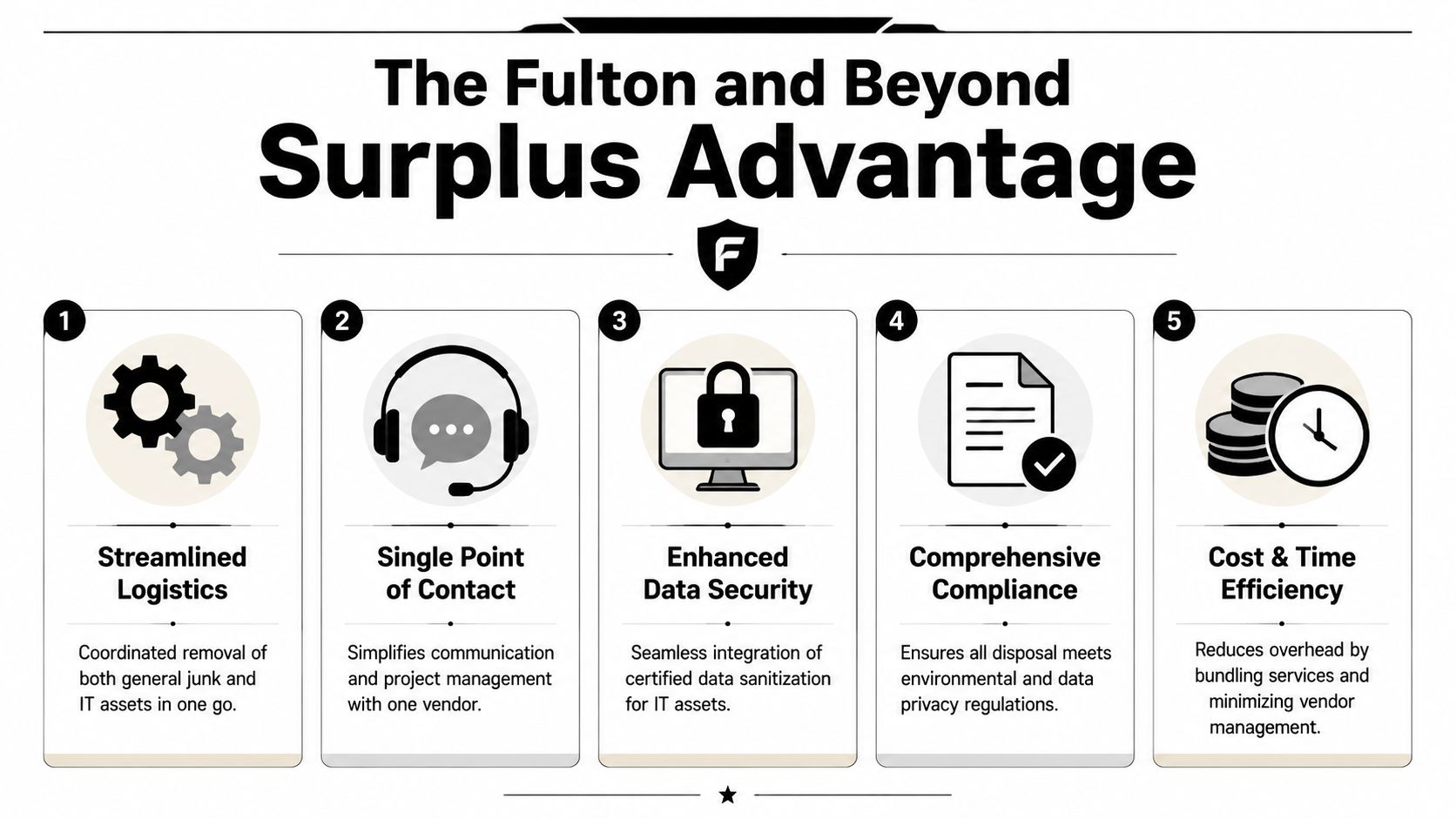
That's where an integrated model makes sense. Fulton handles the physical removal side of the cleanout, while Beyond Surplus handles electronics recycling and ITAD functions within the same project workflow.
Why integration changes the project
A key challenge in Atlanta office disposals is handling mixed IT during relocations or downsizing without disrupting operations. Best practice starts with a full inventory, segregation of assets, and a signed transfer-of-custody document before anything leaves the site, as noted in Atlanta Computer Recycling's Atlanta data destruction guide. An integrated hauler and ITAD provider simplifies that process.
That matters because the friction in these jobs usually comes from coordination gaps:
- Two scheduling calendars instead of one
- Two site walkthroughs with different assumptions
- Two paperwork streams that don't line up cleanly
- Two custody moments where mistakes can happen
Where this helps office managers most
For an office manager or facilities lead, the benefit isn't abstract. It's fewer moving pieces.
One team can remove furniture, miscellaneous junk, and non-IT debris while the electronics stream stays separated for secure downstream processing. That reduces hallway pileups, duplicate labor, and confusion over what belongs in which load.
For companies operating beyond central Atlanta, that same coordinated model is relevant in nearby areas such as South Fulton commercial cleanout projects, where office, warehouse, and mixed-asset jobs often overlap.
Mixed office cleanouts fail when teams treat IT assets and general junk as unrelated. In the field, they affect the same schedule, the same access points, and the same internal stakeholders.
Common Atlanta ITAD Questions Answered
What does IT asset disposal usually cost?
Cost depends on the mix of assets, whether devices need wiping or physical destruction, how much labor is required on-site, and whether any equipment has reuse value. A room of loose monitors and cables is a different job from palletized laptops with a clean inventory. The right way to price it is by scope, handling requirements, and reporting expectations.
How long does the process take?
Simple pickups can move quickly when inventory is already organized. Projects take longer when assets are scattered across floors, need sorting, or are tied to a relocation schedule. Final reporting also depends on whether the load includes data-bearing devices that require documented downstream processing.
Can you handle a small batch, like a few laptops?
Yes, but the best approach depends on the situation. A few laptops may still require the same security discipline as a larger project if they contain company data. The practical question isn't just quantity. It's whether you need pickup, sanitization, documentation, or all three.
What about servers, racks, and data center gear?
Yes. Enterprise equipment needs more planning because de-racking, staging, drive handling, and transport are more demanding than ordinary office electronics. The process should still follow the same discipline: inventory first, custody control, correct sanitization path, and final disposition records.
What should I prepare before calling a vendor?
Have a rough asset list, photos if possible, your site access limitations, and your timing window. Also decide who internally owns approvals. The cleanest projects have one decision-maker coordinating between IT, facilities, and management.
If your office is planning a tech refresh, move, lease exit, or downsizing project, Fulton Junk Removal can help you coordinate the physical cleanout and the electronics recycling workflow in one process, so your team can clear the space without losing control of data security, documentation, or responsible disposal.
