
HIPAA Compliant Electronics Recycling Atlanta
A lot of Atlanta offices have the same problem hiding in a back room. Retired laptops are stacked under shelving. Old phones sit in a banker's box. A decommissioned server from a renovation project is still leaning against a wall because nobody wants to be the person who guesses wrong about disposal.
That storage closet isn't just clutter. It's a risk register with power cords.
For healthcare groups, dental practices, billing companies, mixed-use office buildings, and property managers supporting medical tenants, electronics disposal crosses into compliance the moment a device may contain patient information. For operations teams, the hard part usually isn't finding someone to haul things away. It's deciding which assets need HIPAA handling, how to document the handoff, and how to avoid turning a cleanup project into a data incident.
The Hidden Risks in Your Office Storage Closet
An Atlanta office manager usually notices the problem when space runs out. The closet that once held toner and supplies now holds obsolete desktops, badge readers, networking gear, monitors, and a few unidentified hard drives nobody wants to touch. A clinic administrator has the same issue, except the consequences are higher because some of those devices may still hold ePHI.
That's the point where disposal stops being a housekeeping task.
HIPAA's Security Rule requires covered entities and business associates to implement policies for the final disposition of hardware and the removal of ePHI before reuse under 45 CFR 164.310(d)(2). In plain terms, if a device may contain patient data, you need a controlled process for retiring it.
What actually creates the risk
The obvious risk is a hard drive leaving the building without being sanitized or destroyed. The less obvious risk is operational sloppiness. Devices get moved during a renovation. An old workstation is placed in a loading area for “later.” A vendor picks up scrap in bulk, but nobody records serial numbers or who released the equipment.
That's how chain-of-custody gaps happen.
Practical rule: If your team can't identify where a retired data-bearing device is, who handled it, and how the data was destroyed, you don't have a defensible disposal process.
A property manager can get pulled into this even without running a medical practice. Multi-tenant buildings often inherit abandoned electronics after a move-out, suite turnover, or eviction. If a former tenant was a healthcare provider, billing firm, or benefits administrator, those assets may need a very different path than standard junk removal.
Why standard hauling often falls short
General cleanout vendors solve the space problem. They don't automatically solve the data problem.
A compliant retirement project usually needs two coordinated functions:
- Physical removal: Clearing offices, suites, storage rooms, and loading areas without disrupting operations
- Secure media handling: Isolating data-bearing devices, controlling transport, and documenting destruction
- Responsible recycling: Sending electronics into a proper recycling stream instead of treating everything as landfill-bound debris
That's why many commercial teams end up needing both facilities support and specialized electronics processing. If you're already planning an office clearout, warehouse cleanup, or tenant turnover, it helps to review how commercial junk and recycling projects are typically handled before pickup day. The disposal workflow has to be built before the truck arrives, not after.
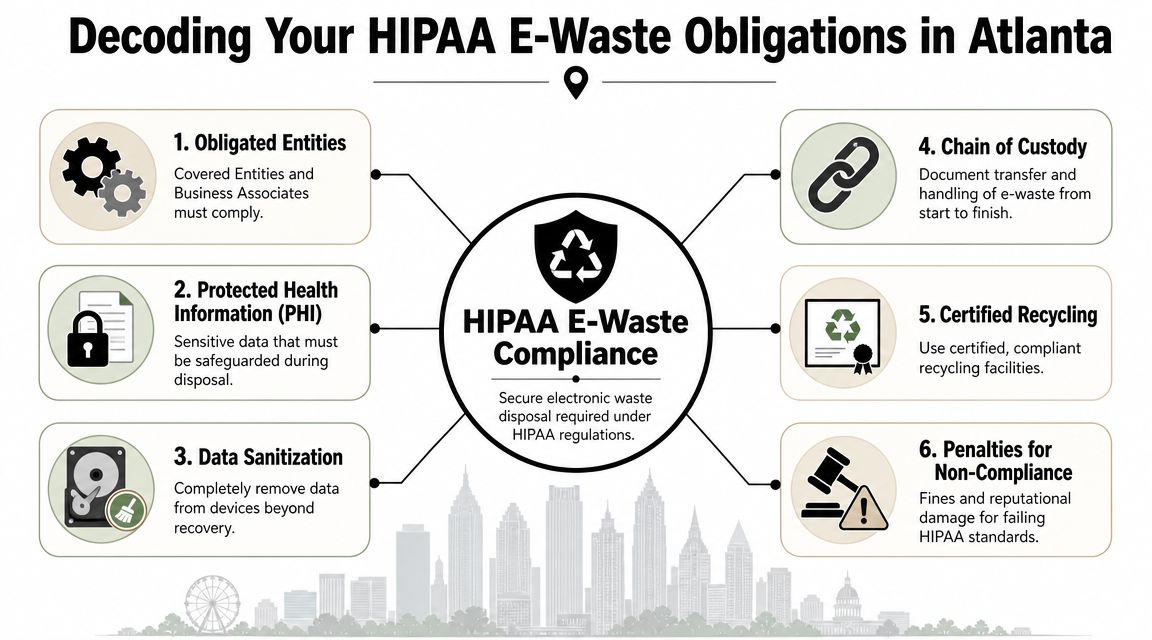
Decoding Your HIPAA E-Waste Obligations in Atlanta
Most confusion starts with one phrase: “HIPAA compliant electronics recycling.” It sounds like every old device in your office needs the same high-security treatment. That isn't how the decision should be made.
HIPAA applies only when devices may contain PHI, which means organizations need a data classification workflow before pickup, especially in mixed-use Atlanta offices and medical practices with hybrid asset streams, as explained in this Atlanta HIPAA recycling guidance.
Which devices usually need HIPAA handling
Start with function, not appearance. A monitor might look “electronic,” but it may not store data. A tiny multifunction copier hard drive can be the opposite.
Use this triage lens:
- Likely HIPAA scope: Clinic workstations, laptops used by care teams, servers, tablets, mobile phones, copiers with storage, external drives, backup media, and specialty equipment with embedded memory
- Needs review before pickup: VoIP phones, security devices, printers, network appliances, and access systems with storage or logging capability
- Often standard e-waste stream: Basic monitors, cables, keyboards, mice, power supplies, and breakroom electronics that never stored or transmitted PHI
The key word is may. If your team can't confidently rule out PHI, treat the device as sensitive until IT or compliance says otherwise.
A practical triage method for busy teams
Most managers don't need a legal memo. They need a workable sorting process that staff can follow in a real office.
Use a short internal review:
Identify where the device was used
Exam room, billing office, reception, tenant suite, data closet, warehouse station, or conference room all suggest different risk levels.Ask whether it stored, processed, or transmitted PHI
If the answer is yes or maybe, route it into the secure stream.Check whether the device contains removable or embedded media
Desktops, laptops, servers, copiers, and some network gear often do.Separate non-data electronics physically
Don't mix keyboards and monitors with laptops and drives in the same gaylord or pallet if you want clean documentation later.
Offices usually overbuy compliance in one of two ways. They either treat every cord and monitor like a regulated asset, or they send mixed loads out as general scrap and hope the vendor sorts it out. Both approaches create waste. One wastes money. The other creates exposure.
This matters for Atlanta businesses managing multiple properties or regional sites. A central office may have clean IT records, while a satellite clinic or vacated tenant suite may not. The disposal plan needs to reflect those differences.
For operations teams coordinating pickups across the city, it also helps to align scheduling with your actual footprint in Atlanta commercial service areas, especially when assets are spread across offices, storage rooms, and managed properties.
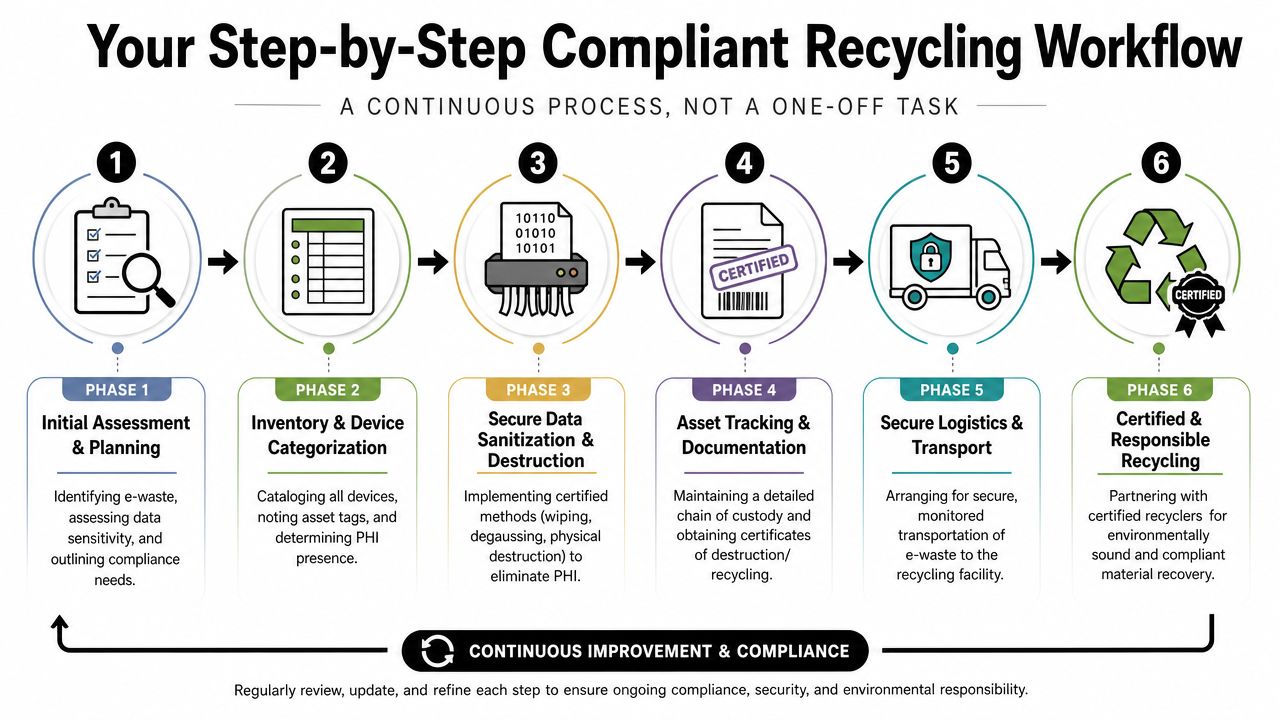
Your Step-by-Step Compliant Recycling Workflow
A defensible disposal project follows a sequence. Miss one part and the rest gets weaker. Secure destruction without inventory creates audit problems. Inventory without controlled transport creates custody gaps. Recycling without final documentation leaves the file incomplete.
A solid workflow starts with the asset list and ends with records you can retrieve later.
Start with serialized inventory
A compliant workflow should begin with a serialized asset inventory, then apply a destruction method matched to the media type, and finish with chain-of-custody records plus a certificate of destruction listing each device serial number, according to this HIPAA recycling workflow guidance.
That means your prep list should capture:
| Inventory field | Why it matters |
|---|---|
| Device type | Tells the recycler what destruction path may be needed |
| Serial number | Connects the physical asset to the destruction record |
| Asset tag | Helps your internal team reconcile retired equipment |
| Location | Shows where custody began |
| Data sensitivity | Distinguishes PHI-risk devices from standard e-waste |
If a device has no visible serial number, document that before release. Don't wait until it's already in transport.
Control the handoff before pickup
Many projects break down at this point. Teams focus on destruction and ignore the hours before the truck leaves.
Use temporary controls on-site:
- Stage sensitive assets separately: Keep PHI-risk devices in a restricted room or caged area
- Limit handlers: Too many hands create confusion about accountability
- Label by stream: Data-bearing devices, standard electronics, and general junk should not be piled together
- Assign one release owner: Facilities, IT, or compliance should sign off on the transfer, not three different departments
For office closures and larger cleanouts, an integrated removal plan is particularly helpful. Teams that need furniture removal, pallet clearing, fixture disposal, and electronics segregation at the same time usually benefit from reviewing commercial service options for cleanouts and recycling coordination.
Match the destruction method to the media
Not every device needs the same treatment. The method should fit the media type and the reuse decision.
Accepted approaches include:
- Clearing: Complete overwrite when reuse is appropriate and the media supports it
- Purging: A higher-level sanitization approach such as degaussing for applicable media
- Physical destruction: Shredding, disintegration, incineration, melting, or pulverization when reuse isn't the goal or the risk is high
In practice, the safest path for higher-risk drives is often physical destruction because it reduces ambiguity. If a drive came from a clinical workstation, imaging server, or unknown storage environment, many compliance teams prefer a method that leaves no room for debate later.
When records are incomplete, choose the method that gives you the strongest evidence, not the cheapest invoice.
Keep the chain of custody intact
Transport is part of the compliance process, not just logistics. The transfer from your site to the processing facility should be documented in a way that lets you reconstruct custody if someone asks questions months later.
A usable record should show:
- Date of transfer
- Origin location
- Who released the assets
- Who received them
- What was moved
- How the load was secured
- What destruction path was assigned
For multi-site pickups, keep site-specific logs. One combined “electronics pickup” note for three properties won't help much in an audit.
Close the file with the right documentation
The final paperwork matters because memory fades and staff turns over. Your organization needs a record that stands on its own.
At minimum, retain:
- Chain-of-custody documentation
- Certificate of destruction
- Device serial numbers tied to destruction
- Internal approval or disposition record
- Recycling documentation for non-sensitive materials
That's the difference between saying a device was “probably handled correctly” and being able to prove what happened.
How to Vet and Choose Your Atlanta Recycling Partner
Most vendor mistakes happen before the first pickup. A company gets selected because pricing was fast, the truck looked professional, or someone said they “do HIPAA jobs all the time.” None of that proves they can support an audit or defend a breach investigation.
The vendor has to show process, controls, and documentation.
Providers should be able to show current R2, e-Stewards, or NAID AAA certifications, and Atlanta recyclers often point to NIST 800-88 certified data-destruction processes. Improper disposal can trigger HIPAA penalties from $100 to $50,000 per violation, as summarized in this Atlanta electronics recycling compliance guide.
Non-negotiables to ask before pickup
A serious vendor won't hesitate when you ask direct questions.
| Category | Question to Ask | What to Look For |
|---|---|---|
| Certifications | Which certifications are current right now? | Current R2, e-Stewards, or NAID AAA documentation |
| Data destruction | Which sanitization standard do you follow? | Clear reference to NIST 800-88 processes |
| Documentation | What will the certificate include? | Device-level detail, especially serial numbers for sensitive media |
| Chain of custody | How do you document transfer from site to processing? | Written custody records, named handlers, dates, and asset detail |
| Transport | How are sensitive assets segregated and secured? | A defined process, not vague assurances |
| Mixed loads | How do you handle junk, non-data e-waste, and PHI devices on the same job? | Separation by stream and documented handling rules |
| Downstream handling | Who processes the material after pickup? | A transparent answer, not “our partners take care of it” |
| Audit readiness | Can you provide sample reporting? | Real examples of destruction and recycling records |
Red flags that usually mean trouble
You can learn a lot from what a vendor avoids answering.
- No certification details: If they say certifications are “in process” or “not really necessary,” keep looking.
- No serial-based documentation: Bulk certificates without device traceability weaken your file.
- Overly broad promises: “We make everything HIPAA compliant” usually means they haven't scoped your device mix.
- Suspiciously cheap pricing: Low quotes often exclude the controls that create defensible documentation.
- Blurry service boundaries: If the company is really a basic hauler subcontracting the sensitive work, ask who actually controls data destruction.
A handshake and a truck aren't a compliance program.
Before signing anything, it's smart to understand who you're working with, how the company is set up, and whether its operating model fits commercial projects. Reviewing a vendor's company background and service approach can reveal whether they're structured for managed cleanouts or just ad hoc pickups.
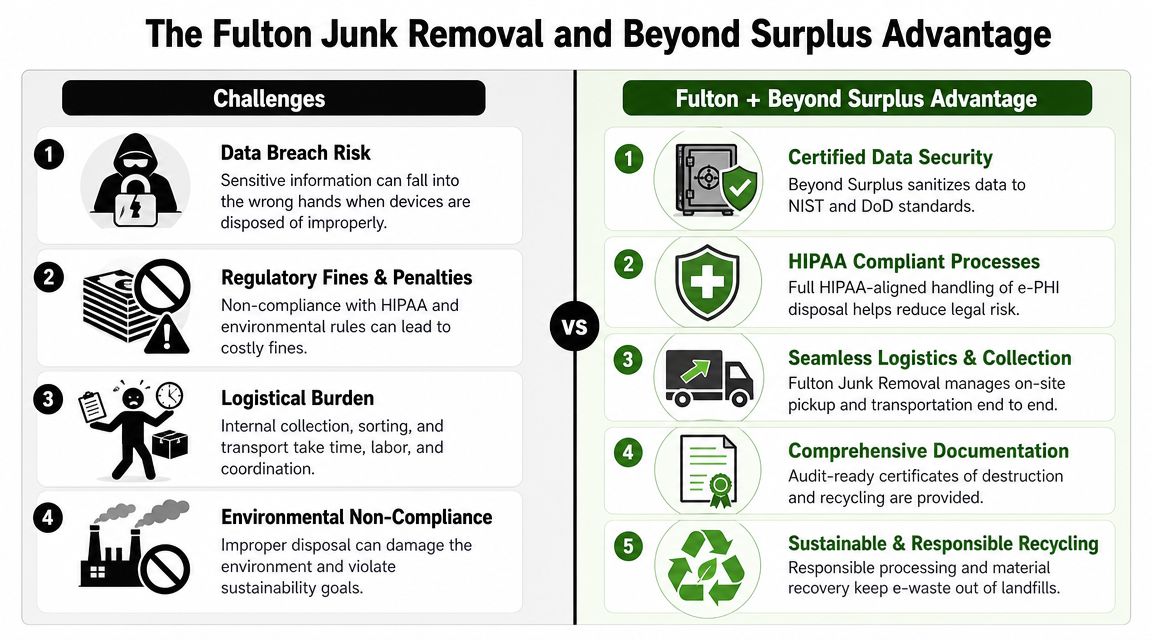
The Fulton Junk Removal and Beyond Surplus Advantage
Atlanta businesses often split this work between two vendors. One hauler removes furniture, pallets, and general debris. A second recycler handles electronics. That can work, but it creates more handoffs, more scheduling friction, and more room for assets to get mixed together.
An integrated model is cleaner. The hauling crew clears the site, and the electronics stream moves directly into a specialized recycling and data-destruction workflow.
Where separate vendors create friction
The issue usually isn't competence. It's coordination.
One vendor may arrive prepared to remove cubicles and loose junk but not isolate drives. Another may be excellent at media destruction but not interested in hauling non-electronic material from a suite turnover or warehouse cleanout. Your staff ends up acting as project manager between them.
Common failure points include:
- Mixed staging areas: Sensitive devices get placed in the same zone as scrap or trash
- Split paperwork: One vendor documents pickup, the other documents destruction, and nobody reconciles the two
- Scheduling gaps: Electronics sit longer on-site because the recycler comes later
- Responsibility confusion: When something is missing, each vendor blames the other handoff
What the integrated approach changes
For higher-risk drives, expert guidance recommends serialized shredding with destruction certificates listing each device serial number because that creates defensible evidence that PHI was made unusable, as noted in this medical e-waste disposal guidance.
That's where the Fulton Junk Removal and Beyond Surplus model fits practical operations. The hauling side handles the physical collection and site-clearance portion of the job. The electronics stream then goes into Beyond Surplus for responsible recycling and data destruction support, including the documentation trail needed for sensitive assets.
For offices, warehouses, and property managers, that structure simplifies several things at once:
- One coordinated pickup plan: General junk, recyclable materials, and electronics can be managed in a single project scope
- Cleaner segregation on-site: Teams don't have to improvise sorting rules while a suite is being emptied
- Less internal administration: Fewer vendors means fewer dispatch windows, approval chains, and invoice disputes
- Better sustainability reporting: Recyclable material is processed through a dedicated recycling channel rather than treated like ordinary debris
This won't replace internal classification. You still need to decide which devices require HIPAA-level handling. But once that scope is set, the integrated model reduces the chance that sensitive equipment gets buried inside a broader cleanout.
Achieve Compliance and Sustainability with Confidence
HIPAA compliant electronics recycling in Atlanta isn't complicated because the rules are mysterious. It gets complicated when organizations skip scoping, mix sensitive and non-sensitive devices, or rely on vendors that can remove items but can't document disposition properly.
The cleanest approach is practical. Classify devices before pickup. Separate data-bearing assets from standard e-waste. Keep the inventory tied to serial numbers. Make sure custody is documented. Match destruction to media type and risk. Retain the final records where your team can find them later.
That process protects more than compliance. It also keeps usable material out of the landfill stream and gives operations, IT, and facilities teams a cleaner way to manage office transitions, decommissions, and property turnovers.
If your Atlanta organization is dealing with old computers, drives, office electronics, or a mixed cleanout that includes both junk removal and secure recycling, start with a scoped review instead of a rush pickup. A short planning conversation usually identifies what belongs in the HIPAA stream, what can move through standard electronics recycling, and what should be handled as general debris.
If you need help mapping that workflow to a real site, request a project review through the Fulton Junk Removal contact page.
If you're planning an office cleanout, clinic refresh, warehouse cleanup, or tenant turnover in metro Atlanta, Fulton Junk Removal can coordinate physical removal while routing electronics and recyclable materials through Beyond Surplus for responsible processing. That gives your team one place to start when you need cleaner logistics, clearer documentation, and a more manageable path to secure disposal.
