
A Guide to Commercial Computer Parts Disposal
Properly disposing of old computer parts is a lot more than just dragging them to the curb. It’s a full-blown process that, if done right, protects your business from data leaks and hefty compliance fines. And, just as importantly, it ensures all the hazardous gunk inside those old machines is handled safely.
Beyond the Dumpster: Why Proper E-Waste Disposal Is Crucial
Tossing old IT equipment out with the regular office trash is a high-stakes gamble. The consequences aren't just a slap on the wrist; we're talking about seven-figure fines for data breaches and serious penalties for environmental violations. Every time you refresh your office computers, upgrade a data center, or clean out a warehouse, you’re creating a mountain of electronic waste (e-waste) that needs special attention.
This isn't just about old monitors and keyboards. These devices are a complex mix of valuable resources and genuinely hazardous materials. Think about it: a single server rack can hold precious metals like gold and copper right alongside toxic substances like lead and mercury.
One of the biggest mistakes I see businesses make is treating e-waste as a simple trash problem. It's not. It's a risk management and corporate responsibility issue. Get it wrong, and you're looking at brand damage, legal trouble, and a major environmental headache.
The Growing E-Waste Challenge
The sheer scale of this problem is mind-boggling. Globally, we’re on track to generate more than 70 million metric tonnes of e-waste by 2026, with that number projected to climb to 82 million tonnes by 2030. This explosion is fueled by the ever-shrinking lifecycles of computers and servers.
What's really shocking is that only about 20-22.3% of it is properly collected and recycled. That leaves a massive volume of equipment—and the hazardous materials inside—unaccounted for. For a business, this is a real liability. If your old computer parts wind up in a landfill, you could be on the hook for steep fines. To get a better handle on the best practices, it's worth reading up on the professional disposal of electronic waste.
Before you start unplugging, it helps to know what you're dealing with. Different components carry different risks, from data security to environmental hazards.
Quick Guide to Computer Component Disposal Risks
| Computer Part | Primary Disposal Risk | Recommended Action |
|---|---|---|
| Hard Drives (HDD/SSD) | Data Security: Sensitive company, employee, or customer data. | Certified data wiping or physical shredding is non-negotiable. |
| Batteries (Laptop/UPS) | Hazardous Material: Lithium-ion batteries can catch fire if damaged. | Must be separated and sent to a specialized battery recycler. |
| Motherboards/Circuit Boards | Hazardous Material: Contain lead, mercury, and cadmium. | Certified electronics recycling to safely recover metals. |
| CRT Monitors | Hazardous Material: Contain several pounds of lead in the glass. | Requires specialized handling and recycling; illegal to landfill. |
| Power Supplies | Compliance: Contain various metals and capacitors. | Handle through a certified e-waste recycler. |
This table just scratches the surface, but it highlights why you can't just throw everything into one big bin. Each part requires a specific disposal path to keep your business safe and compliant.
A Streamlined Solution for Atlanta Businesses
For office managers, warehouses, and property managers, navigating the world of computer parts disposal can feel like a full-time job. You have to ensure data is destroyed, materials are recycled responsibly, and you have the paperwork to prove it all. This is where an integrated, all-in-one service really pays off.
Fulton Junk Removal, operating under Beyond Surplus, provides a circular, eco-friendly solution that goes beyond traditional junk hauling.
- One-Stop Service: Our bundled junk removal + recycling pickup means we handle the physical removal of everything you want gone, from old desktops to an entire server room's worth of equipment.
- Responsible Recycling: Fulton works hand-in-hand with Beyond Surplus to recycle electronics, metals, and other materials responsibly. We divert items from landfills to ensure they’re repurposed or recycled.
- Simplified Compliance: Our integrated approach simplifies compliance and sustainability reporting, turning a major headache into an efficient, trackable process.
Instead of juggling multiple vendors for junk hauling, data destruction, and recycling, you get a single, reliable solution that covers all your bases. For more tips on getting organized, check out our guide on how to prepare for a commercial junk removal service.
Locking Down Your Data Before It Leaves the Building
Before a single piece of hardware even heads for the door, you have to think about the data on it. Hitting "delete" or reformatting a drive is a rookie mistake. For any business, property manager, or IT department, that kind of “deleted” data is a goldmine for thieves and a massive liability for you.
This isn't just a best practice; it's often a legal requirement. Failing to properly handle data can turn a simple office cleanout into a seven-figure nightmare. The risk is just too high to cut corners.
Data Erasure vs. Physical Destruction
When it's time to destroy data for good, you really have two main choices: software-based wiping or old-fashioned physical destruction. The right path depends on how sensitive the data is, the age of the hardware, and your company's specific compliance needs.
- Software-Based Erasure: This method uses special software to overwrite every sector of a drive with random data, sometimes multiple times. The DoD 5220.22-M standard, for example, uses a three-pass method to make the original data completely unrecoverable. This is a great choice for newer hard drives you might want to resell or reuse.
- Physical Destruction: This is the nuclear option—and the most secure. It leaves zero doubt that the data is gone. Methods range from degaussing, which uses powerful magnets to obliterate the drive's magnetic field, to shredding, which grinds the drive into small, useless metal fragments. This is the only way to go for drives with highly sensitive information or for older, non-functional equipment.
Failing to choose one of these secure paths can quickly spiral into a major problem.
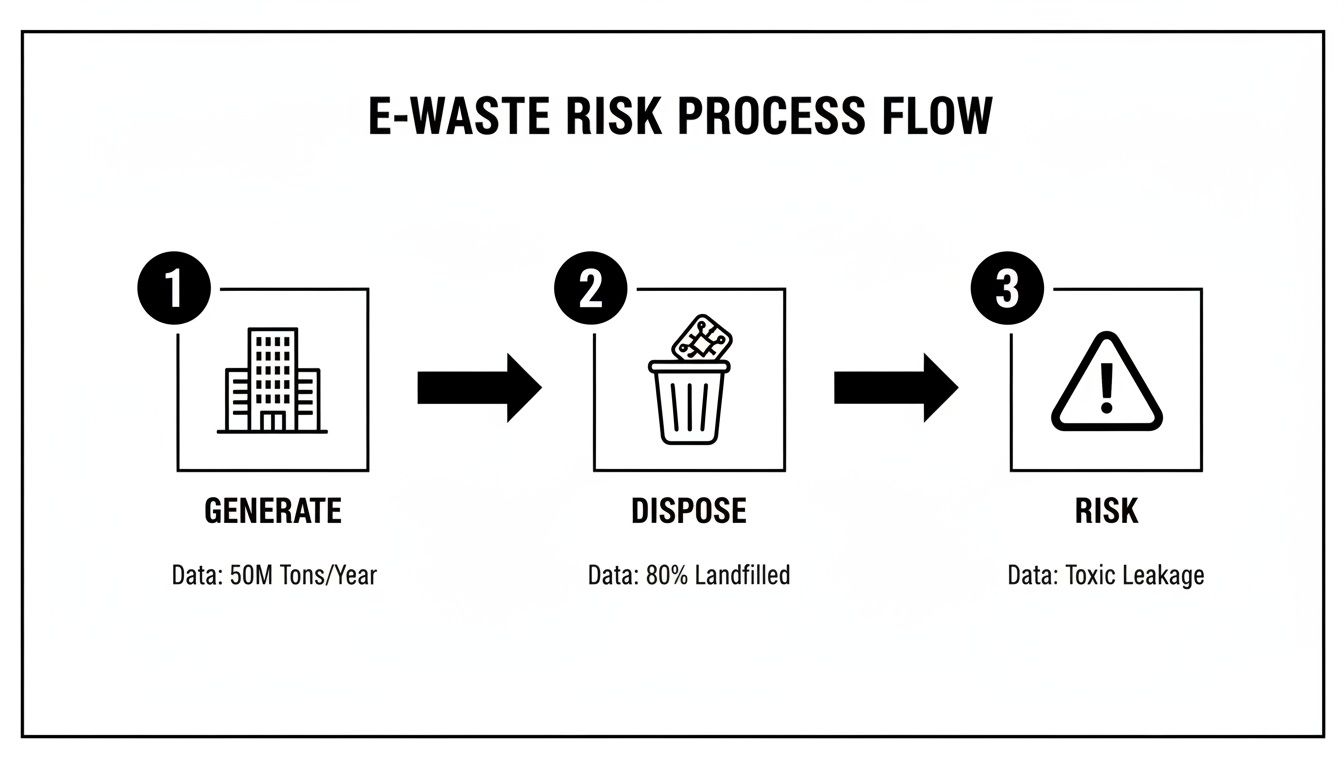
As you can see, simply generating e-waste without a documented disposal plan leads directly to business risk. It’s a straight line from that old stack of computers to a potential compliance disaster.
Creating an Auditable Chain of Custody
For businesses, proving you destroyed the data is just as important as actually doing it. Let's say you're an office manager getting rid of 50 old workstations. You need a rock-solid, auditable trail for every single machine. This is where creating an asset inventory is non-negotiable.
Start by building a detailed spreadsheet. It should track:
- Asset Tag: Your company's internal ID for the device.
- Device Type: (e.g., Dell Latitude Laptop, HP ProDesk Desktop).
- Serial Number: The manufacturer's unique serial number.
- Storage Device Serial Number: The specific serial number of the hard drive or SSD.
- Destruction Method: A note on whether it was wiped, degaussed, or shredded.
- Date of Destruction: The exact day the data was destroyed.
This inventory isn't just busywork; it's your legal proof of due diligence. When a certified recycler gives you a Certificate of Destruction, this list is what allows you to match every single asset to that certificate, creating an unbroken paper trail for your records.
We get it. If you're a property manager clearing out an abandoned office or a warehouse full of old tech, this process can feel overwhelming. That’s where we come in.
Fulton Junk Removal’s partnership with Beyond Surplus means all electronic waste and recyclable materials are directly processed by certified pros who live and breathe this stuff. We manage the pickup and logistics, and you get a Certificate of Data Destruction that verifies every single drive was handled according to industry standards. It makes your sustainability and compliance reporting completely painless.
How to Sort and Segregate Your Obsolete IT Assets
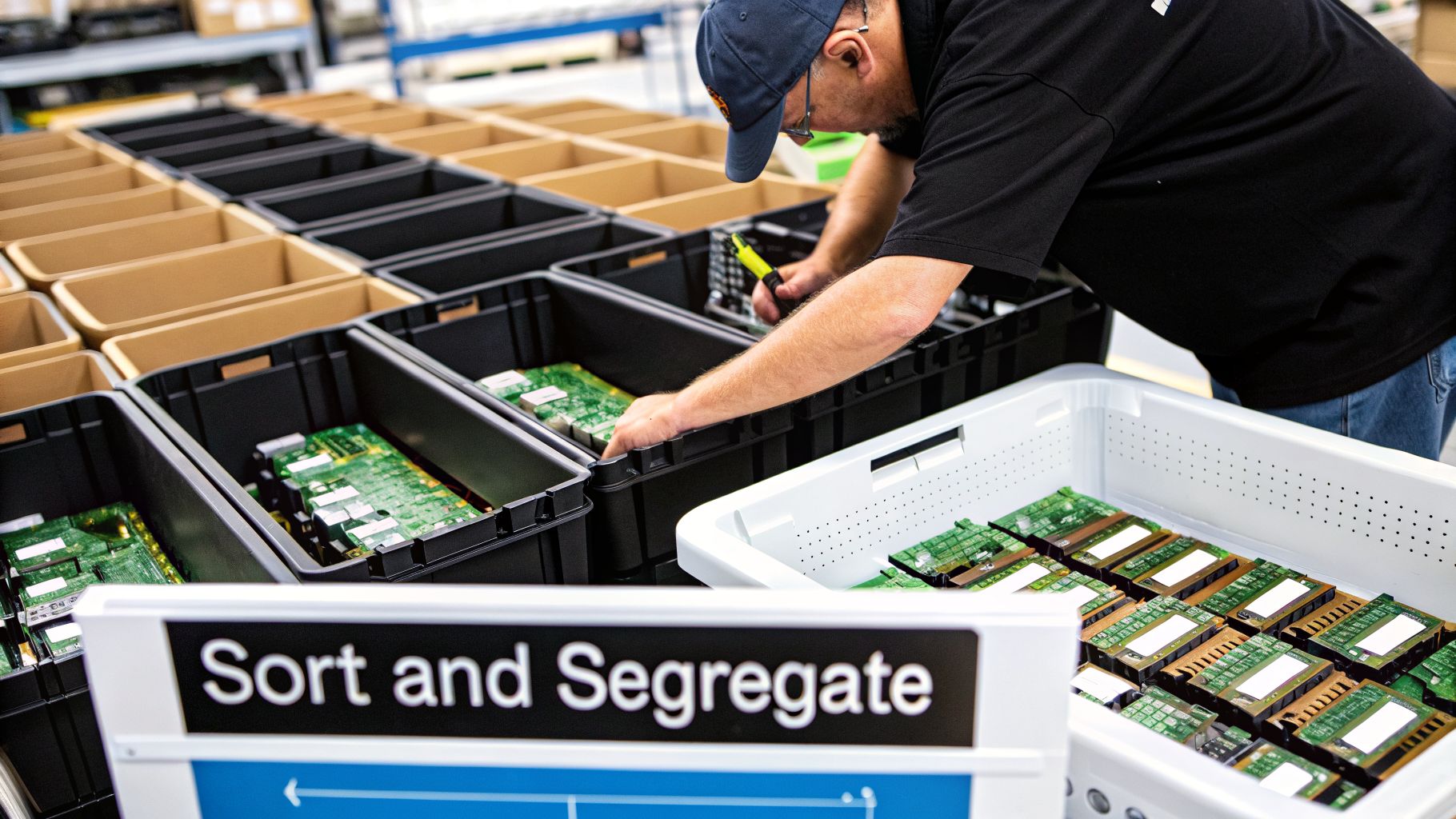
Once your data is wiped clean or the drives are set aside for shredding, it's time to get your hands on the physical hardware. This isn't just about tidy housekeeping—proper sorting is what separates responsible disposal from a compliance nightmare. It's how you maximize resource recovery, stay on the right side of environmental laws, and shield your business from liability.
Frankly, a jumbled mess of e-waste is a recycler's worst enemy. It’s inefficient and, more importantly, can be genuinely dangerous to handle.
Before you can get rid of anything, you need to know exactly what you have. This is why it’s so helpful to learn how to perform an asset audit. A good inventory gives you a clear roadmap, letting you separate everything into the right buckets from the get-go.
Setting Up a Sorting Station
Picture a typical warehouse or office cleanout. The temptation is to throw everything into one big pile, but that's a mistake. Instead, set up distinct areas or use large, clearly labeled bins for different types of equipment. It’s a simple move that makes a world of difference.
Think of it as an assembly line running in reverse. Your goal is to create sorting stations that prevent cross-contamination and make the final pickup a breeze.
Here are the main categories we see on the job:
- High-Value Components: This is your low-hanging fruit. Things like CPUs, RAM sticks, and intact motherboards are packed with precious metals and hold the most recovery value. Keep them separate and safe from damage.
- Hazardous Materials: Pay close attention here. This is anything that could poison the environment if it ends up in a landfill.
- General E-Waste: This is the bulk of what's left—computer cases, keyboards, mice, and tangled masses of cables.
- Scrap Metal: Don't forget old server racks, metal enclosures, and heat sinks. These can be recycled for their basic metal content.
Taking the time to sort upfront makes life easier for your disposal partner. For businesses, it’s a clear sign of due diligence and makes your sustainability reporting far more accurate.
Handling Hazardous Computer Parts
Some components are ticking time bombs, containing toxic materials that require special handling. Getting this wrong isn't just bad for the planet; it can lead to some hefty fines.
The biggest mistake businesses make during a cleanout is mixing hazardous and non-hazardous materials. A single cracked CRT monitor or a leaking battery can contaminate an entire pallet of otherwise clean recyclables, complicating the entire computer parts disposal process.
Keep a sharp eye out for these common culprits:
- CRT Monitors: Those old, heavy monitors contain several pounds of lead. They absolutely cannot go in a dumpster and require a specialized recycler.
- Batteries: Laptop and UPS batteries, especially lithium-ion types, are a serious fire hazard if they get punctured. They must be removed from their devices and stored in a separate, fire-safe container.
- Circuit Boards: Motherboards, graphics cards, and other printed circuit boards (PCBs) have small amounts of lead, mercury, and cadmium. They need to go to a certified facility that can safely extract the valuable metals while containing the toxins.
This kind of careful segregation isn't optional—it's a core part of doing things right.
For offices, warehouses, and property managers in the Atlanta area, Fulton Junk Removal offers a bundled service that takes this entire headache away. Our crew handles all the sorting, making sure every piece of your e-waste—from office furniture to servers—is diverted from landfills and managed by our certified partner, Beyond Surplus. You can see all the locations we cover by checking out the Fulton Junk Removal service areas.
Choosing Your Disposal Path: Certified Recyclers vs. Donations
Once your old equipment is sorted and wiped clean of data, you’ve got a big decision to make: where does it all go? Most businesses consider two main routes—donation or certified recycling. While donating sounds great on the surface, it’s rarely a practical solution for corporate hardware.
Think about it from the nonprofit's perspective. A local charity might love a few five-year-old laptops that still work, but they have absolutely no use for a pallet of dead servers or a box of outdated graphics cards. For the bulk of commercial e-waste, donation just isn't a viable option.
That’s why certified recycling has become the only real choice for responsible computer parts disposal.
Why Certified E-Waste Recycling Is a Must
When you hand over your old IT assets, you're not just tossing junk—you're transferring liability. Partnering with a certified e-waste recycler is your best defense against data breach lawsuits and environmental fines down the road. You should be looking for recyclers holding top-tier certifications like R2 (Responsible Recycling) or e-Stewards.
These credentials prove the recycler follows strict, audited standards for:
- Data Security: Using verifiable processes to destroy all data for good.
- Environmental Safety: Banning the export of hazardous e-waste to developing nations.
- Worker Protection: Ensuring safe handling of toxic materials like lead and mercury.
An uncertified vendor gives you none of these guarantees. They might say they recycle, but you have no way of knowing if your equipment is actually ending up in a local landfill or on a container ship. For any business, the risk is far too high.
A Certificate of Destruction from a certified recycler is your official proof of compliance. It’s the auditable document that shows you did your due diligence, effectively ending your liability for that equipment and its data. Without it, you’re leaving yourself exposed.
The sheer volume of corporate IT turnover makes this choice even more critical. Computers already dominate the electronics recycling market, which is projected to balloon past USD 22,210 million by 2026. This is driven almost entirely by corporate upgrades, with PCs and servers making up over 43% of all e-waste recycling. While broken hardware needs recycling, the growth of refurbishment shows the strategic choice businesses must make between reuse and disposal. You can explore these trends and what they mean for asset management by reading more insights from Mordor Intelligence.
How to Vet a Disposal Partner
When you're evaluating a recycler, you need to ask the tough questions. Treat it like an interview for a critical risk management role, because that's exactly what it is.
Here’s what you need to ask:
- "What certifications do you hold?" If they don't immediately say R2 or e-Stewards, walk away. It’s a major red flag.
- "Can you provide a Certificate of Destruction and a Certificate of Recycling?" The only acceptable answer is "yes." Ask for a sample to see what you'll get.
- "What does your chain of custody process look like?" They should be able to clearly explain how they track your assets from your door to their final destination.
- "Who are your downstream partners?" A legitimate recycler has a fully vetted and audited network of processors they work with.
Frankly, this vetting process can be a real headache. For busy offices, warehouses, and property managers in Atlanta, there’s a much easier way.
Fulton Junk Removal’s partnership with Beyond Surplus takes all the guesswork out of the process. We’ve already done the vetting for you, bundling our junk hauling with fully compliant, certified recycling. All the electronics we pick up are processed by Beyond Surplus, an R2 certified recycler, so your computer parts disposal automatically meets the highest industry standards.
To see how we can handle both your e-waste and general office junk in one go, check out our commercial junk removal services.
The Fulton Advantage: One Call for Hauling and Certified Recycling
Let’s be honest. Managing a commercial property cleanout or an office IT upgrade often feels like you’re juggling two completely different projects. First, you have to track down a junk hauler to get rid of the big, bulky stuff. Then, the real headache begins: finding a specialized—and certified—recycler to handle the sensitive job of computer parts disposal.
This two-vendor shuffle is complicated, expensive, and a logistical nightmare for any busy property manager, office admin, or warehouse supervisor.
At Fulton Junk Removal, we do things differently. We are a commercial services firm operating under Beyond Surplus, a circular, eco-friendly solution that goes far beyond traditional junk hauling. It allows us to offer a single, integrated service that handles everything from start to finish.

A Seamless Experience for Commercial Clients
Let's walk through a common scenario. Imagine a property manager needs to clear out a storage unit packed with old office tech—desktops, monitors, printers, and boxes of tangled cables. The previous tenant just left it all behind, and the new one moves in next week. The clock is ticking.
The old way? You’d call a junk hauler for the non-electronic junk and then start frantically searching for a certified e-waste recycler to deal with the computers. That’s two phone calls, two separate quotes, two different pickup schedules, and two invoices to process.
With Fulton Junk Removal, it’s just one call. Our bundled junk removal + recycling pickup means a single team shows up in one truck to handle it all. We’ll clear out the old desks and furniture while securing the electronic waste, which then goes directly to our partner, Beyond Surplus, for processing.
This integrated model is built for pure efficiency. You get one point of contact, one transparent invoice, and one service that covers all your bases.
From Pickup to Paperwork, We Make It Easy
The real value of our approach goes far beyond just the pickup. While most junk removal companies take everything to the landfill, we recycle through Beyond Surplus to minimize waste and maximize reuse. This appeals to environmentally conscious homeowners and businesses who want to do the right thing without adding more work to their plate.
Fulton Junk Removal works hand-in-hand with Beyond Surplus to recycle electronics, metals, and other materials responsibly. Our main goal is always landfill diversion, making sure items are repurposed or recycled whenever possible. Once your e-waste arrives at the Beyond Surplus facility, it undergoes a fully certified process.
Here’s what that looks like:
- Secure Data Destruction: All hard drives and storage media are completely destroyed according to the highest industry standards. No exceptions.
- Responsible Materials Recovery: We extract valuable materials while safely containing hazardous substances like lead and mercury.
- Full Compliance Documentation: You get all the official paperwork you need for your records, proving you’ve acted responsibly.
The end result is a complete, auditable trail. You’ll receive a Certificate of Destruction for the data and a Certificate of Recycling for the hardware. This documentation is crucial for your company’s compliance and sustainability reporting, making it simple to prove you handled your old assets the right way.
The Smart Choice for Your Office, Warehouse, or Property
For offices, warehouses, and property managers, the benefits are crystal clear. You need a solution that’s fast, reliable, and removes liability from your shoulders. Fulton handles the junk removal, and Beyond Surplus ensures responsible recycling, making compliance and sustainability reporting easier.
No more coordinating multiple vendors. No more sleepless nights worrying if your old computers will end up in a landfill. Just a simple, effective solution that saves you time and gives you total peace of mind.
If you're managing an office move, a warehouse cleanout, or clearing out a commercial space, our integrated service is built specifically for you. To learn how we can build a custom plan for your project, get in touch with our team through our contact page.
Common Questions About Commercial Computer Disposal
When it comes to getting rid of old business computers, we know property managers, office admins, and IT teams have a lot of questions. You need to get it right. To make sure you're handling everything correctly, let's walk through some of the most common questions we hear from businesses every day.
What Paperwork Should I Expect From a Commercial Disposal Service?
Never work with a disposal partner who can't provide the right documents. It’s a huge red flag. You should always demand two critical pieces of paperwork for your records.
First is a Certificate of Data Destruction. Think of this as your legal, auditable proof that every bit of sensitive information was professionally wiped and destroyed. This document is your number one defense against a potential data breach.
Second, you'll need a Certificate of Recycling or a detailed diversion report. This confirms your e-waste was managed in an environmentally compliant way and, most importantly, stayed out of the landfill. Because of our unique partnership with Beyond Surplus, we provide all this essential paperwork, giving you total peace of mind.
Can You Handle Large and Awkward IT Equipment?
Absolutely. Our service was built to handle far more than just desktops and laptops. We specialize in the heavy, bulky equipment you often find during data center tear-downs and large-scale office cleanouts.
Our crews show up ready to manage and remove items like:
- Full-size server racks and cabinets
- Large network switches and enterprise-grade routers
- Heavy uninterruptible power supplies (UPS) and battery backups
- Legacy IT hardware and old mainframe components
We bring the right team and the right tools for all the heavy lifting. This ensures a complete, efficient clear-out in a single visit, taking the logistical headache completely off your plate.
How Does Your Pricing for Computer Disposal Work?
We keep our pricing straightforward. It’s based on the volume and type of equipment you need us to take. We believe in total transparency, which is why we offer free, no-obligation estimates so you know the full cost right from the start. No surprises.
Our bundled service, which combines general junk hauling with certified e-waste recycling, is specifically designed to be more cost-effective than hiring two separate vendors. You get a single, transparent quote for the entire job, saving you time, coordination headaches, and money.
This integrated approach makes billing and project management so much simpler, making it the perfect solution for businesses that need to be efficient. To learn more about what makes our service different, you can read all about Fulton Junk Removal and our eco-friendly mission.
We Are Moving Offices. Can You Take E-Waste and Other Junk at Once?
Yes, this is our specialty and where our service really shines. Office moves, renovations, and cleanouts are the perfect time to use our integrated junk removal and recycling service. Our team can haul away everything you're leaving behind in one efficient trip.
For instance, we can clear out old cubicles, unwanted office furniture, and worn-out conference room tables while also collecting all the obsolete tech from your IT closet. We handle all the sorting on-site, making sure computer parts are properly sent to Beyond Surplus for certified recycling while other debris is disposed of responsibly. It’s the most efficient way to manage a commercial move-out, by far.
Ready to simplify your commercial cleanout? Fulton Junk Removal offers a single, reliable solution for both junk hauling and certified computer parts disposal. Get your free, no-obligation estimate today and let us handle the rest. Visit us at https://fultonjunkremoval.com.
