
Fast Data Destruction and IT Equipment Disposal Atlanta
Most Atlanta office cleanouts start the same way. A lease is ending, a floor is being restacked, a warehouse corner has become a graveyard for retired hardware, and someone finally opens the storage room door. Inside are old laptops, broken monitors, a few rack servers, a box of phones, tangled cables, and maybe a printer nobody wants to touch.
The problem isn't just space. The critical issue is that old IT equipment sits at the overlap of data security, compliance, recycling, and logistics. A facilities manager may be responsible for clearing the room, but the drives inside those devices still carry risk until someone documents, sanitizes, and removes them correctly. At the same time, dumping electronics with general junk creates an environmental and operational mess that many businesses would rather avoid.
That's why Data Destruction and IT Equipment Disposal Atlanta projects work best when they're treated as a controlled disposition process, not a last-minute haul-away job.
The Hidden Risks in Your Office Storage Closet
A storage closet full of retired tech looks harmless until you sort through what's in it. A dead laptop may still contain a solid-state drive. An old desktop tower may still have a hard drive inside. A server pulled during an upgrade may still hold company records, internal documents, or user data.
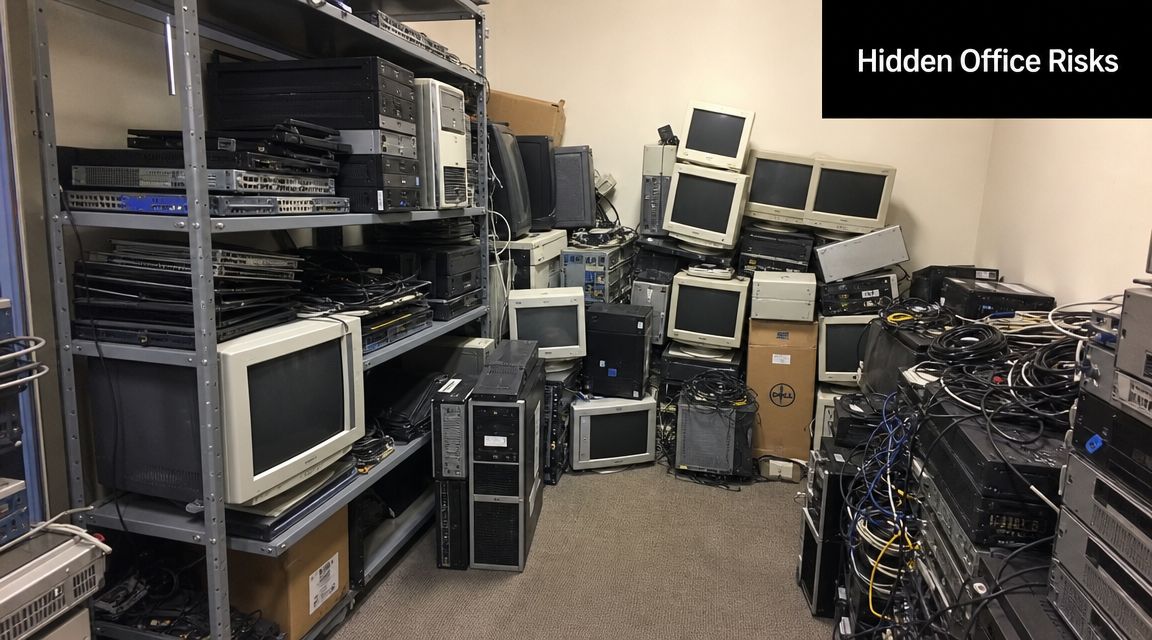
In Atlanta, this comes up constantly during office relocations, branch closures, server refreshes, and mixed cleanouts where furniture and electronics are leaving at the same time. One team is focused on furniture, another on move-out deadlines, and the IT assets get pushed aside for later. “Later” is where mistakes happen.
If you're clearing out comms rooms, server racks, or networking gear and want a plain-English refresher on what may be sitting in that space, this guide to explore data center components is useful context before disposal planning starts.
Two risks usually get missed
The first is data exposure. If a company treats old equipment like scrap before confirming what media is inside, the disposal decision starts backward. You don't remove first and ask questions later. You identify the data-bearing devices first.
The second is improper e-waste handling. Offices often bundle keyboards, monitors, cables, docks, phones, batteries, and metal shelving into one removal stream. That may clear the room quickly, but it doesn't create a clean record of what was recycled, what was sanitized, and what left the site as general junk.
Practical rule: If a device can store data, don't let it leave the building on the same assumptions you'd use for a broken chair.
A secure cleanout works differently. Data-bearing assets get identified, segregated, documented, and processed through a disposal path that matches the device. Non-data items can move through standard recycling or removal channels without creating confusion around chain of custody.
That distinction matters most when one vendor handles physical removal and another handles electronics. Gaps usually appear at the handoff. Businesses that want a broader view of how Atlanta commercial cleanouts are handled can review the operational context on the Fulton Junk Removal blog.
Preparing Your IT Assets for Secure Disposal
The cleanest disposal jobs start before the truck arrives. Internal prep doesn't need to be complicated, but it does need to be deliberate. A simple spreadsheet and a disciplined pickup plan will solve most of the problems that create disputes later.
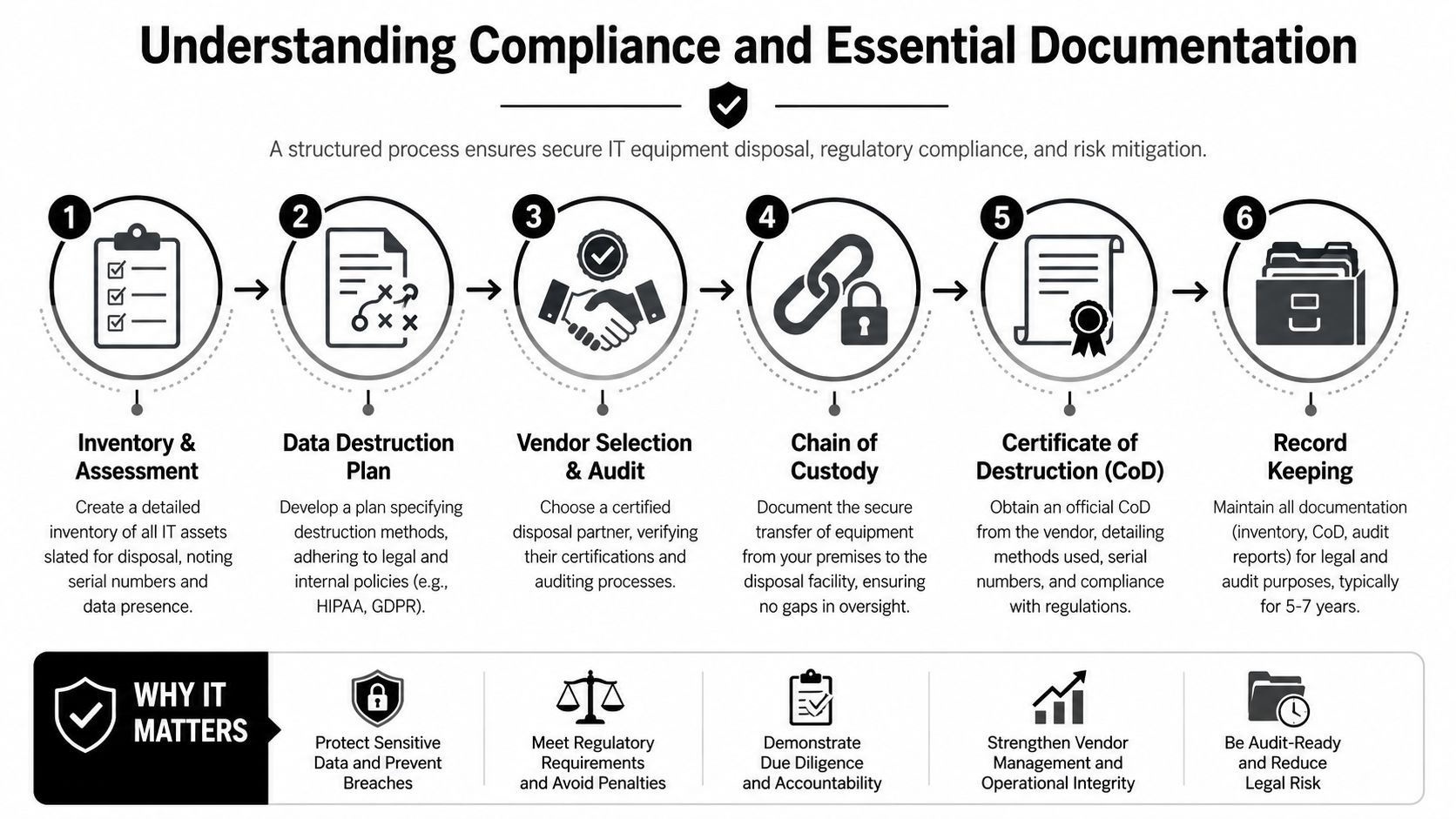
A high-rigor workflow starts with a full asset inventory, segregation of devices by media type, a signed transfer-of-custody document before removal, and a final Certificate of Destruction that records the destruction method, date, and a serialized list of every drive or device destroyed. That chain of custody is the practical control point that reduces compliance disputes during review, as described in this overview of Atlanta data destruction workflow requirements.
What to do before pickup day
Start by separating equipment into three groups:
- Data-bearing devices. Laptops, desktops, servers, external drives, SSDs, phones, tablets, and loose hard drives.
- Non-data electronics. Monitors, docking stations, keyboards, mice, cables, printers, scanners, and similar peripherals.
- Non-IT cleanout items. Desks, chairs, shelving, cubicle parts, and warehouse debris.
That separation sounds basic, but it changes everything. It helps your team quote accurately, route assets correctly, and avoid the common mistake of mixing secure devices into a general office haul.
The short internal checklist
Use a working list that includes the basics:
Asset description
Record the device type. “Dell laptop,” “rack server,” or “external SSD” is enough to start.Identifier
Capture any visible asset tag, service tag, or serial number.Data status
Mark whether the item is known to contain storage media, unknown, or confirmed non-data.Physical condition
Note whether the unit is functional, damaged, locked, or incomplete.Location
List where the equipment sits now. Storage closet, server room, warehouse cage, reception office, and so on.
If your team can't confirm whether a device contains media, treat it as if it does until inspection proves otherwise.
Why prep matters operationally
Preparation improves security, but it also improves the actual removal day. Drivers know what needs controlled handling. Your office manager knows which items need signatures before loading. Your IT lead knows which devices may still have reuse value.
It also helps to think about physical controls in the same way you would for any sensitive site movement. This data center security guide is useful because it frames security as a chain of access points, not a single event. Disposal works the same way. Risk appears during staging, loading, transport, and final processing, not just at destruction.
If your company is planning a broader office or warehouse pickup, it helps to align the asset list with the removal scope shown on commercial cleanout services. That keeps the secure IT stream separate from the general junk stream without making the project harder to manage.
Choosing the Right Data Destruction Method
Many buyers get stuck at this point. They know they need “secure destruction,” but that phrase doesn't answer the core question. Which method fits which device?
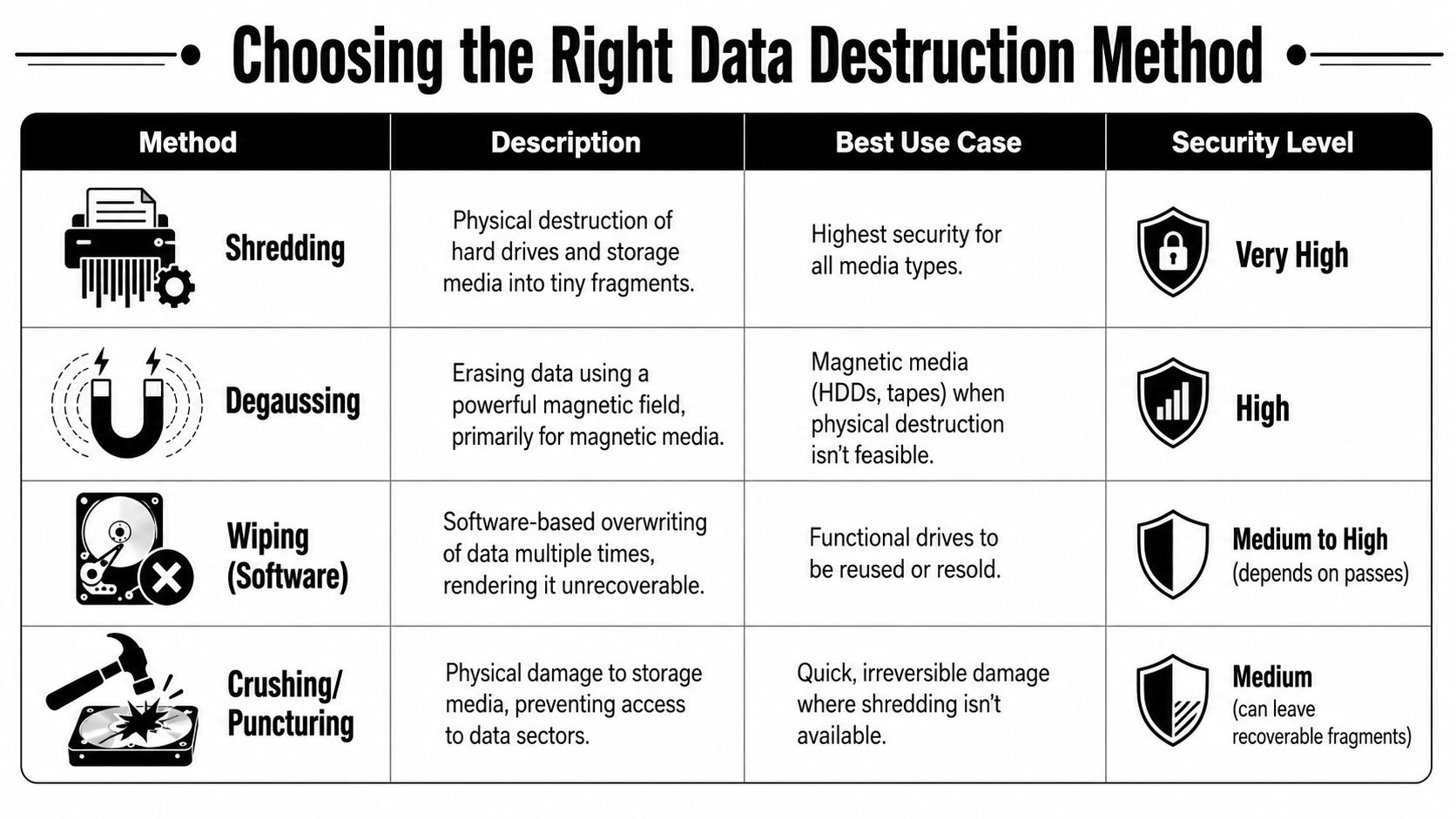
One of the most useful industry observations is that Atlanta businesses are often choosing between wiping, shredding, or a hybrid approach, and many providers don't explain which method fits laptops, servers, SSDs, mobile devices, or mixed fleets. A stronger ITAD program uses NIST SP 800-88 as the decision framework and matches the sanitization method to the asset's risk and reuse potential, rather than applying one blanket rule to everything, as discussed in this piece on wiping, shredding, or hybrid ITAD decisions.
Wiping works when reuse matters
Software wiping is the right conversation when the device is still functional and the organization wants reuse, redeployment, or resale value. That usually applies to newer laptops, some desktops, and certain servers with usable components.
The strength of wiping is obvious. You sanitize the data while preserving the equipment. The weakness is also obvious. It depends on the media being suitable for that process and on documentation being complete.
Wiping is usually a poor fit when a drive is damaged, inaccessible, encrypted in a way that prevents verification, or mixed into a pile of unknown devices with no practical audit trail.
Shredding works when finality matters
Physical shredding is the strongest choice when the organization wants no chance of reuse and no ambiguity about data removal. End-of-life drives, failed media, highly sensitive storage, and loose hard drives from decommissioned systems often belong here.
Shredding is also simpler to explain to auditors and internal stakeholders. The media is physically destroyed. There's no future disposition question hanging over it.
The trade-off is that once you shred the storage media, any reuse value tied to that media is gone. For some organizations, that's exactly the policy they want. For others, it's unnecessarily destructive if the asset could have been sanitized and reused.
Degaussing and crushing sit in the middle
Degaussing can make sense for magnetic media such as hard disk drives and tapes. It doesn't apply universally across modern device types, so it shouldn't be treated as a universal answer.
Crushing or puncturing is often used as immediate physical damage, but it's less elegant as a long-term policy if documentation and final downstream handling aren't tight. It can be a field expedient step. It isn't always the most complete program by itself.
The best disposal policy isn't “always shred” or “always wipe.” It's “match the method to the media, the risk, and the intended outcome.”
A simple decision framework
Here's the practical way to decide:
| Device situation | Preferred method | Why |
|---|---|---|
| Functional laptop slated for remarketing or reuse | Wiping | Preserves value while addressing data risk |
| Failed HDD removed from a retired server | Shredding or degaussing, then documented disposition | Failed media is harder to verify through software alone |
| SSD from a sensitive environment | Shredding or a hybrid process based on policy | SSD handling often benefits from a stricter approach |
| Mixed box of unknown loose drives | Shredding | Fastest path to certainty |
| Office desktop with no resale interest | Hybrid decision | Depends on drive condition, policy, and documentation needs |
For teams that want to understand the service mindset behind a full Atlanta cleanout operation, the background on Fulton Junk Removal's approach gives useful context around integrated removal, recycling, and project handling.
Understanding Compliance and Essential Documentation
Removal is easy to see. Documentation is where proof lives.
The foundational standard for secure IT data destruction is NIST Special Publication 800-88, which defines the media sanitization outcomes clear, purge, and destroy. Under that framework, organizations should treat data-bearing devices as requiring documented sanitization before reuse, resale, or recycling, and many ITAD providers rely on NIST 800-88 because it is the U.S. government benchmark for verifiable destruction and compliance, as outlined in this summary of NIST 800-88 and data-center decommissioning in Atlanta.
What documentation should include
A Certificate of Data Destruction or Certificate of Destruction should do more than confirm that “items were destroyed.” For business use, it should support an audit trail.
Look for documentation that includes:
- Destruction method. The record should state whether media was wiped, degaussed, shredded, or processed another approved way.
- Date of processing. You need a clear event date, not a vague project window.
- Serialized device listing. The strongest records tie the outcome back to each drive or device.
- Chain-of-custody linkage. The final document should match the inventory and transfer paperwork created earlier.
Without that, you're relying on trust instead of evidence.
Why this matters in the real world
Office managers often think compliance belongs entirely to IT or legal. In practice, facilities, operations, procurement, and property teams all get pulled into disposition decisions. If equipment leaves the building and nobody can later show what happened to the storage media, the organization has a process gap.
That's why I push clients to think of paperwork as a control, not an afterthought. If a question comes up months later, the file should show what was removed, who transferred it, how the media was handled, and what final proof was issued.
Audit mindset: If you had to explain the disposal event to a regulator, insurer, or internal reviewer with no verbal context, would the file stand on its own?
There's also a sustainability side to this. Businesses increasingly want records that show electronics were processed through responsible recycling streams rather than treated like mixed trash. In Atlanta, that matters for internal reporting, landlord expectations, and ESG or CSR narratives. A disposal partner serving the local market should be able to support both security records and recycling accountability. Businesses managing local projects can review Atlanta-specific service logistics through commercial junk removal in Atlanta.
How to Select a Certified Disposal Partner in Atlanta
A disposal vendor shouldn't be chosen the same way you'd hire a general trash hauler. You're not buying truck space. You're assigning custody of business assets that may still contain data and recyclable materials that need proper downstream handling.
The partner you choose should be able to explain their process clearly, in plain language, and without getting slippery when the questions turn to documentation, chain of custody, and what happens after pickup.
The non-negotiables
A high-rigor IT asset disposition workflow requires a full asset inventory, a signed transfer-of-custody document, and a final Certificate of Destruction that records the method, date, and a serialized list of every device. That creates the auditable chain of custody that matters most when compliance questions appear.
If a vendor can't support that, keep looking.
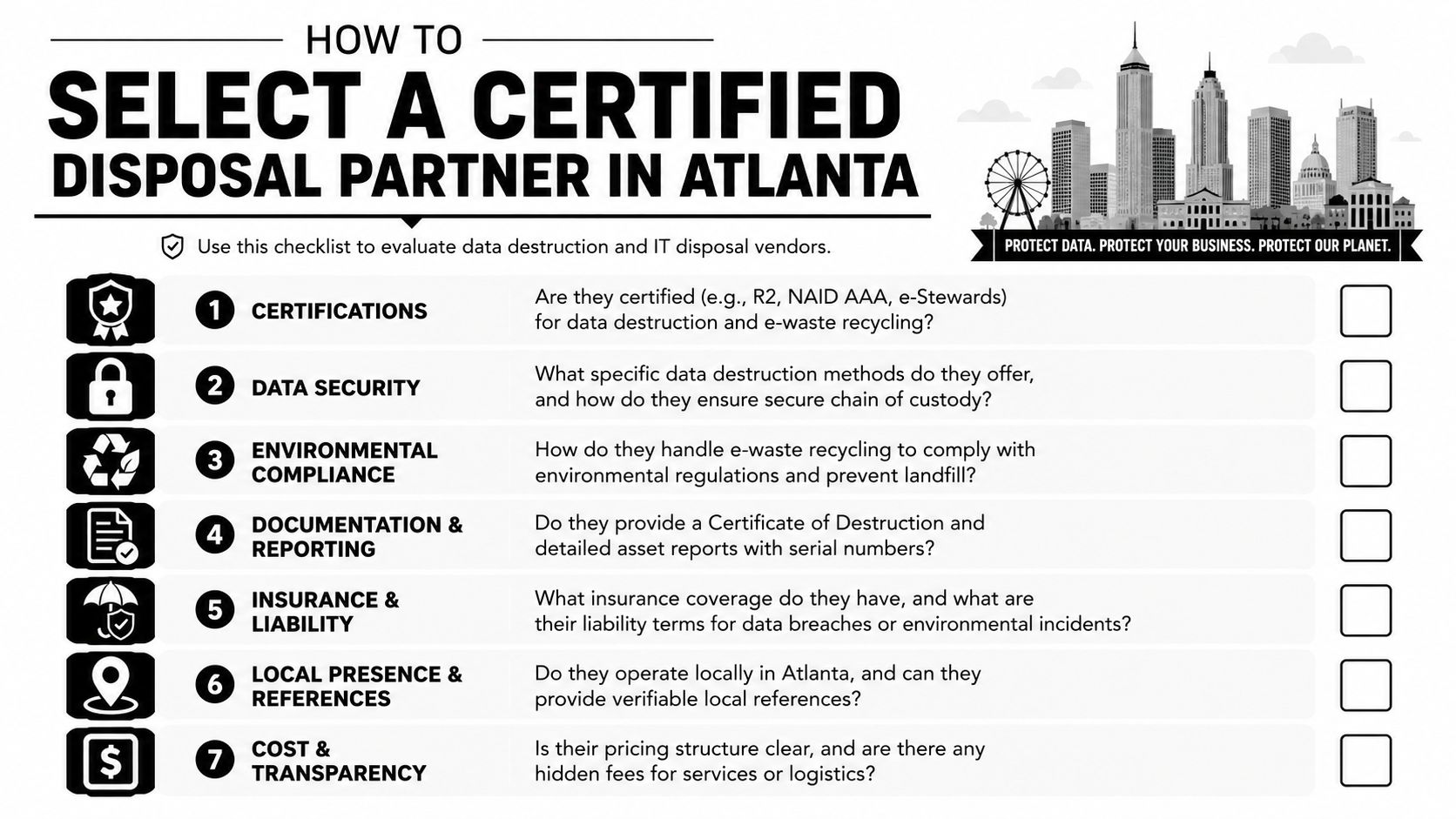
Key questions to ask your Atlanta IT disposal provider
| Question category | What to ask | Why it matters |
|---|---|---|
| Certifications | What certifications do you hold for electronics recycling and data destruction? | Certifications show whether the company follows recognized operating controls |
| Chain of custody | When does custody begin, and what paperwork is signed before removal? | The handoff point is where many projects become hard to defend later |
| Destruction methods | Which devices do you wipe, which do you shred, and when do you use a hybrid approach? | You want a risk-based answer, not a canned script |
| Reporting | Will I receive serialized reporting and a final Certificate of Destruction? | Audit support depends on detailed records |
| Downstream handling | What happens to monitors, cables, printers, batteries, and scrap metals? | Full cleanouts create mixed streams, not just hard drives |
| Project scope | Can you handle office furniture and non-IT debris in the same job without mixing secure electronics? | Multi-vendor projects create delays and custody gaps |
| Insurance and liability | What coverage do you carry, and how are claims handled? | If something goes wrong, you need clarity before the job starts |
| Local operations | Who is actually performing pickup in Atlanta? | Local execution matters during time-sensitive office closures |
What good answers sound like
Strong vendors answer directly. They don't hide behind buzzwords like “certified process” without explaining what gets inventoried, what gets signed, what gets sanitized, and what report you receive at the end.
Weak vendors usually collapse into generalities. They say they handle “all electronics,” but they can't distinguish between a monitor and a laptop with an SSD. They promise “secure disposal,” but they can't tell you what appears on the certificate.
Ask one simple follow-up: “Show me what the final documentation package looks like.” Serious providers are ready for that question.
For buyers who want one point of contact for scheduling and scope review, the practical next step is to contact Fulton Junk Removal and ask how mixed office cleanouts, electronics pickup, and recycling documentation are coordinated.
The Complete Solution for Atlanta Office and Warehouse Cleanouts
The easiest way to mishandle retired IT equipment is to treat it like a side task inside a larger cleanout. The cleanest way is to run the whole job through one coordinated plan. Inventory first. Separate data-bearing assets from everything else. Choose the right sanitization method for each device category. Require transfer paperwork and final destruction records. Keep recyclable materials out of the landfill stream.
That's the operational answer to Data Destruction and IT Equipment Disposal Atlanta work. Not more complexity. Better separation of roles, clearer records, and a removal plan that matches what's leaving the building.
Why the combined model works better
Most businesses don't want to juggle one vendor for desks, another for warehouse debris, and a third for laptops, servers, and e-waste. That creates more scheduling friction and more handoff risk.
A combined cleanout and recycling model solves a real problem for offices, warehouses, and property managers:
- One project scope for furniture, scrap, and obsolete electronics
- One removal schedule instead of staggered pickups
- One documented process for secure IT handling and responsible recycling
- One cleaner reporting trail for compliance and sustainability records
That's where the Fulton Junk Removal and Beyond Surplus model stands out. Fulton handles the physical cleanout side that offices and facilities teams need. Beyond Surplus supports the electronics recycling and IT asset disposition side so data-bearing devices, e-waste, metals, and reusable materials move through a more responsible downstream process instead of a landfill-first route.
What this looks like on a real site
In a typical office closure, the front half of the suite may contain desks, chairs, cubicles, file cabinets, and breakroom equipment. The back room holds monitors, towers, docking stations, old phones, and a shelf full of retired drives. A warehouse project may add pallets, shelving, packaging debris, and network gear.
Handled separately, that becomes a coordination problem. Handled together, it becomes a controlled cleanout with secure segregation where it matters.
If you're responsible for getting a space empty without creating new risk, that's the outcome you want. Fast removal, documented data destruction, responsible recycling, and fewer vendors to manage.
If you need a practical plan for an office, warehouse, or property cleanout, Fulton Junk Removal can coordinate the removal side while working with Beyond Surplus to ensure electronics, metals, and recyclable materials are processed responsibly. That gives Atlanta businesses a single path for junk removal, IT equipment disposal, data destruction support, and sustainability-minded recycling. Reach out for a free estimate and build the cleanout around security, compliance, and reuse instead of landfill shortcuts.
