
Free Electronics Recycling for Atlanta Businesses
Your office is replacing laptops, clearing a storage room, or shutting down a floor before a move. The old equipment is piling up next to broken chairs, dead printers, and random cables no one wants to claim. What usually slows the job down isn't finding someone to haul it away. It's figuring out which items qualify for free electronics recycling, what has to be documented, and how to keep the process from creating a data-security problem.
In Atlanta, free electronics recycling for businesses can work well when the load fits the economics of IT asset recovery. The catch is that "free" doesn't mean anything and everything goes on a truck at no cost. It usually means the recycler can recover enough value from reusable or recyclable business equipment to cover pickup and processing.
For office managers, facilities teams, and IT staff, the practical answer is simple. Qualify the load correctly, prepare assets before pickup, and choose a recycler that can document what happened after the equipment leaves your site. If you're also dealing with furniture, palletized scrap, or a broader cleanout, combining junk removal with electronics recycling can save a lot of coordination time.
Confirming Your Eligibility for Free Recycling Services
"Free" only works when the pickup is operationally efficient and the load contains enough standard business electronics to justify the trip. That's why some Atlanta providers offer no-cost commercial pickup only for qualifying business loads, not for one-off residential items or scattered equipment.
One widely cited Atlanta benchmark is that free commercial pickup is typically available when a business has about 10 to 20 major items, such as PCs, laptops, or servers, or a full pallet, and the site must be a commercial address with items consolidated for efficient loading, according to an Atlanta commercial electronics pickup guide.

If your business is in the metro area, start by confirming service coverage for Atlanta commercial pickup availability. Then qualify the load before you schedule anything.
What usually qualifies
The easiest loads to place into a no-cost business recycling program are the standard assets recyclers can process efficiently:
- Desktops and laptops: These are common business assets, easy to count, and straightforward to palletize.
- Servers and network hardware: These often fit commercial pickup models when they come from an office, server room, or decommissioned rack.
- Related IT equipment: Keyboards, docks, and similar accessories may be accepted when they accompany a larger core load.
What usually doesn't fit the free model is a mixed pile of low-value material with no clear staging. A recycler doesn't want to spend crew time hunting through cubicles for two old towers and a box of cords.
Practical rule: If your team can't count the load quickly and point to one pickup area, the recycler probably can't price or route it efficiently either.
A quick self-qualification check
Use this simple screen before calling:
| Question | Why it matters |
|---|---|
| Is the pickup at a commercial address? | Most no-cost business programs are built around commercial routing. |
| Do you have about 10 to 20 major items or a full pallet? | Volume is what makes a free trip feasible. |
| Are the items consolidated in one accessible area? | Labor and loading time can make or break pickup economics. |
| Is the load mostly business IT equipment? | Recyclers look for recoverable, standard assets. |
A lot of businesses miss one basic point. Free electronics recycling for Atlanta businesses isn't really a trash service. It's an asset recovery and compliant disposition service that works when the load has enough value, enough volume, and enough routing efficiency to support pickup.
What works and what wastes time
What works is sending a recycler a clean list: 14 laptops, 6 desktops, 3 servers, 2 switches, all on the ground floor. What doesn't work is saying you have "some electronics" and then expecting a no-cost quote on an undefined mix of monitors, broken peripherals, loose batteries, and office junk.
If your load doesn't meet the threshold, that doesn't mean you're stuck. It just means you may need to combine it with other recyclable material, wait until a refresh cycle creates enough volume, or use a paid service for smaller or harder-to-process loads.
Preparing Your IT Assets for Secure and Efficient Pickup
Once the load qualifies, internal prep determines whether pickup is smooth or chaotic. The most common problems I see aren't caused by the recycler. They're caused by poor staging, missing asset records, and devices leaving the building before anyone has confirmed what was on them.
Start with your own internal controls. Even if the recycler provides data destruction, your business should still decide what gets wiped, what gets shredded, and who signs off before release.
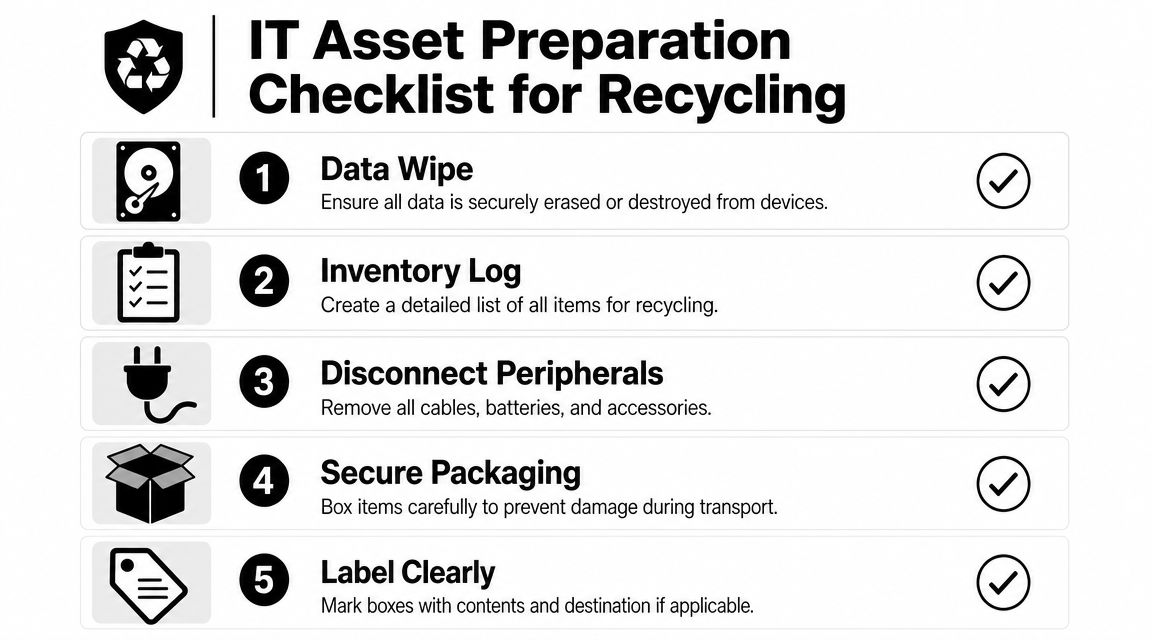
For teams building a repeatable process, it's worth reviewing broader operations and cleanout workflow guidance on the Fulton blog so this doesn't turn into a one-off scramble every time equipment is retired.
Build a usable inventory before anything moves
An inventory doesn't need to be complicated. It needs to be accurate enough that finance, IT, facilities, and compliance can all work from the same list.
At minimum, log:
- Asset type: laptop, desktop, server, switch, printer
- Manufacturer or model: enough to identify what was retired
- Serial number or asset tag: if your internal process tracks it
- Condition: working, non-working, damaged, incomplete
- Data-bearing status: yes or no
Pickup day is not the right time to sort out ownership questions. If a department manager asks where a device went, you need a record that it was approved for disposition.
Handle data before the truck arrives
The safest habit is to decide internally whether each device will be wiped, have storage removed, or be sent for physical destruction. Don't assume every recycler handles every data-bearing item the same way. Don't assume a simple drop-off would satisfy your company's requirements either.
The practical sequence is usually:
- Identify all data-bearing devices. Laptops, desktops, servers, and loose drives come first.
- Apply your internal sanitization policy. Some organizations wipe in-house. Others remove drives before release.
- Separate storage media from general peripherals. That avoids accidental mixing with low-risk material.
- Document exceptions. If a damaged machine can't be wiped internally, note that before pickup.
The cleanest chain of custody starts before the equipment leaves your office, not after it reaches a warehouse.
Stage the load for speed and control
A recycler can only move as efficiently as your building allows. The best pickups happen when everything is already in one place, access is confirmed, and someone onsite can answer questions fast.
Use a loading dock, freight-access room, or ground-floor staging area when possible. Keep similar items together. Put loose cables, docks, and small accessories in boxes instead of leaving them in rolling piles.
A few details make a big difference:
- Disconnect peripherals early: Remove devices from desks before pickup day so employees aren't interrupted.
- Label boxes clearly: Mark data-bearing equipment, loose drives, and accessories separately.
- Check building access: Elevators, dock hours, parking restrictions, and COI requirements can delay a crew if no one handles them in advance.
- Assign one point of contact: One person from facilities, IT, or office operations should approve the final load.
What efficient prep looks like
Good prep is boring. That's the point. The recycler arrives, verifies the staged items, loads them, and leaves without disrupting your workday.
Bad prep looks familiar to most offices: untagged laptops under desks, servers still mounted, cords everywhere, a locked freight elevator, and no one onsite who knows whether the hard drives were approved for release. That turns a simple recycling pickup into an avoidable risk event.
Choosing a Certified Recycler to Protect Your Data and Reputation
The biggest mistake businesses make is choosing a recycler the same way they'd choose a bulk trash hauler. Electronics recycling isn't just a removal task. It's a chain-of-custody decision.
The U.S. EPA recommends using certified electronics recyclers under standards such as R2 or e-Stewards, and that recommendation matters because only 22.3% of the 62 million metric tons of e-waste generated in 2022 was formally collected and recycled, according to the EPA's electronics management guidance. If your business wants disposal that stands up to internal review, certification and documentation matter more than a vague promise of "eco-friendly" service.
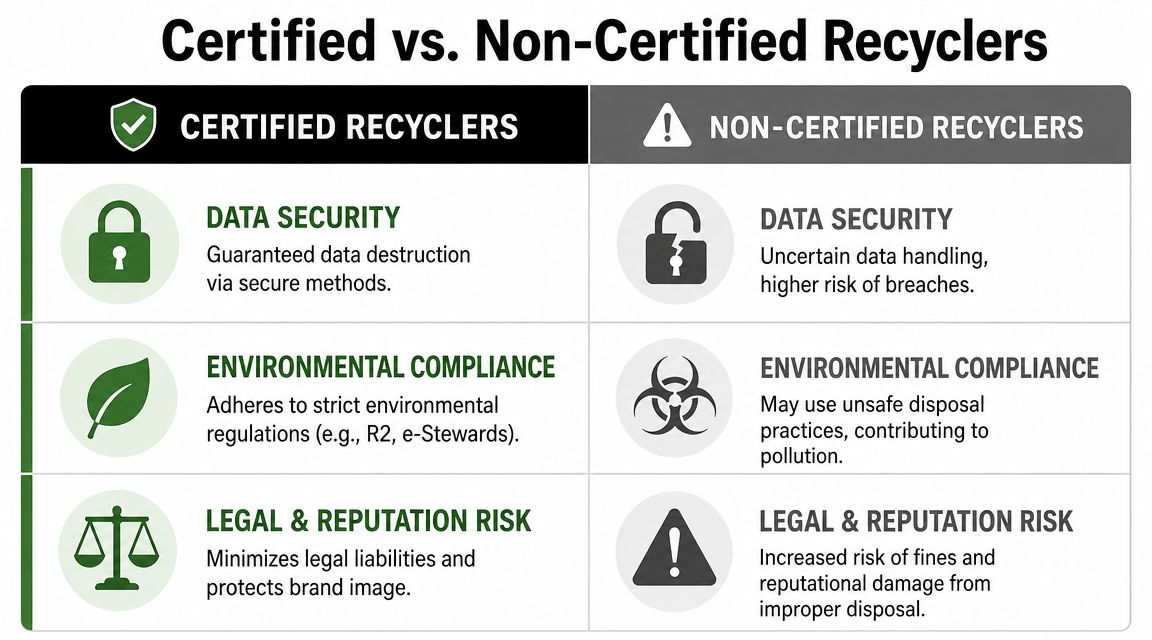
A lot of facility teams already think this way when they evaluate janitorial, HVAC, and waste vendors. The same discipline applies here, and this overview of optimizing facility vendor strategy is useful if you're tightening vendor standards across multiple service categories.
What certification means in practice
R2 and e-Stewards aren't marketing labels. They are frameworks used to evaluate environmental practices, worker safety, and security controls. For a business customer, that translates into a more defensible process for handling data-bearing equipment and downstream recycling.
Here's the practical difference:
| If a recycler is certified | If a recycler can't verify certification |
|---|---|
| You have a clearer basis for trusting the process. | You're relying on verbal assurances. |
| Security and environmental procedures are part of the operating model. | Procedures may exist, but you have to take them on faith. |
| Documentation is usually part of the service conversation. | Documentation may be limited or inconsistent. |
Certification doesn't remove your responsibility. It gives you a stronger partner and a clearer paper trail.
Questions worth asking before you schedule
Ask direct questions and listen for direct answers.
- Are you certified under R2 or e-Stewards? If the answer is vague, keep digging.
- How do you handle data-bearing devices? You want a defined process, not "we take care of it."
- What documentation do you issue after processing? This aspect often exposes weak vendors.
- Do you separate recycling from simple junk hauling? If they don't understand the difference, that's a warning sign.
- Who controls the chain of custody after pickup? Your risk doesn't end at the loading dock.
Vendor screen: If a provider talks mostly about convenience and barely mentions documentation, security, or downstream handling, that's not enough for business IT disposal.
Why the single-contact model can help
For many offices, the challenge isn't only old electronics. It's also obsolete furniture, warehouse debris, and general cleanout material tied to a move, closure, or renovation. Using separate vendors for junk hauling and electronics disposition can create confusion over who took what and where it went.
That's where an integrated model can be useful. Fulton Junk Removal's company background explains its connection to Beyond Surplus, which allows a business to coordinate general junk removal and electronics recycling through one contact instead of splitting the job across unrelated providers. That's especially practical for office managers who need one schedule, one site walk-through, and a cleaner handoff between facilities and IT.
The point isn't convenience alone. It's reducing the number of moving parts in a process that already carries security and compliance implications.
Scheduling Your Pickup and Managing On-Site Logistics
A scheduled pickup goes well when the provider gets clean information before the truck is dispatched. It goes badly when the crew arrives to discover a different load, no building access, and no one authorized to release equipment.
When you're ready to book service, use a single request that covers both the electronics and anything else leaving the site. If you need to coordinate dates or submit building details, start with pickup scheduling through the Fulton contact page.
What to send before the appointment
Keep the request structured. The person routing the job needs enough detail to decide crew size, truck space, and whether the load looks like a no-cost electronics pickup, a paid cleanout, or a combined service.
Include:
- A plain item count: laptops, desktops, servers, printers, pallets, furniture pieces
- Site details: floor number, freight elevator, dock access, stairs, parking rules
- Pickup window: morning, afternoon, building-restricted hours
- Photos if the load is mixed: useful when electronics are bundled with office junk
- Your onsite contact: name, phone, and role
That last item matters more than people think. Crews lose time when reception doesn't know they're coming and the only person with access is in an offsite meeting.
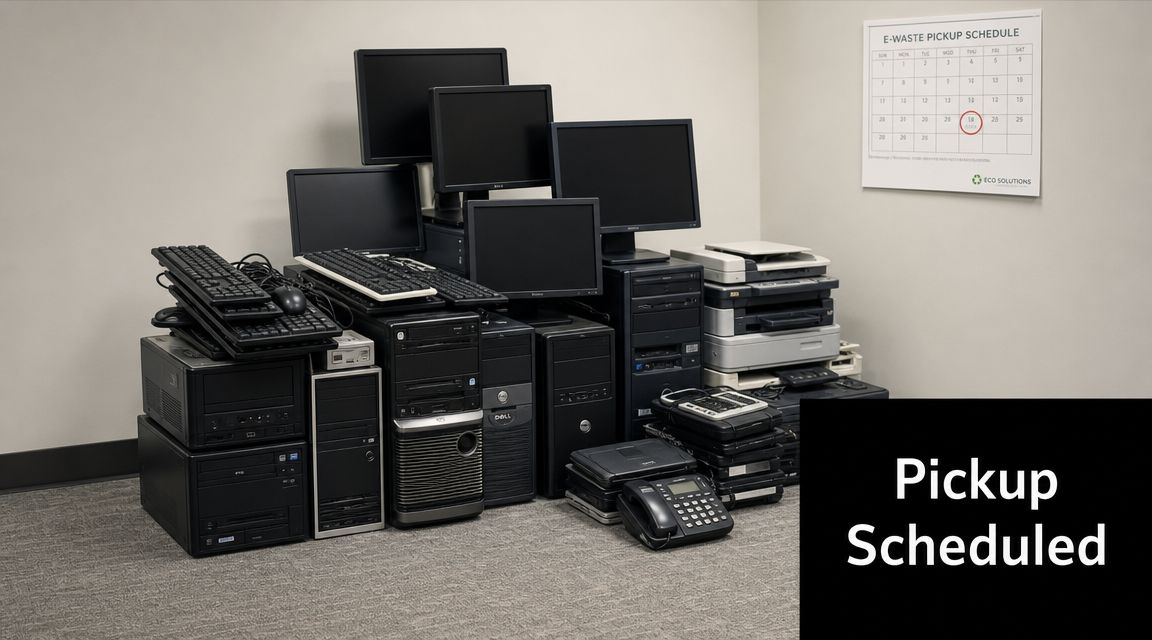
How mixed cleanouts should be handled
Office managers can simplify the entire project. If you're clearing electronics and non-electronic junk at the same time, treat it like one coordinated site operation, not two separate errands.
A workable layout looks like this:
- Create a recycling zone for approved IT assets.
- Create a junk-removal zone for furniture, fixtures, and non-IT debris.
- Mark hold items so nothing gets removed by mistake.
- Walk the crew through the layout before loading starts.
One walkthrough at the beginning prevents a lot of avoidable confusion at the truck.
This is also where the Fulton and Beyond Surplus setup fits busy buildings. One team can handle the broader cleanout while electronics and recyclable materials move into the appropriate downstream process. For property managers, warehouse supervisors, and office administrators, that means fewer vendor calls and fewer chances for equipment to get mixed into the wrong load.
Pickup-day details that save time
Good site logistics are simple and disciplined:
- Clear the route: Hallways, dock doors, and elevator access should be ready before the crew arrives.
- Keep items consolidated: Don't make loaders collect equipment from multiple departments unless that was planned.
- Verify the release scope: The onsite contact should know exactly what is approved to leave.
- Hold onto your internal list: Check staged items against your own records during the handoff.
If the project involves a move-out, tenant improvement work, or a warehouse reset, bundling services often makes more sense than trying to coordinate separate junk haulers, recyclers, and donation pickups. The fewer handoffs you create, the easier it is to manage the site and explain the result afterward.
Finalizing Compliance with Documentation and Alternative Options
The job isn't finished when the truck leaves. Your real closeout happens when documentation lands in the file and your internal record matches the final disposition.
A key differentiator in business recycling is the issuance of a certificate of recycling and data destruction after processing, which supports a clear chain of custody and audit-ready records, as described in this business recycling documentation overview. If you don't receive documentation, you may have removal proof, but you don't have the same level of compliance proof.
What to keep in your records
Your file should be useful to more than one department. Facilities may need it for cleanout closeout. IT may need it for asset tracking. Compliance or procurement may need it later during a review.
A clean file usually includes:
- Your internal inventory list: What you approved for release
- Pickup confirmation: Date, location, and service details
- Certificate of recycling and data destruction: The formal disposition record
- Internal approvals: If your company requires signoff from IT, security, or finance
That paperwork turns a pickup into a documented IT asset disposition event. That's a different standard than "someone hauled away some old computers."
Where free service may stop
It is important that expectations remain realistic. Free programs usually work best for standard, business-grade IT assets with enough volume and recovery value. They may not apply the same way to mixed loads with low-value items or harder-to-process material.
Watch for these common friction points:
- Broken or low-value displays: These can be less attractive in a free pickup model.
- Battery-related items: Handling may require extra care or different processing.
- Peripheral-heavy loads: Pallets full of small, low-value accessories don't always support no-cost service.
- Refresh leftovers: During a large office replacement cycle, some items qualify cleanly and others don't.
One current planning issue is the Windows 10 replacement wave. Industry guidance has pointed to Windows 10 end-of-support in October 2025 as a driver of business PC refresh activity, which means some companies will discover that free pickup applies to core systems but not necessarily every extra monitor, damaged accessory, or battery-containing add-on.
Alternatives when the load doesn't qualify
If your business falls short of a free-pickup threshold, you still have workable options.
Consider:
- Paid recycling service: Often the most direct path for smaller or mixed business loads.
- Manufacturer or trade-in programs: Useful when equipment still has remarketing value.
- Donation through appropriate organizations: Sometimes viable for reusable equipment, subject to your data policy.
- Waiting to consolidate: If another office refresh is coming, combining loads can improve logistics.
Documentation is what lets sustainability reporting, internal audit, and asset governance line up with each other instead of contradicting each other.
The practical takeaway is that "free" is one part of the decision. The stronger long-term value comes from knowing what left the site, how it was processed, and what proof you can produce later.
A Smarter Approach to Business Cleanouts in Atlanta
The easiest way to create risk in a cleanout is to separate the job into too many disconnected pieces. One vendor takes furniture. Another picks up electronics. Someone else handles scrap. Then a week later, nobody is fully sure which company removed which assets or where the paperwork lives.
A smarter approach is to treat electronics recycling as part of a broader asset-disposition and site-clearance plan. That matters for office managers because your real job isn't just clearing space. It's protecting data, keeping records straight, and closing the loop in a way that your facilities team, IT group, and leadership can all defend.
For companies tightening their internal controls, it also helps to review broader best IT asset management practices so disposal isn't handled as an isolated event. The strongest programs connect purchasing, deployment, tracking, refresh cycles, and end-of-life disposition.
If you're planning a move-out, office refresh, warehouse cleanup, or property turnover, a bundled service model is often easier to run than juggling separate providers. Fulton Junk Removal services cover commercial cleanouts, while the Beyond Surplus connection supports responsible recycling and reuse for electronics and other recoverable materials. For busy Atlanta teams, that single point of coordination can reduce scheduling friction and make the final documentation easier to manage.
Choose the process that gives you control, not just pickup. That's what keeps a cleanout from turning into a compliance gap.
If you need one point of contact for office junk removal, electronics pickup, and responsible downstream recycling in Atlanta, Fulton Junk Removal can help coordinate the cleanout so your team spends less time managing vendors and more time closing the job properly.
