
Telecom Solutions Near Me: Find Top Atlanta Providers
A lot of Atlanta managers search telecom solutions near me after a bad day, not before one. The trigger is usually operational, not strategic. A client call freezes in the middle of a proposal review. Handheld scanners in the warehouse start lagging during receiving. A tenant complains that the building WiFi drops in the same conference room every week. The phone system still works, technically, but only because three separate workarounds are holding it together.
Those problems look small when they happen one at a time. In practice, they create the same kind of drag that facilities teams already know how to spot in other asset categories. You see wasted staff time, avoidable service calls, duplicate vendors, aging hardware nobody wants to touch, and a growing compliance headache when old devices pile up in closets and MDF rooms.
The mistake is treating telecom as a monthly bill instead of a managed business asset. Good infrastructure should be selected, documented, maintained, and retired with the same discipline you apply to security systems, elevators, access control, or e-waste handling. That mindset changes how you buy.
Your Atlanta Business Deserves Better Than Bad Connections
An office manager in Atlanta usually doesn’t call a telecom provider because the network diagram looked messy. They call because the business day is getting chewed up by friction. Sales can’t trust video meetings. Operations can’t rely on warehouse coverage. Front-desk staff keep asking whether calls were dropped or forwarded incorrectly.
That’s operational waste. It’s no different from storing dead equipment in a back room because nobody owns the decommissioning plan.
What bad telecom really costs
The obvious issue is poor service. The less obvious issue is what poor service forces your team to do around it. Staff start using personal phones. Departments buy their own hotspots. IT spends time babysitting circuits instead of planning improvements. Facilities gets dragged into access requests, patchwork cabling, and emergency vendor visits.
Practical rule: If your telecom environment depends on tribal knowledge, sticky notes, or one employee who “knows how it works,” the system is already overdue for replacement planning.
Atlanta businesses also have local realities to manage. Multi-tenant office buildings, older industrial properties, and distributed sites around the metro can make provider choice more complicated than a simple speed comparison. What’s available in one corridor may not be practical at another address, which is why local context matters when you’re evaluating Atlanta service coverage.
Treat telecom like responsible asset management
A strong provider doesn’t just sell bandwidth or phones. They help remove legacy clutter from the environment. That can mean retiring an on-prem PBX that nobody can support, replacing consumer-grade broadband in a warehouse, or consolidating overlapping voice and network contracts into something your team can govern.
The sustainability lens matters here too. Old telecom gear often sits longer than it should because replacement projects focus only on installation, not lifecycle management. Smart buyers ask what gets removed, what can be repurposed, what must be securely recycled, and how documentation will be handled when the transition is complete.
Here’s what usually works:
- Map services by business function: Tie internet, voice, WiFi, and failover to actual departments and workflows.
- Remove duplicates early: Find the old PRI, the forgotten backup line, the extra firewall, or the unsupported switch before renewal season.
- Build retirement into procurement: New service should come with a plan for old hardware, old contracts, and old responsibilities.
What doesn’t work is buying the cheapest package that appears in search results and hoping the rest gets sorted out later.
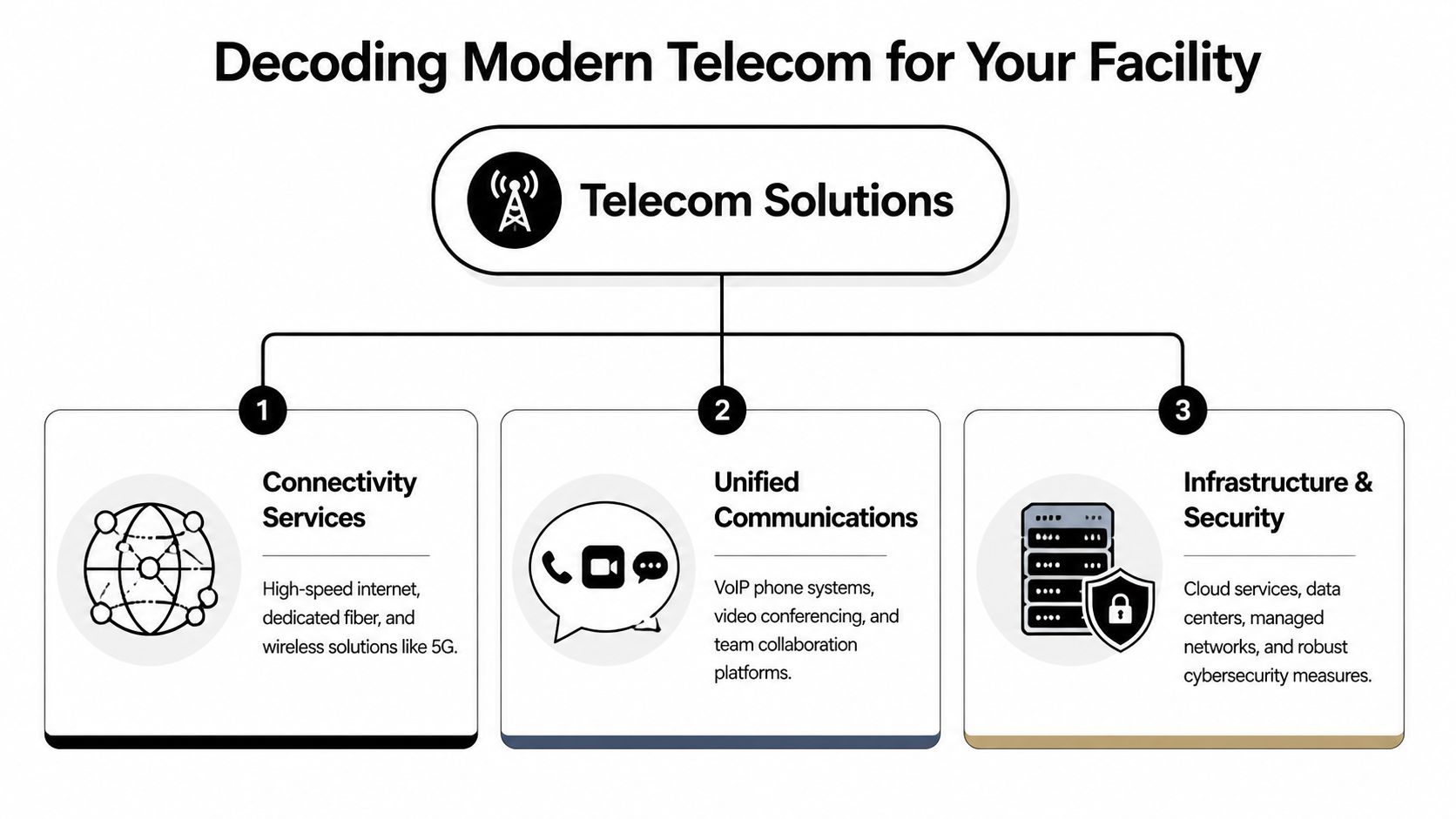
Decoding Modern Telecom for Your Facility
Telecom isn’t one thing. It’s a stack of services that support how people talk, how systems connect, and how traffic moves through the building. Facilities leaders usually understand this quickly when you compare it to utilities. Your site needs incoming service, internal distribution, and controls that keep the whole environment stable.
This visual helps frame it.
Connectivity is the utility feed
Connectivity is the outside pipe. For most businesses, that means fiber, coax-based business internet, fixed wireless, or cellular options such as 5G for backup or temporary deployment. If this layer is weak, everything above it suffers.
Dedicated internet access and business broadband both have a place. The right fit depends on the tolerance for interruption, application sensitivity, and whether your site depends on guaranteed performance during business hours. A law office handling constant video conferences and cloud document workflows will assess this differently than a small retail storefront running basic point-of-sale and guest WiFi.
Voice and collaboration are the fixtures people actually use
Many buyers often oversimplify. They ask for “phones” when what they really need is call routing, voicemail-to-email, auto attendants, softphones, SMS support, mobile continuity, and meeting tools that work across desktops and smartphones.
If your team needs a stronger baseline before evaluating providers, this guide to telephony systems gives a useful plain-language overview of how modern voice services differ from legacy phone setups.
Telecom should be designed from the user backward. Start with how reception answers calls, how managers move between sites, and how remote staff handle escalations. Then choose the platform.
Networking and security are the building systems behind the walls
A fast circuit won’t fix poor internal design. This layer includes switches, firewalls, managed WiFi, VLAN planning, SD-WAN, network monitoring, and policies that separate guest, corporate, and operational traffic. In facilities terms, this is the panel, conduit, controls, and protection.
A practical way to consider this:
| Layer | What it does | Common failure mode |
|---|---|---|
| Connectivity | Brings service to the site | Wrong circuit type for business needs |
| Communications | Handles calls, meetings, messaging | Legacy phone design with poor mobility |
| Infrastructure | Moves and protects traffic inside | Weak WiFi design or unmanaged network growth |
For many Atlanta sites, the right answer isn’t a single product. It’s a coordinated package of access, communications, and internal infrastructure. That’s why vendor conversations should go beyond “What speed can you install?” and into support scope, equipment ownership, security roles, and service lifecycle planning. Teams that already think this way about cleanouts, recycling, and asset disposition tend to do better with telecom buying too, because they already understand systems, dependencies, and end-of-life responsibility. The same operational discipline shows up in broader commercial service planning.
Common Telecom Services for Atlanta Businesses
Most buyers don’t need more terminology. They need a way to match common services to real operating conditions. The right service for a Midtown office with heavy cloud usage won’t always be right for a warehouse in an older industrial corridor or a professional firm with a small headcount and high call sensitivity.
The image below reflects the nature of these decisions. Telecom procurement is rarely just an IT task. It usually involves operations, facilities, finance, and someone who has to live with the support process after the contract is signed.

Dedicated internet access versus business broadband
These two options get compared constantly, and for good reason.
Business broadband is often easier to procure and can be perfectly acceptable for lighter-duty environments. It suits offices that use cloud tools, email, browsing, and standard conferencing without strict performance expectations at all times. It can also make sense for temporary spaces or lower-priority branch locations.
Dedicated internet access is usually the better fit when your operation depends on stability, cleaner support escalation, and predictable performance. Think contact centers, medical offices with cloud platforms, manufacturing environments with connected systems, or headquarters where multiple business functions ride the same pipe.
Who each one fits best:
- Choose broadband when your site can tolerate occasional variability and cost control matters more than premium assurance.
- Choose DIA when downtime creates customer impact, workflow disruption, or contractual risk.
- Choose a hybrid model when a primary circuit and a secondary path give you resilience without overbuilding every location.
Hosted VoIP versus on-prem PBX
On-prem PBX systems still exist in plenty of Atlanta buildings, especially in organizations that kept extending the life of a once-reliable deployment. The problem is rarely that the system can’t place calls. The problem is supportability, mobility, and integration.
Hosted VoIP is usually the more practical option for businesses that want easier moves, adds, changes, and remote continuity. Reception, mobile users, satellite offices, and hybrid teams all benefit when the call platform isn’t tied to one wiring closet.
On-prem PBX still has edge cases. Some organizations want tighter local control, have legacy workflows that are firmly embedded, or face unusual regulatory constraints. But for most small and midsize businesses, hosted platforms remove a lot of avoidable complexity.
If you’re comparing options for streamlined business communication, this overview of streamlined business communication is a useful reference point for the hosted model and what to look for operationally.
SD-WAN and managed networking for multi-site operations
A single office can often survive with a straightforward setup. Multi-site organizations usually can’t. If you’re supporting a main office, a warehouse, and a few smaller branches, network policy and path selection start to matter more than raw access speed.
SD-WAN is worth considering when:
- You have multiple locations: Central policy is easier than treating every site as a one-off project.
- Applications matter differently: Voice, ERP traffic, guest internet, and camera systems shouldn’t all compete the same way.
- You need cleaner failover behavior: Backup connectivity is far more useful when traffic can shift with intention instead of chaos.
Service fit by business type
Here, I’d keep the discussion simple.
| Business type | Often works well | Usually disappoints |
|---|---|---|
| Law firm | DIA plus hosted voice and secure WiFi segmentation | Consumer-style broadband with ad hoc phone apps |
| Retail store | Business broadband, managed WiFi, cloud calling | Overcomplicated enterprise stack with no local support |
| Warehouse | Strong internal WiFi design, cellular backup, voice mobility | Buying bandwidth first and ignoring coverage inside |
| Property management office | Hosted voice, mobile call routing, resilient internet | Legacy desk-phone dependence with no remote continuity |
For suburban offices and mixed-use commercial corridors, local serviceability matters just as much as product fit. A provider that looks ideal on paper may have weak install options or poor field coverage near Sandy Springs commercial properties.
The best telecom package is the one your staff can actually operate, support, and expand without turning every office move into a mini-crisis.
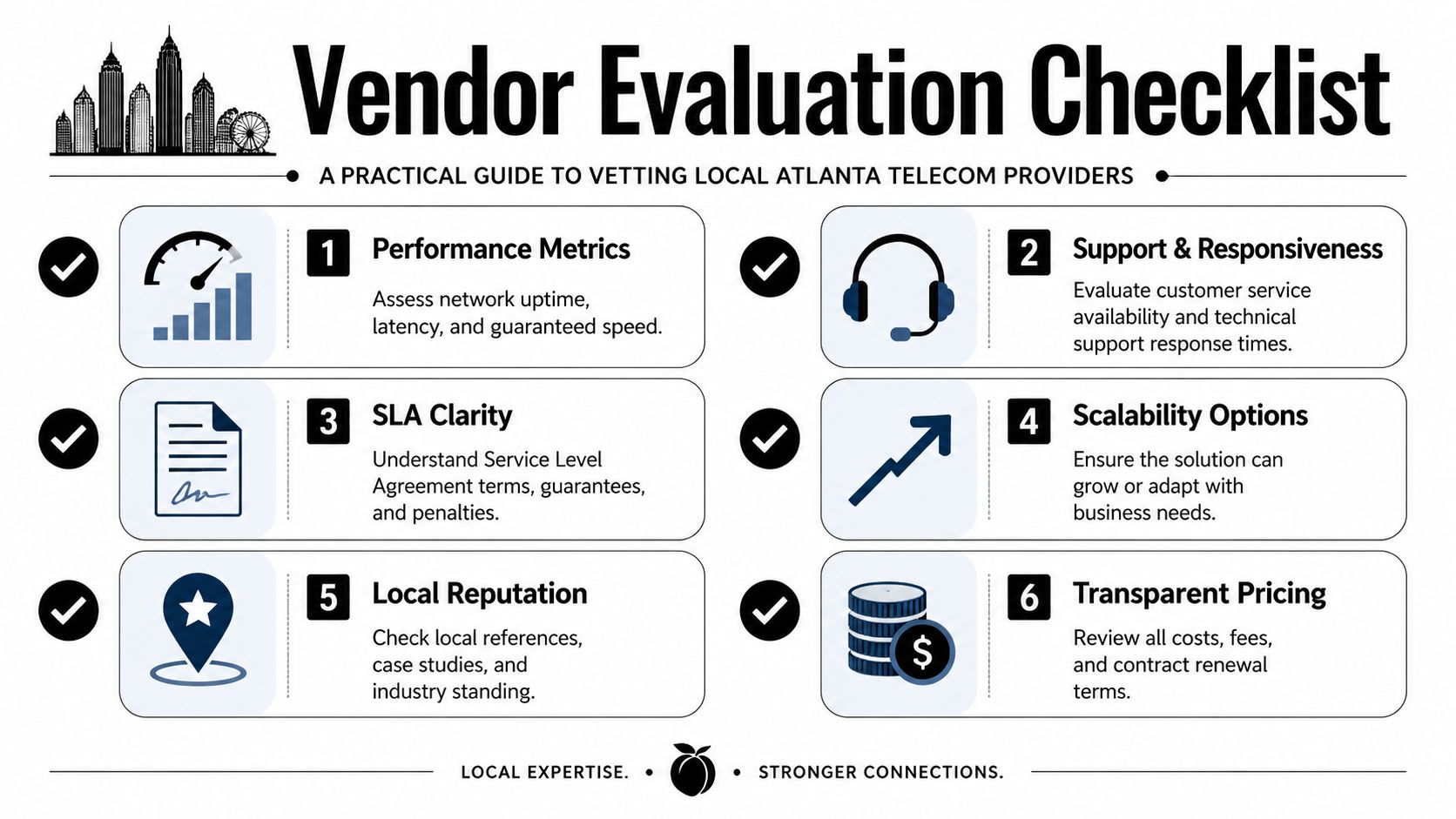
Your Vendor Evaluation Checklist for Performance and Reliability
A telecom proposal can look polished and still leave major operational questions unanswered. Vendor evaluation gets better when you treat it like due diligence, not shopping. The same logic applies when selecting any partner that touches compliance, disposal, access, or business continuity. You need to know how they work when things go wrong, not just how they present themselves in a sales meeting.
This checklist gives you a practical screen.
Start with the network they actually control
Some providers own substantial infrastructure. Others resell access and rely heavily on third parties. Neither model is automatically bad, but the support experience is different. If a carrier doesn’t control much of the path serving your address, escalation can get slow and accountability can get fuzzy.
Ask direct questions about local footprint, installation dependencies, and whether the provider can show path diversity to your site. A polished answer like “we have service in your area” isn’t enough. You want to know who owns what, who dispatches field technicians, and who’s responsible when a handoff fails.
Evaluate support like a facilities contract
Support quality shapes the day-to-day experience more than most buyers expect. The core issue isn't whether a provider has a support number. It's whether your team can reach someone who understands the environment, can identify priority, and can coordinate with building management when access is needed.
Use this short checklist in meetings:
- Local coverage: Ask whether support technicians and project staff are familiar with Atlanta buildings, access procedures, and common site constraints.
- Escalation discipline: Request a clear explanation of what happens during a major outage, including after-hours handling.
- Documentation habits: Strong vendors keep records of circuits, installed equipment, demarc details, and change history.
- Project ownership: Find out whether one person coordinates the order or whether your team gets passed between sales, provisioning, implementation, and support with no continuity.
A provider’s support model tells you whether they see your environment as an account number or as a live operation that needs stewardship.
Look for route diversity and recovery thinking
Weak proposals expose their flaws. If the primary path goes down, what happens? Is there a true secondary route, a wireless backup, or just a second service that enters the building through the same vulnerable path? Buyers often think they purchased resilience when they really purchased duplication.
Review these areas carefully:
| Evaluation point | Why it matters |
|---|---|
| Physical path diversity | Prevents one external cut from taking down all service |
| Power dependency | Clarifies what fails during building power events |
| Equipment ownership | Determines who replaces failed edge devices |
| Change control | Reduces surprise outages caused by undocumented modifications |
Reputation matters when it’s local and relevant
References are still useful, but generic testimonials don’t tell you much. Ask for customers with a similar footprint, similar building type, or similar use case. A provider that performs well in a suburban office park may struggle in older mixed-use buildings, and the reverse is also true.
This is also where broader operational mindset shows up. Providers that respect asset lifecycle, clean installations, cable discipline, and decommissioning procedures usually produce better long-term outcomes. Those habits matter in Roswell offices, shared suites, and owner-managed buildings where infrastructure clutter can linger for years. It’s worth viewing local service context through the same practical lens you’d use for Roswell commercial support needs.
Key Questions to Ask Before Signing a Telecom Contract
Sales conversations often stay high level until contract language forces specificity. That’s when buyers learn whether “business-grade” means real commitments or polished ambiguity. The contract stage is where you need hard questions, especially around restoration, security, and implementation responsibility.
This review mindset helps. Don’t ask only what the service includes. Ask what happens when the service fails, changes, or needs to scale.

Questions that expose the real operating model
These questions usually separate mature providers from providers that mainly sell around the edges:
- How do you define a priority outage? Ask for their internal severity levels and what triggers executive escalation.
- What is your restoration process? Have them explain who owns triage, field dispatch, updates, and final closeout.
- Can you provide a path-diversity explanation for this address? You don’t need marketing language. You need a plain answer.
- Which equipment is included, and who supports it? Many disputes start when the line is up but the managed device is not.
- What security responsibilities belong to you versus us? This matters for firewalls, voice platforms, logging, and access control.
- What happens at renewal? Auto-renewal terms, notice windows, and extension language deserve close reading.
Questions for voice and number porting
Voice contracts create a different set of risks because phone numbers are public-facing business assets. If those numbers don’t move cleanly, the disruption lands immediately on customers, tenants, and staff.
Ask these before signing:
- Who manages the porting process and carrier coordination
- What is the cutover plan for reception, hunt groups, and after-hours routing
- How will failed ports or partial ports be handled on go-live day
- Can temporary forwarding be configured during transition
Request answers in writing. Verbal reassurance disappears quickly once implementation starts.
Questions that protect you later
A good contract should clarify more than service delivery. It should define responsibilities at the messy edges.
| Contract area | Ask this question |
|---|---|
| Building access | Who coordinates landlord access, riser access, and scheduling windows? |
| Inside wiring | Where does your responsibility start, and what cabling work is excluded? |
| Managed equipment | What happens if the device fails after install but before contract end? |
| Service changes | What approvals are required before any configuration or billing change? |
If a provider struggles to answer those questions clearly, expect problems during onboarding and even more during outages.
A Smooth Transition to Your New Telecom Partner
A telecom switch goes well when somebody owns the sequence, not just the contract. The move involves procurement, technical design, building coordination, end-user communication, and cleanup of old assets. When nobody owns the full chain, small misses stack up. The circuit is installed, but the suite access wasn’t arranged. The phones arrive, but the auto attendant script isn’t approved. The old firewall stays in place because decommissioning never made the task list.
Build a cutover plan before installation starts
The kickoff meeting should include more than the provider’s project manager and your IT contact. Pull in facilities, reception or office administration, and anyone who controls building access or vendor scheduling. If you have multiple sites, identify a local contact at each one.
Your transition plan should spell out:
- Primary contacts: One internal owner, one backup, and one provider-side project lead.
- Site readiness: Power, rack space, patching, labeling, and access to the demarc or telecom room.
- Critical workflows: Front desk calls, alarm lines, POS traffic, scanners, guest WiFi, and conference rooms.
- Cutover window: A realistic schedule that fits your business day and allows rollback decisions if needed.
Treat old hardware like a cleanout project
This is where facilities discipline helps. New telecom gear shouldn’t be layered onto years of abandoned equipment and unlabeled patching. If the old system is staying temporarily, mark it clearly. If it’s being retired, document what’s coming out, what data or configuration needs to be retained, and who signs off on removal.
I’ve seen transitions improve immediately once teams stop viewing old hardware as harmless clutter. Dead phones, legacy PBX components, spare access points, mystery power supplies, and outdated switches all create confusion during support calls. A clean room supports a clean handoff.
Old telecom gear is still an asset until it becomes a liability. Label it, document it, and remove it on purpose.
Manage the people side of the switch
End users don’t care that the new environment has a better architecture if they can’t place a call or join a meeting on day one. Training doesn’t have to be elaborate, but it does need to be timely and role-specific.
A simple rollout sequence works well:
- Notify staff early: Tell them what’s changing, when, and who to contact for help.
- Train by role: Reception needs different guidance than warehouse supervisors or hybrid staff.
- Pilot key functions: Test call flows, voicemail, WiFi dead zones, and application performance before broad launch.
- Stage a support floor period: Keep provider and internal contacts available right after go-live.
- Close the loop: Remove unused gear, cancel old services, and update documentation once the system is stable.
If your current environment is cluttered enough that implementation planning keeps stalling, it often helps to simplify the physical side first and centralize ownership of the transition steps through a single project coordination contact.
Frequently Asked Questions About Local Telecom Services
Managers usually ask the best telecom questions after they’ve already been burned once. The concerns are practical. Contract timing, inside wiring, backup circuits, and provider handoffs matter more than feature lists. If you’re evaluating telecom solutions near me, these are the questions worth settling before the next outage does it for you.
FAQ Quick-Reference
| Question | Short Answer & Key Consideration |
|---|---|
| Can I switch providers before my current contract ends? | Yes, sometimes. Review termination language, notice windows, and whether the new provider offers a phased migration that reduces overlap risk. |
| What’s the difference between business and residential internet? | Business service is generally built for support, continuity, and operational use. Residential service may work technically, but support expectations and service design are usually different. |
| Who handles wiring inside my office? | It depends on the provider and the contract scope. Always confirm whether inside cabling, patching, and wall-to-rack work are included or excluded. |
| What’s the best failover setup? | The best setup is one that uses a genuinely separate path and is tested in your environment. A backup that shares the same weak point isn’t much of a backup. |
| Should I keep any old telecom equipment after cutover? | Keep only what you’ve documented a reason to retain. Unlabeled leftovers create confusion and can complicate support and compliance. |
| Do small offices need managed WiFi? | Many do. If staff, guests, voice apps, printers, and cameras share the network, basic unmanaged WiFi can become a support problem quickly. |
How do I handle switching providers if my current contract isn’t up yet
Start with paper, not emotion. Pull the agreement and read the termination, renewal, and notice clauses carefully. Then compare the remaining obligation against the operational cost of staying put.
In some cases, a business keeps the existing contract active while migrating critical services first. In others, it makes more sense to wait for the notice window and prepare the new install early. What you don’t want is to discover an auto-renewal after the replacement plan is already underway.
What’s the real difference between business-grade and residential-grade service
The simplest answer is accountability. Business telecom is purchased for operations, not convenience. That changes the installation process, support path, equipment expectations, and contract language.
Residential-style service might seem adequate in a very small office until static addressing, voice quality, multi-user load, guest traffic, or support delays become a problem. That’s why small offices should evaluate service in terms of business function, not just monthly price.
Who is responsible for wiring inside my office
This catches buyers all the time. Some providers bring service to the demarc and stop there. Others include a defined amount of inside wiring or managed installation work. Landlords may own some pathways, but tenants still need clarity on suite-side cabling, patch panels, and power.
Ask for a written scope that identifies exactly where provider responsibility ends. If your office has old cabling, unlabeled drops, or inherited buildout issues, budget time for remediation before cutover.
What is the best way to manage internet failover
Use a backup path that fails differently than the primary. That can mean a second wired provider with separate entry, fixed wireless, or cellular failover depending on the site. The key is testing. A backup line that was never validated under real conditions can create false confidence.
For sites with front-desk call handling, cloud applications, and payment systems, failover should also include a priority plan. Decide what must stay up first and configure around that reality.
Should facilities be involved in telecom procurement
Yes, especially in multi-tenant buildings, industrial sites, and offices with aging infrastructure. Facilities often knows what IT doesn’t yet know: riser limitations, power concerns, access restrictions, abandoned cabling, and how previous vendors left the room.
That perspective improves provider selection because it brings physical reality into a conversation that sales reps often keep abstract.
What’s the cleanest way to retire old telecom equipment
Inventory it before removal. Identify whether anything stores call records, credentials, or configuration data. Confirm ownership, then schedule removal as part of the transition instead of leaving it for “later.”
That last step matters more than people think. Old gear tends to linger because everyone assumes someone else owns the final cleanup.
If your office, warehouse, or property needs help clearing out retired telecom hardware, old electronics, or general operational clutter after an upgrade, Fulton Junk Removal is a practical local resource. Their commercial cleanout approach, paired with responsible recycling through Beyond Surplus, can make post-project cleanup, compliance, and sustainability reporting much easier for Atlanta businesses.
