
Office Cleanouts and IT Equipment Disposal Atlanta
Your lease is ending in Buckhead. A renovation crew is booked in Midtown. Or your company finally decided that a full floor of cubicles no longer fits a hybrid schedule. The problem looks simple at first. Remove the desks, empty the filing cabinets, clear the breakroom, and move on.
Then the IT pile shows up.
Old laptops are tucked into drawers. Monitors are stacked in corners. A network closet still holds switches, access points, and backup drives nobody wants to claim. That's where a routine cleanout turns into an operations project. You're not just clearing space. You're managing disposal, data risk, property access, internal approvals, and sustainability reporting at the same time.
In Atlanta, that mix comes up constantly. Office managers call about furniture, then remember there are retired desktops in storage. Facilities teams schedule a cleanout, then legal asks how hard drives will be handled. IT wants chain of custody. Procurement wants a clean quote. Sustainability wants proof the load didn't go straight to a landfill.
That's why office cleanouts and IT equipment disposal in Atlanta work better as one coordinated workflow than as two separate vendors trying to sort it out in the hallway.
The Modern Atlanta Office Cleanout Challenge
An Atlanta office cleanout usually starts with a calendar problem. The move-out date is set. The landlord wants the suite empty. Employees are still working. Someone has to decide what stays, what goes, and who owns the mess left behind by years of small decisions.
Furniture is the visible part. IT assets are the risky part.
A floor of desks and chairs can be removed with muscle and planning. A closet full of retired electronics needs a different standard. Those devices may hold company files, user credentials, internal records, or regulated data. If they get mixed into general junk, the cleanout stops being inconvenient and starts becoming a control failure.
Why Atlanta offices get stuck
Most delays happen for one of three reasons:
- Nobody separates assets from junk: Laptops, docking stations, phones, and drives end up in the same stream as broken chairs and scrap furniture.
- Too many departments touch the job: Facilities, IT, HR, and office management all make decisions independently.
- The vendor only handles hauling: The truck arrives, but there's no documented path for data-bearing devices.
A clean office isn't the same thing as a closed-loop cleanout. One removes clutter. The other removes risk.
That difference matters whether you're closing a satellite office, refreshing hardware after a lease cycle, or consolidating after headcount changes. Teams that plan only for “haul-away” usually discover the hard part late.
For managers building the broader move plan, this guide for winning lucrative office jobs is useful because it frames office work as a coordinated commercial operation rather than a one-day moving event. The same mindset applies to cleanouts. Access, sequencing, and vendor fit decide whether the job runs cleanly.
What a unified job looks like
The better model is simple. One project plan covers both physical removal and secure IT disposition. General contents move on one track. Data-bearing equipment moves on another. Documentation ties the whole job together.
For companies operating in the city, local familiarity also matters. Building rules, dock scheduling, freight elevator reservations, and downtown access windows affect the job just as much as labor. That's why businesses planning Atlanta cleanout coverage usually benefit from using a team that already works inside metro commercial properties.
When this is handled well, the office gets cleared once. Assets are triaged once. Documentation is produced once. Nobody has to explain later why a server was left next to cubicle panels waiting for a junk truck.
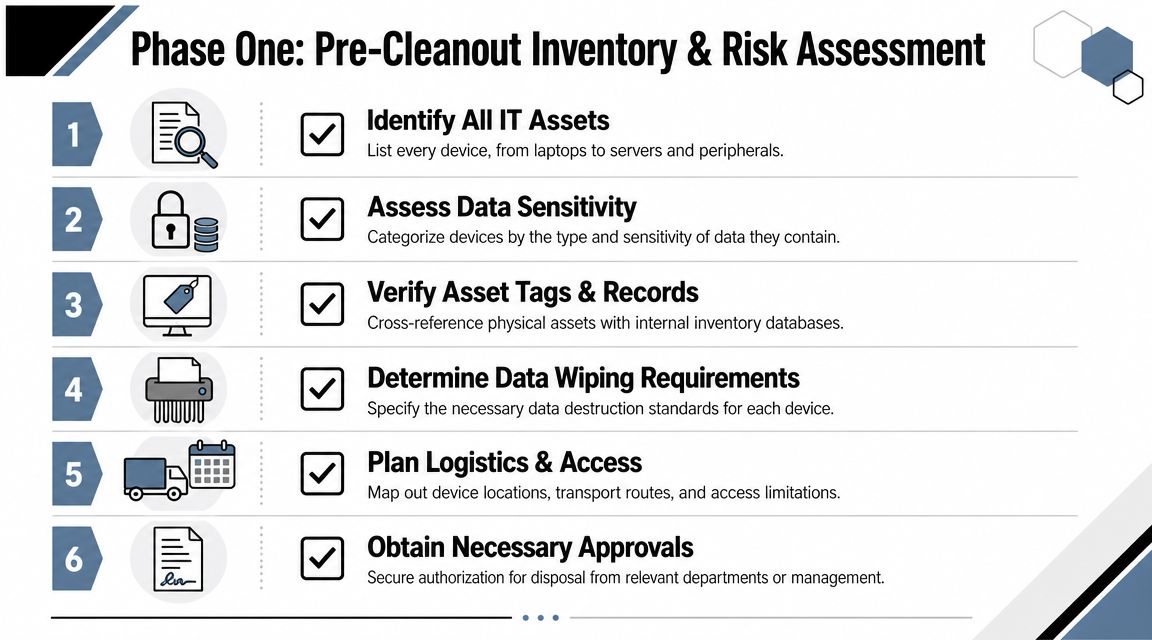
Phase One Your Pre-Cleanout Inventory and Risk Assessment
Most office cleanout problems start before any crew arrives. They start when the company skips inventory and tries to make disposal decisions on the fly.
For IT-heavy spaces, the right sequence is already clear. A technically sound process should survey rooms and volumes, tag assets by disposition path, reserve dock and elevator logistics, stage a secure IT-only pickup zone, and require vendor due diligence before removal starts, with chain of custody as the control objective from intake through final records, as described in Beyond Surplus' office cleanout workflow.
Here's the visual version many teams need before they begin:
Start with rooms, not categories
Walk the space room by room. Don't begin with “electronics” or “furniture.” Begin with the actual footprint:
- Executive offices
- Open workstations
- Conference rooms
- Storage areas
- Server or telecom closets
- Print and mail rooms
That approach catches the devices that are always missed in high-level counts. Spare monitors in a cabinet. Old printers in a copy room. UPS units in a network closet. Badge readers, phones, cables, and external drives in drawers.
Assign a disposition path before moving anything
Every item needs a destination before pickup day. Not a general intention. A specific path.
A practical tagging system usually includes:
- Keep: Active assets staying on site or moving to the new office.
- Redeploy: Equipment that still works and can be reassigned internally.
- Resale review: Devices with remaining market value that can be tested and cleared.
- Donation review: Usable equipment that fits company policy for charitable transfer.
- Recycle: End-of-life assets with no reuse path.
- Secure destruction: Devices or media that should not re-enter circulation.
Many office cleanouts in Atlanta falter because teams, despite wanting “eco-friendly recycling,” haven't decided which items belong in reuse, recycling, or destruction. That decision has to happen before the truck is loaded.
Practical rule: If an item might contain data, don't place it in the general removal area even for a few minutes. Put it directly into the secure IT stream.
Build the inventory that your vendor can work from
The inventory doesn't need to be elegant. It does need to be usable. A strong working sheet includes:
| Field | Why it matters |
|---|---|
| Asset type | Separates laptops from monitors, drives, phones, printers, and servers |
| Location | Tells the crew where the item sits now |
| Asset tag or serial | Supports tracking and chain of custody |
| Condition | Helps determine reuse, recycling, or destruction |
| Data risk | Flags devices needing wipe, hold, or shred |
| Final disposition path | Prevents ad hoc decisions at pickup |
A vague list creates vague pricing, vague pickup instructions, and vague accountability.
Create a secure staging zone
Use a separate, controlled area for IT assets awaiting pickup. That zone should not be a shared hallway, open reception area, or loading dock corner. Limit access. Mark it clearly. Route all exceptions through one internal lead.
If multiple departments can add or remove devices without logging them, your cleanout already has a chain-of-custody gap.
Get approvals before removal day
The final pre-cleanout step is internal authorization. That usually means facilities approves access, IT confirms device handling, finance or procurement signs off on disposition, and leadership approves any donation or resale path.
A smooth cleanout starts to look boring at this point. That's a good sign. Boring means every item has an owner, a category, and a destination.
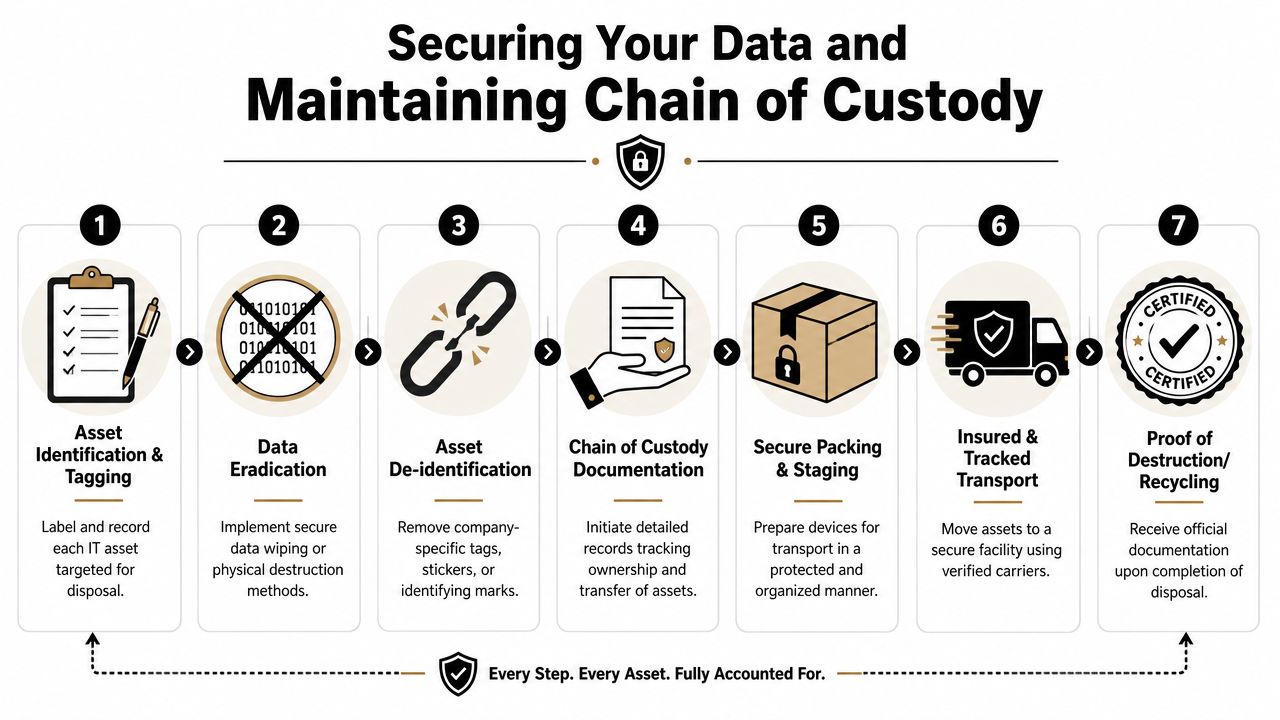
Securing Your Data and Maintaining Chain of Custody
Once assets are sorted, a key question becomes simple. Can this device leave your control safely? If the answer isn't documented, it's no.
One of the most overlooked parts of office cleanouts and IT equipment disposal in Atlanta is the decision between resale, redeployment, donation, recycling, and secure destruction. Atlanta Computer Recycling notes that few cleanout services explain how to make that call based on data risk and remaining value, even though it's central to a compliant office cleanout asset disposition workflow.
This process map helps teams understand the handoff:
Match the destruction method to the asset
Not every device needs the same handling. Treating all media the same is inefficient. Treating all media casually is worse.
Here's the practical breakdown:
| Method | Best fit | Trade-off |
|---|---|---|
| Software wiping | Laptops, desktops, and some reusable systems | Preserves reuse value, but only works when the drive is functional and the process is documented |
| Degaussing | Certain magnetic media | Useful for specific media types, but not a universal answer for every device in an office cleanout |
| Physical shredding | Hard drives, SSDs, failed drives, highly sensitive assets | Ends reuse value, but provides the strongest final destruction outcome |
If a laptop is headed for redeployment or resale, wiping may make sense. If a failed drive came out of a finance workstation, shredding is usually the cleaner decision. If the chain of custody is unclear, don't assume the asset belongs in a reuse stream.
Chain of custody is the part auditors care about
A strong chain of custody answers four questions:
- What was the asset
- Where was it collected
- Who handled it
- What happened to it in the end
That record should start inside the office, not at the recycling dock. Devices should be logged when they're identified, confirmed again when staged, and signed over at transfer. Final disposition records should match the original intake list.
If your inventory count and your final disposition count don't reconcile, you don't have a paperwork problem. You have a control problem.
For organizations comparing vendors, it helps to look at providers that can coordinate hauling with documented asset handling instead of forcing your team to split the job. Businesses reviewing commercial removal and cleanout services should ask whether the provider can keep secure IT handling separate from general junk from the first touch onward.
What works and what fails in the field
What works:
- A single project lead controls exceptions.
- Devices are packed and staged separately from furniture.
- Serial numbers or asset tags are tied to handoff records.
- Final outcomes are categorized clearly.
What fails:
- Employees drop retired devices into a shared pile all week.
- Facilities clears closets before IT reviews contents.
- A junk crew loads electronics before anybody logs them.
- The business asks for certificates after the fact instead of requiring them upfront.
Good chain of custody isn't complicated. It's disciplined. The office cleanout should never outrun the documentation.
Coordinating Logistics to Minimize Business Downtime
Execution day exposes weak planning fast. The crew is on site. The dock isn't reserved. Security hasn't been told. Freight access is limited. Someone is still deciding which monitors are staying. That's how a four-hour job turns into an all-day disruption.
A practical office-cleanout guide recommends scheduling pickup 1 to 2 weeks in advance and having everything gathered and ready in a temporary holding place, while also warning that poor staging increases delays and compliance risk, especially when materials aren't sorted into zones such as keep, recycle, and secure-IT, according to the University of Pennsylvania's office cleanout process document.
Handle the building before the truck arrives
Property logistics deserve their own checklist. In Atlanta office towers and mixed-use buildings, the cleanout often depends on access more than labor.
Confirm these items early:
- Dock reservation: Get your loading time in writing.
- Freight elevator access: Some buildings allow only narrow windows or require staff escorts.
- Certificate and insurance requirements: Property management may need vendor documents before entry.
- After-hours rules: Weekend or evening work can reduce disruption, but only if the building approves it.
- Protection requirements: Some buildings require floor protection, corner guards, or specific cart routes.
A lot of businesses focus on removal volume and forget the route from suite to truck. That route decides the pace of the day.
Stage for speed, not for appearance
The fastest cleanouts don't happen because the crew moves faster. They happen because the site is ready.
Use separate staging zones for:
- Items staying
- General furniture and non-IT removal
- Recyclables
- Secure IT assets
- Anything pending manager review
Don't rely on verbal instructions once the work starts. Tape off areas. Label doors. Mark carts or pallets by stream. If people have to ask where something goes, the sort plan is too loose.
The single biggest time saver is having the material already sorted before pickup starts.
Limit the operational footprint
If the office is still active, isolate the cleanout. Clear one wing at a time. Keep live work areas and retired asset zones separate. Notify employees in advance so they don't pull items back out of the removal area once the crew starts.
For teams coordinating the removal side of the job, the main Fulton Junk Removal website gives a clear starting point for scheduling and service scope. What matters operationally is less about branding and more about whether the vendor can work within your building's access rules and your internal cutover schedule.
Business downtime is usually blamed on hauling. In practice, downtime comes from indecision, weak access planning, and poor staging.
Meeting Sustainability Goals and Atlanta Compliance
Electronics disposal is no longer a back-room facilities issue. It sits in the middle of compliance, procurement, ESG reporting, and public credibility. If a company says it operates responsibly, its cleanout process has to prove it.
The global context is hard to ignore. E-waste is expected to reach 50 million tons per year, only 12% is recycled globally, and the underlying volume is rising by 4% to 5% annually, with the EPA estimate cited in the same source putting U.S. e-waste generation at 23.7 million tons annually, according to this e-waste recycling statistics summary. For Atlanta businesses, that means office cleanouts are part of a much larger material and documentation problem, not just a local hauling task.
This section includes a visual asset provided for the page:
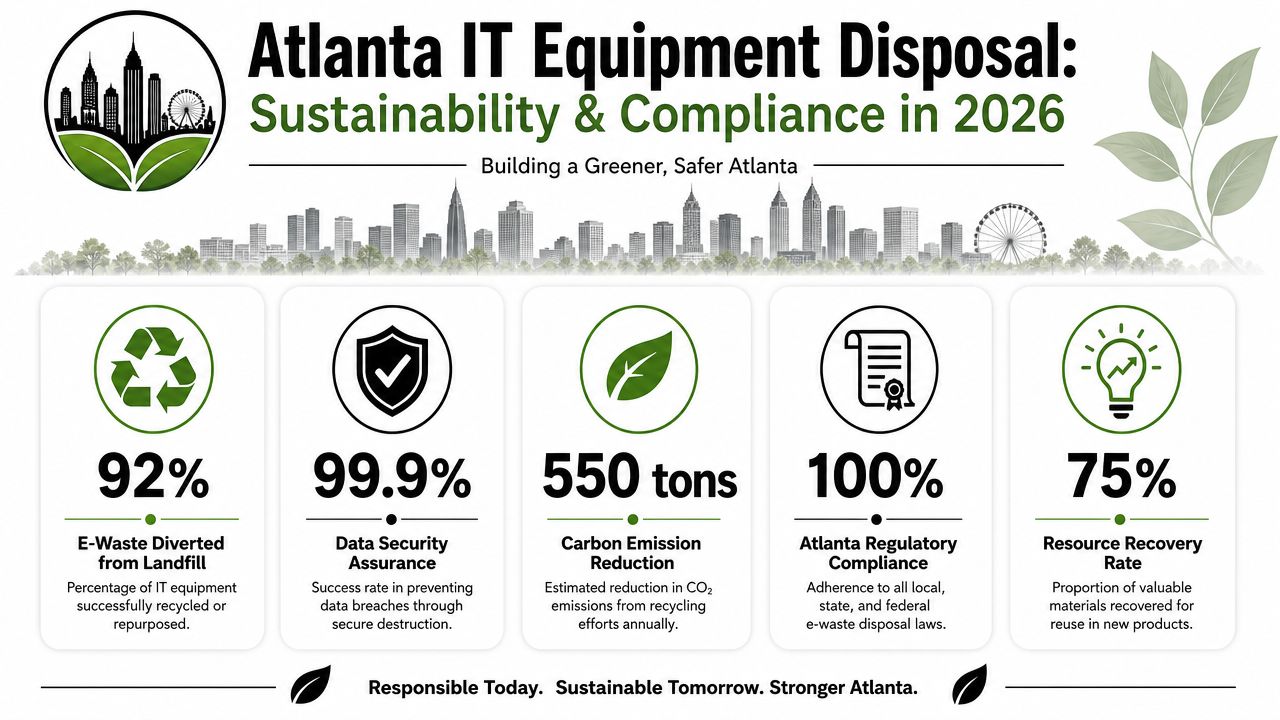
What responsible disposal actually looks like
Responsible disposal has three visible outputs:
- Material diversion
- Documented downstream handling
- Proof of data destruction where required
Without those records, “green” is just a label.
That's why an integrated hauling and recycling model is more useful than a landfill-first pickup. Furniture, scrap metal, and mixed office contents can move through standard cleanout channels. Electronics need a documented recycling or destruction path. When both happen under one workflow, the reporting is easier to reconcile internally.
A practical example of this mindset outside the hauling space is Nexus IT Group's write-up on an IT firm's green business approach. It's a useful reminder that sustainability works best when it's built into operating decisions, not added at the end as a marketing line.
What to ask for after the cleanout
If sustainability reporting matters to your company, request records that support it. That usually means:
- Itemized disposition records: What was recycled, destroyed, or diverted into another approved path.
- Certificates where applicable: Especially for data-bearing media.
- Clear separation of streams: General junk should not be reported the same way as IT assets.
- A consistent paper trail: Procurement, IT, facilities, and sustainability should all be able to read the same documentation.
Businesses reviewing a partner's operating model can use the about Fulton Junk Removal page to understand how hauling and recycling are connected through the Beyond Surplus relationship. That kind of structure matters because sustainability reporting gets much harder when three separate subcontractors each own a different part of the load.
The landfill is the easiest endpoint for a rushed cleanout. It's rarely the endpoint a business wants attached to its name.
Budgeting Your Cleanout and Choosing the Right Vendor
Office cleanout pricing in Atlanta gets distorted when companies compare unlike services. A low quote for hauling desks and bagged trash isn't the same thing as a quote that includes secure IT handling, chain of custody, data destruction, and documented recycling.
The market has real cost ranges you can use as a baseline. A 2026 Atlanta guide reports $0.25 to $0.75 per pound for common IT disposal, $5 to $15 per unit for laptops and desktops, $25 to $100+ per unit for servers and switches, $150 to $400 per pallet for mixed pallets, and notes that a 10-ton data-center decommission can exceed $15,000, based on labor, data destruction, and certified recycling requirements in this Atlanta IT disposal cost guide.
This comparison helps frame what you're buying:
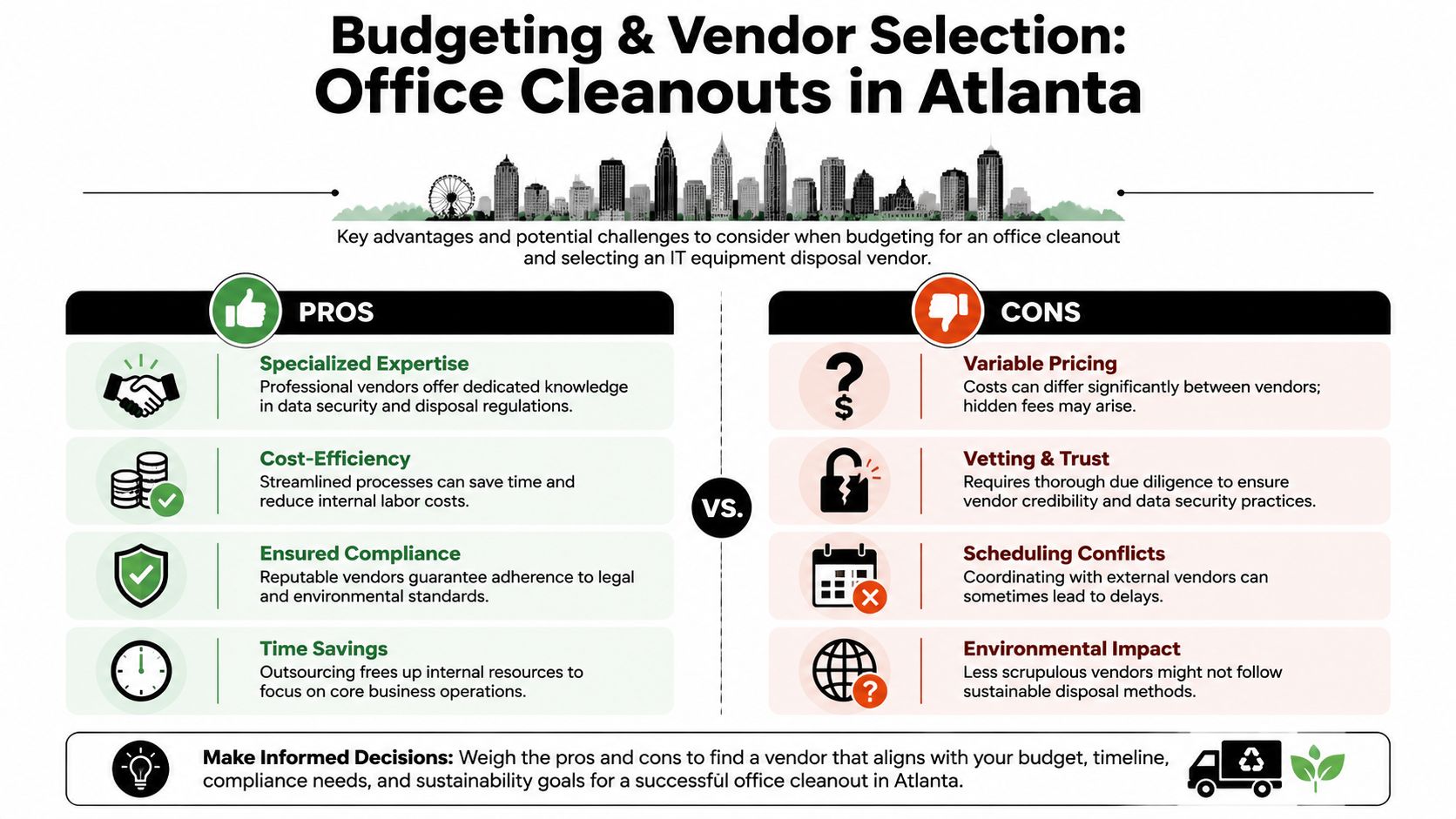
Cheap hauling versus integrated disposal
Here's the trade-off in plain terms:
| Vendor type | What you usually get | What you may not get |
|---|---|---|
| Basic junk hauler | Fast removal of furniture and bulk contents | Asset-level tracking, secure IT segregation, documented destruction, meaningful recycling records |
| Integrated cleanout and ITAD partner | Coordinated hauling plus secure device handling and reporting | The lowest sticker price |
That doesn't mean every job needs a specialized process for every item. It means sensitive and regulated assets need one. If your office cleanout includes laptops, servers, network gear, drives, printers, and mixed electronics, the “junk-only” quote may be incomplete by design.
A combined provider model can make sense. Fulton Junk Removal, working with Beyond Surplus, can bundle general commercial cleanout work with electronics recycling and IT asset handling in one coordinated project flow. For companies trying to reduce vendor sprawl, that setup can simplify scheduling and reporting.
Questions worth asking every vendor
Use the bid process to surface risk early. Ask direct questions.
- How do you separate general junk from data-bearing equipment on site
- What chain-of-custody records do you provide
- Can you track by asset tag or serial number when required
- What happens to reusable equipment versus end-of-life equipment
- Do you provide certificates for destruction or recycling when needed
- Who processes the electronics after pickup
- What building documents can you provide before service day
- How do you price mixed loads that include furniture and IT assets
A vendor who can't answer those questions clearly probably plans to figure it out in your hallway.
Budget for the full scope, not just the truck
The quote should reflect the actual work:
- Labor and removal
- Staging and handling complexity
- Data destruction requirements
- Electronics processing
- Documentation
- Building access constraints
That's why the lowest bid can become the most expensive one operationally. If your team has to sort the load, chase paperwork, manage exceptions, or explain missing devices after pickup, the savings disappear fast.
When you're ready to scope a project, use the Fulton Junk Removal contact page to start the conversation around access, asset mix, and disposal requirements before the move-out window gets tight.
If your Atlanta office needs a cleanout that handles both bulk removal and secure IT disposal in one coordinated workflow, Fulton Junk Removal can help you plan the job around access, staging, recycling, and documentation so the space gets cleared without losing control of sensitive equipment.
